Applying for a government job in the Philippines involves more than just sending a resume. One of the most important documents you need to prepare is the Work Experience Sheet (WES) — the official attachment to CS Form No. 212, also known as the Personal Data Sheet (PDS).
If you’ve ever wondered what the WES is, when you need it, and how to fill it out correctly, this Work Experience Sheet (WES) guide covers everything from download to submission. Whether you’re a fresh applicant or a current government employee applying for a promotion, read on.
Quick Answer: What Is the Work Experience Sheet (WES)?
The Work Experience Sheet (WES) is an official CSC document — the attachment to CS Form No. 212 — where applicants record their complete employment history. It captures your job title, employer, salary grade, inclusive dates of service, and duties per position. It is mandatory for government job applications, civil service exam applications, and internal promotions in the Philippine public sector.
Below is a sample Work Experience Sheet (WES) used in government job applications to record employment history, accomplishments, and duties required by the Civil Service Commission (CSC).
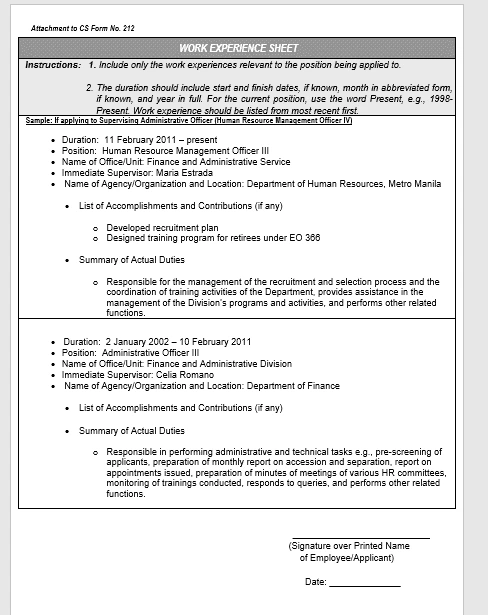
Download the Latest Work Experience Sheet (WES)
The official Work Experience Sheet (WES) is available from the Civil Service Commission (CSC). Download the latest CS Form No. 212 Attachment – Work Experience Sheet together with the revised Personal Data Sheet (PDS) from the official CSC website. Download the Work Experience Sheet (WES) from CSC
Quick Verdict
| Details | |
|---|---|
| ⭐ Importance | Required for all government job applications |
| Best For | Applicants with multiple work experiences that exceed the PDS space |
| Not Ideal For | Fresh graduates with no work history (may not need to submit) |
| Bottom Line | A non-negotiable document for civil service hiring — fill it out accurately or risk disqualification |
What Is the Work Experience Sheet (WES)?
The Work Experience Sheet is an additional attachment to the Personal Data Sheet (CS Form No. 212) required by the Civil Service Commission. It provides a detailed record of an individual’s professional work history, including job titles, specific duties, employment periods, salary grades, and organizational information.
In simpler terms, it is the form that expands on your employment history beyond what the PDS can accommodate. When you have held multiple positions — whether in government or private sector — the WES gives you more space to document each role completely and accurately.
The form is officially designated as CS Form No. 212 – Attachment (Work Experience Sheet). The Civil Service Commission (CSC) requires this form as part of the documentary requirements for most plantilla positions.
It is important to note that the PDS (CS Form No. 212) was revised in 2025. The latest version is the CS Form No. 212, Revised 2025, which includes the updated Work Experience Sheet attachment, downloadable from the official CSC website.
When Do You Need to Submit the Work Experience Sheet?
The Work Experience Sheet is required when applying for most government positions, whether you’re aiming for a high-level role or an entry-level position, as this form will be a part of your application packet.
Here are the specific situations when you must submit the WES:
- Applying for a government plantilla position — Any position that requires a submitted PDS automatically requires the WES if you have prior work experience.
- Taking the Civil Service Examination (CSE) — If you’re applying to take a civil service exam, you’ll need to submit a complete Personal Data Sheet (PDS), which includes the Work Experience Sheet. This is a main part of the process as it highlights your qualifications.
- Applying for an internal promotion — If you are currently employed in a government position and are applying for a promotion, you will also need to submit this form. It helps hiring officials assess your qualifications for the higher position.
- Updating your official 201 file — Government employees are required to keep their records current. Updating your WES ensures your employment file is accurate.
- Applying for transfer to another agency — A fresh set of documents including the WES is typically required.
What Does the Work Experience Sheet Contain?
The WES captures the following information for each position you have held:
| Field | Description |
|---|---|
| Position Title | Official job title as reflected in your appointment or contract |
| Department / Agency / Office | Name of the government office or private company |
| Monthly Salary | Your basic salary per month for the period |
| Salary Grade & Step (if government) | SG and step increment per DBM salary schedule |
| Status of Appointment | Permanent, Temporary, Casual, Contractual, COS, Job Order |
| Government Service | Yes or No — whether the employer is a government body |
| Inclusive Dates (From – To) | Month, Day, Year format; use “Present” if currently employed |
How to Fill Out the Work Experience Sheet: Step-by-Step
Filling out the WES correctly is critical. Errors or omissions can lead to disqualification or delays in your application. Here is a step-by-step guide based on the CSC instructions.
Step 1: Use Your Official Name
Write your full legal name as it appears on your birth certificate and PDS — Last Name, First Name, Middle Name. Do not use nicknames or abbreviations.
Step 2: List All Relevant Work Experience in Reverse Chronological Order
Start with your most recent position and work backward. List positions that match the job you’re applying for, and include your official job title, the name of the office or unit, the duration in Month Year format, your immediate supervisor, and the name and location of the agency or organization.
Do not leave out any position even if it seems unrelated. The CSC requires a complete employment history.
Step 3: Fill in the Salary and Salary Grade
For government positions, indicate the Salary Grade (SG) and step. For private sector jobs, write the actual monthly basic pay. Do not leave these fields blank — estimated or rounded figures are acceptable only if exact records are unavailable.
Step 4: Indicate Appointment Status Accurately
This is a common source of errors. The correct statuses are:
- Permanent — Career service position with full security of tenure
- Temporary — Appointment with a fixed term, usually pending eligibility
- Casual — Non-career position for seasonal or emergency needs
- Contractual — Project-based or fixed-term engagement
- Contract of Service (COS) — Non-employment arrangement; not covered by GSIS, PhilHealth, Pag-IBIG
- Job Order (JO) — Piece-work or lump-sum; no employment relationship with the government
Note: COS and Job Order experience is typically not counted as government service for promotion and retirement purposes, though it must still be declared.
Step 5: Specify Whether the Service Is Government or Not
The column “Gov’t Service (Y/N)” must be answered for every entry. Write “Y” for government agencies and “N” for private companies.
Step 6: Describe Actual Duties and Responsibilities
List your day-to-day responsibilities in detail. Instead of vague terms like “handled office tasks,” describe your role specifically — for example, “Managed recruitment processes for new hires” or “Coordinated training programs for staff.”
The duties column should reflect what you actually performed, not just what the job title implies.
Step 7: Sign and Date the Form
Once you’ve filled everything in, don’t forget to sign and date the form. This confirms that all the information you’ve provided is correct.
Any false statement in the WES is a ground for disqualification and administrative liability under CSC rules.
How to Download the Work Experience Sheet
The official WES form is available for free from the Civil Service Commission.
Steps to download:
- Go to the official CSC website: csc.gov.ph
- Navigate to Downloads → CS Form No. 212 (Revised 2025)
- Look for the attachment labeled “Work Experience Sheet”
- Download the file in .docx format
- Fill it out digitally using Microsoft Word or Google Docs, then print
Download the Work Experience Sheet (WES) and complete it accurately to avoid delays in your government job application.
Tip: Always use the most current version. As of 2025, the revised PDS and its WES attachment have been updated. Using an outdated form may cause your application to be returned.
Common Mistakes to Avoid When Filling Out the WES
Even experienced applicants make errors on the WES. Here are the most frequent mistakes and how to avoid them:
| Mistake | Correct Practice |
|---|---|
| Leaving salary fields blank | Always indicate monthly salary; write “N/A” only if truly inapplicable |
| Using abbreviations without context | Spell out agency names in full at least once |
| Wrong appointment status | Distinguish COS/JO from Permanent/Temporary accurately |
| Forgetting to mark “Gov’t Service” column | Mark Y or N for every entry |
| Not signing the form | An unsigned WES is invalid |
| Omitting part-time or short-term employment | All work experience must be declared |
| Using a personal job description instead of official functions | Base duties on your actual appointment or contract |
Work Experience Sheet vs. Personal Data Sheet: What’s the Difference?
Many applicants confuse the two. Here’s a quick comparison:
| Personal Data Sheet (PDS) | Work Experience Sheet (WES) | |
|---|---|---|
| Form Number | CS Form No. 212 | CS Form No. 212 Attachment |
| Purpose | Overall personal and professional profile | Detailed employment history |
| Sections | Personal info, education, civil service eligibility, work experience, voluntary work, training, references | Work experience entries only (expanded) |
| When to Use | Always required | Required when PDS space is insufficient or upon request |
| Pages | Multi-page comprehensive form | Typically 1–2 pages per set of entries |
The WES does not replace the PDS — it supplements it. You must submit both together.
Why Accuracy in the WES Matters for Your Career
The Work Experience Sheet is not just a bureaucratic requirement. It plays a direct role in your career trajectory in government service.
For salary determination: Your past salary grade and step are used to determine your entry point if you are absorbed into a permanent position.
For promotion eligibility: Your documented years of service, functions, and levels of responsibility are reviewed against the Qualification Standards (QS) of the target position.
For civil service eligibility verification: If you are claiming RA 1080 eligibility or Career Service eligibility, your work experience supports the verification process.
For legal protection: A truthful and complete WES protects you from administrative charges of dishonesty or falsification, which are grounds for dismissal.
Is Declaring Private Sector Experience Required?
Yes. The WES requires you to declare all work experience — both government and private — from your career history. Private sector experience is relevant for positions that consider industry experience as a qualification, especially in technical and specialized roles.
Mark the “Gov’t Service” column as N for private sector positions. These entries are still reviewed by the Personnel Selection Board (PSB) during deliberation.
Work Experience Sheet for Job Order and COS Workers
One of the most frequently asked questions involves Job Order (JO) and Contract of Service (COS) workers. Here is what you need to know:
- JO and COS experience must be declared in the WES — omitting it is considered a misrepresentation.
- JO and COS service is generally not considered government service for the purpose of computing leave credits, retirement benefits, and promotion points under DBM guidelines.
- However, some agencies count COS experience when evaluating functional competency for a position.
- Always declare it and let the agency’s PSB determine its relevance.
Final Verdict: Do You Really Need the Work Experience Sheet?
If you have any prior work experience — whether government or private — and you are applying for a government position, the answer is yes. The Work Experience Sheet (WES) is a mandatory attachment to your PDS and a critical component of your application.
Filling it out accurately demonstrates not just your qualifications but also your integrity as an applicant. Errors, omissions, or falsifications can have serious legal and career consequences.
Who must submit the WES:
- Applicants with prior employment history applying for plantilla positions
- Government employees seeking internal promotions or transfers
- Applicants for civil service examinations with prior work history
Who may not need to submit it:
- Fresh graduates with absolutely no work experience (though a blank form may still be required by some agencies)
Our recommendation: Download the latest version from csc.gov.ph, take your time filling it out, double-check every entry against your actual employment records, and have it certified or confirmed by your HR department if possible.
People Also Ask
What is the Work Experience Sheet (WES)? The Work Experience Sheet (WES) is an official CSC form — the attachment to CS Form No. 212 — that documents your complete employment history including job titles, employer names, salary grades, appointment status, and duties. It is required for government job applications and civil service exam submissions in the Philippines.
Where can I download the Work Experience Sheet? You can download the Work Experience Sheet for free from the official CSC website at csc.gov.ph. Navigate to Downloads → CS Form No. 212 (Revised 2025) and click on the Work Experience Sheet attachment. The file is available in .docx format.
Is the Work Experience Sheet the same as the PDS? No. The Work Experience Sheet is a separate attachment to the Personal Data Sheet (PDS). The PDS (CS Form No. 212) is the main form covering your personal background, education, and eligibility. The WES is the supplemental form that provides additional space for your employment history.
Do I need to include Job Order experience in the WES? Yes. All work experience — including Job Order and Contract of Service engagements — must be declared in the WES. However, JO and COS experience is generally not counted as government service for retirement and promotion purposes. You should still declare it and mark the “Gov’t Service” column accurately.
What happens if I make a mistake on my WES? Minor errors can sometimes be corrected by resubmitting an updated form before the deadline. However, deliberate falsification of information on the WES is a serious offense under CSC rules and can result in disqualification, dismissal, or criminal liability. Always review your entries carefully before signing and submitting.
Is there a 2025 version of the Work Experience Sheet? Yes. The CSC released an updated version of CS Form No. 212 in 2025, which includes a revised Work Experience Sheet attachment. Always use the latest version to ensure your application is compliant with current CSC requirements.
Can I fill out the Work Experience Sheet digitally? Yes. The form is available in .docx format, which can be filled out using Microsoft Word or Google Docs. Filling it out digitally produces a cleaner output. After completing it digitally, print and sign before submission.
Do fresh graduates need to submit the WES? Fresh graduates with no prior work experience typically do not have entries to fill in the WES. However, some agencies still require the blank form to be submitted as part of the complete PDS package. Check the specific requirements of the agency you are applying to.
Frequently Asked Questions
1. What is the full name of the WES form?
The full name is CS Form No. 212 – Attachment: Work Experience Sheet. It is issued by the Civil Service Commission of the Philippines and is an official government document.
2. Is the Work Experience Sheet the same for all government agencies?
Yes. The WES is a standardized CSC form used across all government agencies in the Philippines. Individual agencies cannot require a different format. All agencies must accept the official CSC version.
3. How many pages is the Work Experience Sheet?
The standard WES is a one-page form. However, if your work history is extensive, you may attach multiple copies of the sheet to accommodate all your entries.
4. Should I include volunteer or part-time work in the WES?
Volunteer work and part-time employment should be declared if they are relevant to your application. CSC guidelines advise full disclosure of all work history. Volunteer work related to public service may also be listed in the Voluntary Work section of the main PDS.
5. What does “Status of Appointment” mean in the WES?
It refers to the nature of your employment: Permanent, Temporary, Casual, Contractual, Contract of Service (COS), or Job Order (JO). This determines whether your service counts as government service and affects your benefit entitlements and promotion eligibility.
6. Can I attach certificates to support my WES entries?
Yes, and it is highly recommended. Attaching Service Records, Appointment Papers, or Certificates of Employment strengthens the credibility of your WES entries and speeds up the verification process.
7. What if I cannot remember my exact salary from a previous job?
Indicate your best estimate based on available records. If you still have payslips or employment contracts, use those. For government positions, you can verify your salary grade history through your agency’s HR department or through GSIS records.
Related Topics
- CSC Form 212 Guide: How to Fill Out the Personal Data Sheet (PDS) Correctly
- Civil Service Exam Requirements 2026: Complete Application Guide and Checklist
- Government Jobs in the Philippines 2026: Complete Job Search Guide
- Job Order vs. COS vs. Permanent: What Is a Plantilla Position?
- How to Apply for RA 1080 Eligibility: Full 2026 Step-by-Step Guide
.