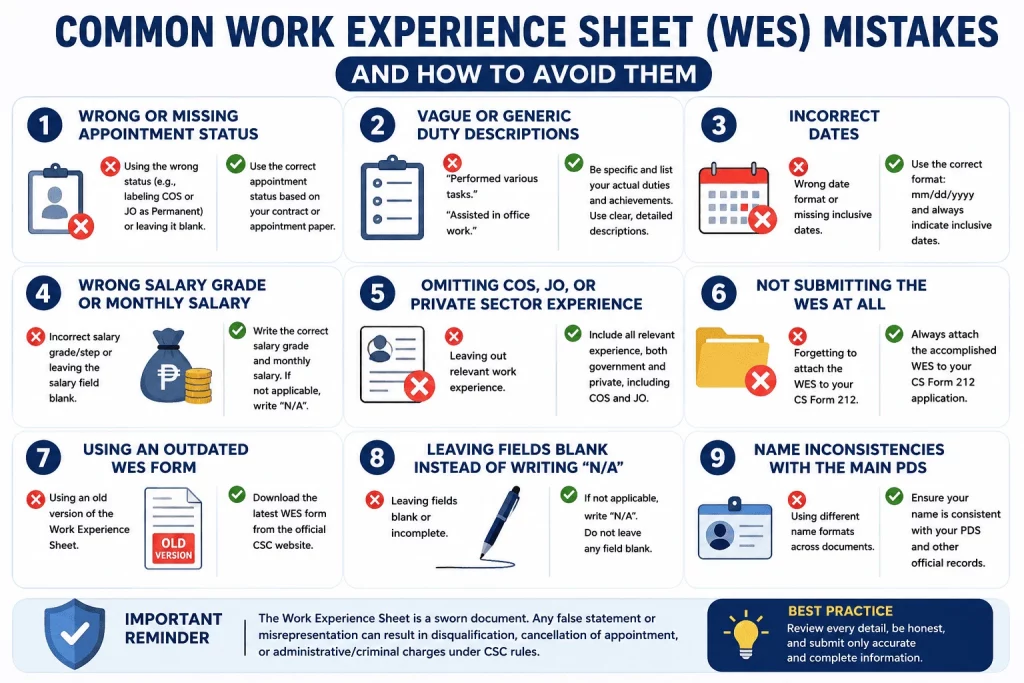
Common Work Experience Sheet Mistakes are one of the biggest reasons government job applications are delayed, returned, or disqualified. Many applicants spend hours preparing their Personal Data Sheet but rush through the Work Experience Sheet. That’s a costly mistake. The WES is a sworn attachment to CS Form No. 212, and errors on it don’t just slow down your application. They can get you disqualified, flag you for administrative investigation, or even void an appointment that’s already been issued.
This guide covers the most common Work Experience Sheet (WES) mistakes Filipino applicants make, explains why each one matters, and tells you exactly how to fix it before you submit. If you’ve ever been unsure whether you filled out your WES correctly, read this before you send anything.
Quick Answer: What Are the Most Common Work Experience Sheet (WES) Mistakes?
The most common WES mistakes in the Philippines include wrong appointment status (labeling COS or JO as Permanent), vague duty descriptions, incorrect date formats, wrong salary grade notation, omitting COS/JO or private sector experience, not submitting the WES at all, using an outdated form version, leaving fields blank instead of writing N/A, and name inconsistencies with the main PDS. Any deliberate misrepresentation on the WES can result in administrative or criminal charges under CSC rules.
Key Takeaways
- Wrong appointment status is the most serious WES mistake.
- Vague duty descriptions can lower your PSB evaluation score.
- Omitting JO, COS, or private sector experience may be considered misrepresentation.
- Always use the CS Form No. 212 Revised 2025 Work Experience Sheet.
- Review the WES checklist before submitting your application.
Quick Verdict
| Details | |
|---|---|
| ⭐ Risk Level | High — WES errors can disqualify you or trigger legal consequences |
| Most Dangerous Mistake | Misrepresenting appointment status or omitting required experience |
| Most Common Mistake | Vague duty descriptions and incorrect date formats |
| Easiest Fix | Download the 2025 version and review every field before signing |
| Bottom Line | The WES is a sworn document — treat it with the same seriousness as a legal affidavit |
Common Work Experience Sheet Mistakes Explained
The Work Experience Sheet is the official attachment to CS Form No. 212 required by the Civil Service Commission. It captures your complete employment history — job titles, employer names, inclusive dates, salary grades, appointment status, and duty descriptions. Because it is a sworn document, every field carries legal weight.
The common Work Experience Sheet (WES) mistakes fall into two categories: technical errors (wrong formats, outdated versions, blank fields) and substantive errors (misrepresented appointment status, omitted experience, false duty descriptions). Technical errors usually result in your application being returned for correction. Substantive errors — especially deliberate ones — can disqualify you or expose you to administrative and criminal liability.
Here are the nine most frequent mistakes, why they happen, and exactly how to correct them.
Mistake #1 — Wrong or Missing Appointment Status
This is the most consequential error applicants make on the WES, and it is almost never discussed in any guide currently available online.
What the mistake looks like
An applicant who worked as a Job Order (JO) worker for two years lists their appointment status as “Casual” or even “Permanent” — either because they misunderstood the terms or because they thought it would make their application look stronger. Some applicants also leave the appointment status field blank entirely.
Why it matters
Appointment status is not just a label. It determines:
- Whether your service counts as government service for GSIS, leave credits, and retirement computation
- How the Personnel Selection Board (PSB) evaluates your experience during deliberation
- Whether your appointment can be verified against official records
Misrepresenting a JO or COS engagement as a permanent position is a form of falsification. If the discrepancy is discovered — and HR offices do verify — your application is disqualified. If it’s discovered after an appointment has been issued, the appointment can be voided.
The correct appointment status terms
| Employment Arrangement | Correct Status to Write |
|---|---|
| Regular government item with security of tenure | Permanent |
| Government item with fixed term pending eligibility | Temporary |
| Emergency or seasonal government position | Casual |
| Project-based or fixed-term engagement | Contractual |
| Output-based arrangement, no employer-employee relationship | Contract of Service (COS) |
| Piece-work or lump-sum, no employment relationship | Job Order (JO) |
The fix
Always refer to your actual appointment paper or contract before filling in this field. If you signed a Contract of Service, write “Contract of Service.” If you were under a Job Order arrangement, write “Job Order.” Do not round up your status to something that sounds more official.
Mistake #2 — Vague or Generic Duty Descriptions
The duties and responsibilities column is where most applicants write the least useful information. HR officers and PSB members read hundreds of WES submissions — a generic description stands out for all the wrong reasons.
What the mistake looks like
Applicants write:
- “Performed various office tasks”
- “Assisted in administrative matters”
- “Handled documents and correspondence”
- “Performed duties as assigned by supervisor”
These descriptions tell the evaluator nothing about your actual competencies.
Why it matters
During PSB deliberation, your duties are compared against the Qualification Standards (QS) of the target position. If you are applying for an Administrative Officer II position that requires experience in procurement or records management, and your WES only says “assisted in office functions,” you lose evaluation points — even if you actually handled procurement every day.
Before vs. After: Duty Description Examples
| ❌ Vague (What Applicants Write) | ✅ Specific (What the PSB Needs to See) |
|---|---|
| Performed administrative tasks | Processed purchase requests and prepared BAC documents in compliance with RA 9184 |
| Handled HR functions | Managed end-to-end recruitment for 20+ positions annually including exam administration and deliberation |
| Assisted in finance matters | Prepared disbursement vouchers, BIR Form 2307, and monthly BAS reports for agency review |
| Managed office operations | Supervised records management for 5,000+ active files under the ARIMS classification system |
| Attended to client concerns | Processed an average of 80 walk-in client transactions daily at the public assistance counter |
The fix
For each position, list at least three to five specific, measurable functions. Use action verbs: managed, coordinated, processed, prepared, supervised, implemented, reviewed. Reference specific laws, systems, or forms where applicable. If your duties match the target position’s functions, make that alignment obvious.
Mistake #3 — Incorrect Inclusive Dates Format
The WES requires inclusive dates for each position — and the format matters more than most applicants realize.
What the mistake looks like
- Writing “2018-2021” without months
- Writing “January 2020 to Present” instead of “Jan 2020 – Present”
- Using full month names instead of abbreviated ones
- Writing “01/2020 – 12/2022” (numeric format, which belongs in the PDS, not the WES)
- Leaving the end date blank for a current position instead of writing “Present”
Why it matters
Inclusive dates are used to compute your total years of relevant experience, which is one of the scoring criteria in PSB deliberation. An incomplete or inconsistent date format makes verification harder and can cause your total experience to be undercomputed — working against you even when you qualify on paper.
The correct format for WES inclusive dates
The CSC guideline is clear: use the month (abbreviated) and year format, in the form “Mon YYYY – Mon YYYY” or “Mon YYYY – Present” for a current position.
Correct examples:
- Jan 2019 – Dec 2021
- Mar 2016 – Present
- Oct 2013 – Mar 2015
Incorrect examples:
- 2019–2021 (no months)
- January 2019 to December 2021 (full month names, wrong separator)
- 01/2019–12/2021 (numeric format)
The fix
Before filling in your dates, lay out your Service Records, appointment papers, or Certificates of Employment. Use abbreviated month names only (Jan, Feb, Mar, Apr, May, Jun, Jul, Aug, Sep, Oct, Nov, Dec) and always include the year in full. Write “Present” — not “ongoing” or “now” — for your current position.
Mistake #4 — Wrong Salary Grade Format
Salary grade entries cause confusion for both first-time applicants and those transitioning from private sector jobs.
What the mistake looks like
- Writing only the Salary Grade number without the step (e.g., “SG 11” instead of “11-1”)
- Leaving the SG field blank for government positions
- Writing “N/A” for government positions where the SG is actually known
- Writing “minimum wage” or “negotiable” for private sector positions
- Using the gross pay instead of the basic monthly salary
Why it matters
Your salary grade history determines your step placement when you move to a new government position. Agencies use this to compute your correct entry salary. An incorrect or missing SG also raises verification flags — HR officers will cross-check this against GSIS records or your Service Record.
The correct format
For government positions, write the Salary Grade and Step in the format: SG-Step (e.g., 11-1, 15-3, 24-2).
For private sector positions, write the actual basic monthly salary in Philippine Peso (e.g., ₱18,500 or 18,500.00). Do not write ranges, gross amounts, or leave it blank.
If you genuinely do not know your SG from a previous government position, request your Service Record from your former agency’s HR department before filling out the WES.
The fix
Check your appointment papers for government SG entries. Check your payslips or employment contract for private sector salaries. The SG-Step format should always appear as two numbers separated by a hyphen — never just the grade alone.
Mistake #5 — Omitting COS, JO, or Private Sector Experience
Some applicants deliberately leave out Job Order, Contract of Service, or private company experience — either because they think it won’t count, or because they want to hide a gap in their employment history. Both are mistakes.
What the mistake looks like
- Skipping all JO/COS entries and jumping straight to the first “official” government position
- Omitting private company jobs on the assumption that only government service matters
- Leaving out internships, part-time work, or short-term contracts
Why it matters
The WES instructions are unambiguous: include all work experience, paid or unpaid, government and private. The CSC requires complete disclosure. Omitting experience — whether JO, COS, or private sector — is considered a misrepresentation, regardless of whether that experience counts as government service.
Additionally, private sector experience is often directly relevant. Technical agencies, regulatory bodies, and supervisory positions frequently award evaluation points for private sector experience in the relevant field.
The fix
List every position you have held, in reverse chronological order. For JO and COS positions, mark the “Government Service” column as Y (government body) and write the correct appointment status. For private companies, mark it N. Let the PSB determine what counts — your job is to declare everything truthfully.
Mistake #6 — Not Submitting the WES at All
This seems obvious, but it happens more than you’d expect — and it has directly caused disqualifications.
What the mistake looks like
An applicant with multiple positions fills out the PDS work experience section and stops there, assuming no additional attachment is needed. They submit the PDS without the WES.
Why it matters
The PDS work experience section has limited space. The WES exists precisely to accommodate applicants with more positions than that space allows — and to capture the duty descriptions that the PDS column cannot. One instance widely cited in government employment forums involved an applicant who was disqualified from a position she was otherwise qualified for because she failed to attach the Work Experience Sheet.
Beyond space limitations, some agencies now require the WES for all applicants regardless of how many positions they’ve held, as part of their standard documentary package.
The fix
If your PDS lists more positions than its work experience rows can accommodate — or if the vacancy announcement lists the WES as a required document — always attach it. Download the current version from csc.gov.ph, fill it out completely, and staple or clip it directly behind the PDS when submitting physically. For email submissions, include it as a separate PDF attachment clearly labeled.
Mistake #7 — Using an Outdated WES Version
The Civil Service Commission periodically updates its official forms. Using an old version can result in your application being returned even if all the information is correct.
What the mistake looks like
Applicants use photocopied or previously downloaded versions of the WES that predate the CS Form No. 212 Revised 2025. Some use the 2017 revision, which is no longer the current standard.
Why it matters
The CS Form No. 212 Revised 2025 is the currently prescribed version. Submission of an outdated form may result in disqualification or processing delays. Agencies have been instructed to use and accept only the current version.
The fix
Always download the WES directly from the official CSC website at csc.gov.ph → Downloads → CS Form No. 212 Revised 2025 → Attachment (Work Experience Sheet). Do not use forms downloaded from agency websites, Studocu uploads, or files shared through group chats — these are often outdated or have been modified.
Mistake #8 — Leaving Fields Blank Instead of Writing N/A
Every field on the WES must be filled out. A blank field is never correct, even if the information doesn’t apply to you.
What the mistake looks like
- Leaving the step increment blank for positions with no step (e.g., JO or COS)
- Skipping the “Government Service Y/N” column for any entry
- Not writing anything in the supervisor field because the person no longer remembers their supervisor’s name
Why it matters
A blank field gives the impression that the form is incomplete. HR officers may return it for resubmission, costing you time and potentially missing a deadline. In some cases, it creates ambiguity that goes against you during deliberation.
The fix
For fields that do not apply, write N/A. For fields where the information is genuinely unknown (e.g., exact supervisor name for a position held years ago), write your best recollection or note “not recalled” — but never leave it blank. The only exception is fields with pre-printed options (checkboxes), where marking the appropriate option is sufficient.
Mistake #9 — Name Inconsistencies Between the WES and PDS
The WES header requires your full name, and it must match your PDS exactly.
What the mistake looks like
- Writing your married name on the WES but your birth name on the PDS
- Spelling your middle name differently between documents
- Omitting your name extension (Jr., Sr., III) on one form but including it on another
Why it matters
The WES is physically attached to the PDS and reviewed as a single document set. Any name inconsistency between the two triggers a verification flag. If your WES name doesn’t match the PDS — or your PSA Birth Certificate — an HR officer may question whether both documents belong to the same applicant.
The fix
Use the exact same name format across the WES, PDS, and all supporting documents. Base your name on your PSA Birth Certificate. If you use a married name, make sure it appears consistently across both forms and matches your PSA Marriage Certificate as well.
WES Mistakes by Severity: A Quick Reference Table
| Mistake | Severity | Consequence |
|---|---|---|
| Wrong date format | Minor | Application returned for correction |
| Blank fields instead of N/A | Minor | Application returned; may miss deadline |
| Outdated WES version | Moderate | Application returned or rejected |
| Vague duty descriptions | Moderate | Lower PSB evaluation score |
| Wrong salary grade format | Moderate | Verification delay; salary computation errors |
| Name inconsistency with PDS | Moderate | Verification flag; potential hold on application |
| Omitting private sector experience | Major | Misrepresentation; disqualification |
| Not submitting WES at all | Major | Automatic disqualification in many agencies |
| Omitting JO/COS experience | Major | Misrepresentation; disqualification |
| Wrong appointment status (accidental) | Major | Disqualification; application voided |
| Wrong appointment status (deliberate) | Severe | Administrative/criminal charges; voided appointment |
| False duty descriptions or fabricated experience | Severe | Administrative/criminal charges; permanent disqualification |
What Happens If Your WES Has a Mistake?
The consequences of a WES error depend on its nature and when it is discovered.
Before your appointment is issued
Minor formatting errors (blank fields, wrong date format, outdated version) typically result in your application being returned for resubmission. If you catch the error yourself before the deadline, contact the receiving HR office immediately and submit a corrected version with a brief explanation letter.
After your appointment is issued
If a material misrepresentation — such as a false appointment status or undisclosed experience — is discovered after an appointment has been issued, the appointment can be voided under CSC Omnibus Rules on Appointments. This applies even if you have already started reporting for work.
When deliberate falsification is involved
The warning printed on the face of the PDS and WES is explicit: “Any misrepresentation made in the Personal Data Sheet and the Work Experience Sheet shall cause the filing of administrative/criminal case/s against the person concerned.”
Deliberate falsification — writing a false appointment status, fabricating experience, or forging a supervisor’s certification — is a ground for:
- Dismissal from service (if already appointed)
- Perpetual disqualification from government service
- Criminal liability for perjury under the Revised Penal Code
This is not a theoretical risk. CSC and agency HR offices do conduct document verification, especially for higher-level positions or when a complaint is filed.
The safest approach
If you are unsure about any entry — especially appointment status or government service classification — consult your former agency’s HR department or the CSC regional office in your area before submitting. It is always better to ask than to guess.
WES Mistakes Pre-Submission Checklist
Use this checklist before signing and submitting your WES:
- [ ] Using CS Form No. 212 Attachment — Revised 2025 (downloaded from csc.gov.ph)
- [ ] Full name on WES matches PDS and PSA Birth Certificate exactly
- [ ] All positions listed in reverse chronological order (most recent first)
- [ ] Inclusive dates use abbreviated month + full year format (e.g., Jan 2020 – Present)
- [ ] Appointment status matches actual appointment papers or contracts for every entry
- [ ] COS and JO positions are declared — not omitted
- [ ] Private sector positions are declared with Government Service marked as “N”
- [ ] Salary Grade and Step written in “00-0” format for government positions
- [ ] Monthly basic salary (not gross, not range) written for private sector positions
- [ ] Duty descriptions are specific, function-based, and use action verbs
- [ ] No blank fields — all non-applicable fields have “N/A”
- [ ] Government Service (Y/N) column completed for every entry
- [ ] WES is signed and dated
- [ ] WES is attached directly to the PDS before submission
Final Verdict
The Work Experience Sheet is not a form to rush through. Every field connects to something that matters: your salary placement, your promotion eligibility, your legal standing as a government applicant or employee.
Who needs this guide most:
- First-time government job applicants filling out the WES for the first time
- COS and JO workers transitioning to plantilla positions
- Government employees applying for internal promotions or inter-agency transfers
- Applicants who have previously been returned or disqualified and want to identify what went wrong
What to do now: Download the CS Form No. 212 Revised 2025 Work Experience Sheet from csc.gov.ph. Set aside your appointment papers, Service Records, and Certificates of Employment. Fill out every field with reference to actual documents — not from memory. Run through the checklist above before you sign.
A few extra minutes of care on the WES can be the difference between an application that sails through screening and one that gets returned, flagged, or rejected.
People Also Ask
What are the most common mistakes on the Work Experience Sheet (WES)? The most common WES mistakes include wrong appointment status (listing COS or JO as Permanent), vague duty descriptions, incorrect date formats, wrong salary grade notation, omitting JO/COS or private sector experience, not submitting the WES at all, and using an outdated form version. Any deliberate misrepresentation is grounds for disqualification or administrative charges.
Can I be disqualified because of a WES mistake? Yes. Major errors — such as omitting required experience, misrepresenting your appointment status, or failing to attach the WES — can result in disqualification from the position you applied for. Deliberate falsification can additionally result in administrative charges, criminal liability, and perpetual disqualification from government service.
Do I need to include Job Order or COS experience on the WES? Yes. All work experience must be declared on the WES, including Job Order and Contract of Service engagements. Omitting them is considered a misrepresentation even if JO/COS service does not count as government service for GSIS or retirement purposes. Declare it truthfully and mark the Government Service column as “Y” for government bodies.
What is the correct format for inclusive dates on the WES? The correct format is abbreviated month and full year: for example, Jan 2019 – Dec 2021. For a current position, write the start date followed by “Present” (e.g., Mar 2023 – Present). Do not use numeric formats, full month names, or leave the end date blank for a position you have already left.
What happens if I use the wrong appointment status on my WES? If the error is accidental and discovered before your appointment, your application may be returned for correction. If it is discovered after your appointment is issued, the appointment can be voided. If the misrepresentation is found to be deliberate, you face administrative charges for dishonesty and potentially criminal charges under the Revised Penal Code.
How should I write my duty descriptions on the WES? Duty descriptions should be specific, function-based, and written using action verbs. Instead of “performed administrative tasks,” write what you actually did: “Processed purchase requests and prepared bidding documents under RA 9184,” or “Managed payroll preparation for 120 employees monthly.” The PSB evaluates your duties against the target position’s Qualification Standards — vague descriptions lower your score.
Can I correct my WES after I have already submitted my application? If the error is discovered before your formal appointment, contact the receiving agency’s HR office immediately and submit a corrected version with a cover note. If a material misrepresentation is discovered after an appointment has been issued, the appointment may be voided. Always proofread your WES carefully before submission to avoid the need for corrections.
What is the latest version of the Work Experience Sheet? The current required version is the CS Form No. 212 Attachment (Work Experience Sheet), which is part of the CS Form No. 212 Revised 2025 package. Always download it directly from the official CSC website at csc.gov.ph to ensure you are using the prescribed version.
Frequently Asked Questions
1. Is the Work Experience Sheet required even if I have only one previous job?
It depends on the agency’s specific requirements. Some agencies require the WES for all applicants regardless of how many positions they have held. Others require it only when the PDS work experience section is insufficient. Always check the documentary requirements in the vacancy announcement. When in doubt, submit it — an extra document never disqualifies you, but a missing one can.
2. What should I write under “Duties and Responsibilities” if I held the same position in two different agencies?
List each appointment separately, even if the position title and duties were similar. Describe the duties for each posting specifically, referencing the agency’s context. You may repeat similar duty descriptions if your functions were identical, but each position entry must be complete and stand on its own.
3. Do I need to have my WES certified or notarized?
The WES does not require separate notarization — your signature on it is your sworn declaration. However, some agencies may require a wet signature from your immediate supervisor at your current or most recent position to certify the accuracy of your declared duties. Check the specific requirements of the agency you are applying to.
4. Can I type directly onto the WES form or must it be handwritten?
Both are acceptable. The CSC allows the PDS and its attachments to be accomplished digitally using MS Word or MS Excel format. If filling out by hand, write clearly in block capital letters using black ink. Typed submissions are preferred as they are more legible during document review.
5. What if I cannot remember the exact name of a previous supervisor?
Write your best recollection of the supervisor’s name and title. If you genuinely cannot remember, write the position title of whoever your direct superior was (e.g., “Division Chief, Administrative Division”). Do not leave the field blank. The field is used for verification purposes, and an approximate entry is always better than a blank one.
6. How many pages of the WES can I submit?
You may attach as many pages of the WES as needed to accommodate your full employment history. The form is one page, but you may print and fill multiple copies. Number each page (e.g., Page 1 of 2) and sign every page. Staple all pages together and attach them behind the PDS before submission.
Related Topics
- CSC Form 212 Guide: How to Fill Out the Personal Data Sheet (PDS) Correctly
- Civil Service Exam Requirements 2026: Complete Application Guide and Checklist
- Government Jobs in the Philippines 2026: Complete Job Search Guide
- Job Order vs. COS vs. Permanent: What Is a Plantilla Position?
- How to Apply for RA 1080 Eligibility: Full 2026 Step-by-Step Guide
- How to Fill Out the Work Experience Sheet (WES) Correctly
- Common PDS Mistakes: Avoid These CSC Form 212 Errors