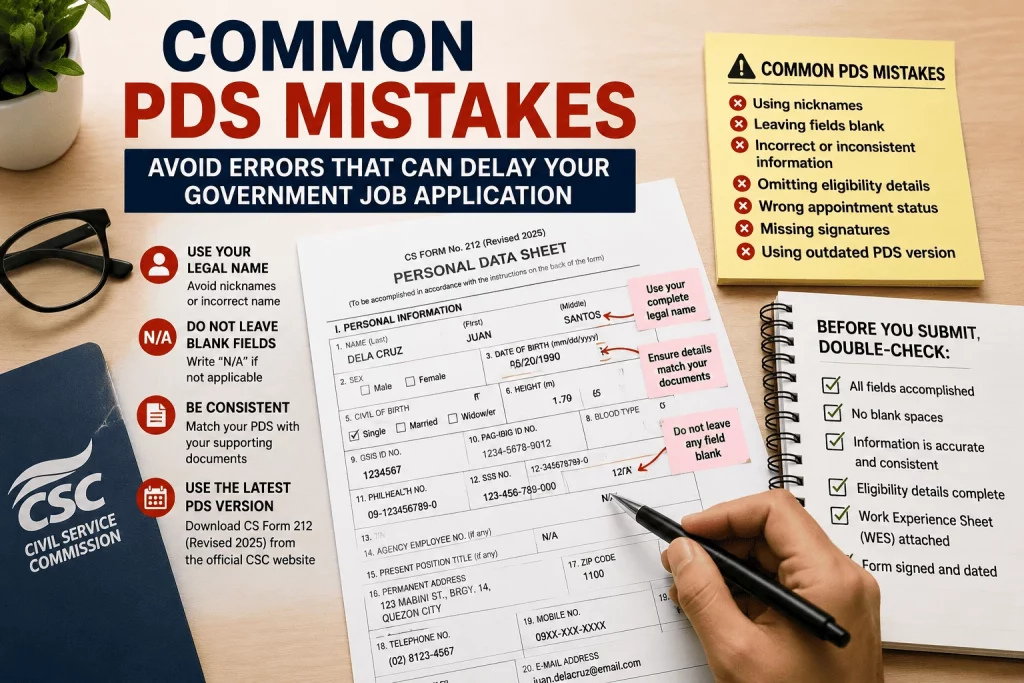
A single wrong entry on your Personal Data Sheet (PDS) can get your government job application returned, delayed, or worse — disqualified. Many applicants spend weeks preparing only to be rejected because of avoidable errors on CS Form No. 212.
This Common PDS Mistakes Guide covers the most frequent errors Filipino government job seekers make on their PDS, why those mistakes matter, and exactly how to fix or avoid them. Whether you’re a first-time applicant or a current employee applying for a promotion, this guide will help you submit a clean, accurate, and compliant PDS.
Quick Answer: What Are the Most Common PDS Mistakes?
The most common PDS mistakes include using nicknames instead of legal names, leaving required fields blank instead of writing “N/A,” inconsistencies between the PDS and supporting documents, wrong appointment status in the work experience section, incomplete civil service eligibility details, and submitting an outdated version of CS Form 212. Any false or misleading information is a ground for administrative or criminal liability under CSC rules.
Quick Verdict
| Details | |
|---|---|
| ⭐ Risk Level | High — errors can disqualify or delay your application |
| Most Dangerous Mistake | Falsification or omission of material information |
| Most Common Mistake | Name inconsistencies and blank fields |
| Easiest to Fix | Using the correct, latest PDS version (Revised 2025) |
| Bottom Line | Accuracy and consistency are non-negotiable — review every field before signing |
Why PDS Errors Are More Serious Than You Think
The Personal Data Sheet is not just a form — it is a sworn document. As stated on the PDS form itself: “Any misrepresentation made in the Personal Data Sheet and the Work Experience Sheet shall cause the filing of administrative/criminal case/s against the person concerned.”
This means errors are not just technical problems. Depending on the nature of the mistake, they can result in:
- Return of your application for correction
- Disqualification from the position
- Voiding of an appointment already issued
- Administrative charges for dishonesty or falsification
- Criminal liability for perjury
Understanding the most common PDS mistakes — and correcting them before submission — is one of the most important steps you can take in your government job application.
Common PDS Mistakes Guide: Section by Section
Mistake #1: Using Nicknames or Incorrect Name Format
This is one of the most frequently cited errors across all PDS submissions.
The mistake: Writing “Ronnie” instead of “Ronald,” using a married name that does not match the PSA birth certificate, or placing the name in the wrong order (First Name, Last Name instead of Last Name, First Name).
Why it matters: Your name on the PDS must exactly match your PSA Birth Certificate. Discrepancies between the PDS and your supporting documents can flag your application for verification and delay processing.
The fix: Always refer to your PSA Birth Certificate when filling out your name. Write your name in the prescribed format: Last Name, First Name, Middle Name. If you have a name extension (Jr., Sr., III), place it in the designated field — not within the name boxes themselves.
Mistake #2: Leaving Required Fields Blank
The mistake: Skipping fields that do not apply rather than writing “N/A.”
Why it matters: Blank fields give the impression that the form is incomplete or was not reviewed carefully. CSC guidelines are clear: for fields that do not apply to you, write “N/A” rather than leaving them blank.
The fix: Go through every single field. If a question does not apply to your situation — such as spouse information for single applicants, or children’s names for those without children — write “N/A” in the space provided.
Mistake #3: Submitting an Outdated PDS Version
The mistake: Using the CS Form No. 212 Revised 2017 when the current required version is CS Form No. 212 Revised 2025.
Why it matters: Submission of an outdated Personal Data Sheet may result in disqualification or processing delays. Even in 2026, the 2025 revised version remains the official and required form in government transactions.
The fix: Always download the PDS directly from the official CSC website (csc.gov.ph). Do not use photocopies of old forms, scanned versions from friends, or files downloaded from unofficial websites.
Mistake #4: Inconsistencies Between the PDS and Supporting Documents
The mistake: Writing a different middle name, birthdate, or birthplace on the PDS compared to what appears on your PSA Birth Certificate, diploma, or government IDs.
Why it matters: Human resource officers cross-check the PDS against original documents during verification. Any discrepancy — even a typographical error in your birthplace — can trigger a request for explanation or cause your application to be held.
The fix: Before filling out the PDS, lay out all your supporting documents side by side: PSA Birth Certificate, diploma, TOR, government-issued IDs, and previous appointment papers. Use these as your reference for every entry.
Mistake #5: Wrong or Incomplete Civil Service Eligibility Information
The mistake: Omitting the rating, date of examination, place of examination, or license number. Some applicants also list an eligibility they have not actually earned, or fail to specify between Career Service Professional and Sub-Professional.
Why it matters: Civil service eligibility is a mandatory qualification for plantilla positions. Incomplete or inaccurate eligibility entries can disqualify you immediately if you cannot produce the supporting documents to verify them.
The fix: Refer to your Certificate of Eligibility from the CSC or your PRC Board Certificate. Fill in all required fields: name of eligibility, rating (if applicable), date of examination, place of examination, license number (for board exams), and date of validity or release.
| Eligibility Type | Source Document | What to Enter |
|---|---|---|
| Career Service Professional | CSC Certificate of Eligibility | Rating, date, place of exam |
| Career Service Sub-Professional | CSC Certificate of Eligibility | Rating, date, place of exam |
| RA 1080 (Board Exam) | PRC Board Certificate | License number, date of release |
| PD 907 (Honor Graduate) | Diploma and CSC recognition | Eligibility type, date issued |
| Others (e.g., BAR, etc.) | Certifying body | As prescribed by CSC |
Mistake #6: Incorrect Appointment Status in the Work Experience Section
The mistake: Labeling a Contract of Service (COS) or Job Order (JO) engagement as “Permanent” or “Casual,” or vice versa. Some applicants also omit COS and JO experience entirely.
Why it matters: Appointment status directly affects how your work experience is counted for promotion and retirement purposes. Misrepresenting your appointment status is a form of falsification. At the same time, omitting COS or JO experience is also considered a misrepresentation since the PDS requires all work experience — paid or unpaid — to be disclosed.
The fix: Use only the prescribed appointment status terms: Permanent, Temporary, Casual, Contractual, Contract of Service (COS), or Job Order (JO). For each position, refer to your actual appointment paper or contract to determine the correct status.
Mistake #7: Vague or Generic Duty Descriptions in Work Experience
The mistake: Writing “Performed office tasks” or “Handled administrative matters” in the duties and responsibilities column without specifics.
Why it matters: During the Personnel Selection Board (PSB) deliberation, your duties are evaluated against the Qualification Standards (QS) of the target position. Generic descriptions do not demonstrate competency and may result in a lower evaluation score.
The fix: Describe your actual functions in clear, specific terms. For example: “Processed payroll for 150 employees monthly,” “Coordinated inter-agency meetings and prepared official minutes,” or “Managed procurement activities in accordance with RA 9184.” Use action verbs and include measurable outputs where possible.
Mistake #8: Missing or Wrong Salary Grade Information
The mistake: Leaving the Salary Grade (SG) and Step fields blank for government positions, or entering the wrong SG.
Why it matters: Your salary grade history is used to determine your entry point when you transfer to another agency or shift from a non-career to a career position. An incorrect or missing SG can cause delays and discrepancies in your compensation records.
The fix: Verify your SG and step from your appointment paper or Service Record. For private sector positions, indicate the monthly basic salary. If you are unsure of your exact SG for a past government position, request a Service Record from your previous agency.
Mistake #9: Errors in the “34 Questions” Section (Legal and Administrative Background)
The mistake: Answering “No” to questions about pending cases, previous convictions, or separation from service when the actual answer is “Yes.” Some applicants also leave these fields blank.
Why it matters: This section carries significant legal weight. False declarations here are a direct basis for administrative charges of dishonesty. CSC resolution and jurisprudence have repeatedly ruled that intentional false answers in this section can void an appointment even after it has been issued.
The fix: Answer every question truthfully. If the answer is “Yes,” provide the required details in the designated space. If you are unsure about a specific question — for example, whether a barangay case counts as a formal charge — consult your agency’s Legal Division or the CSC regional office before submitting.
Mistake #10: Not Signing or Dating the PDS
The mistake: Submitting the PDS without a signature, or signing without indicating the date.
Why it matters: The PDS is a sworn document. Without a signature, it is not legally executed and will be returned. Some applicants also forget to sign the back pages or each attached Work Experience Sheet.
The fix: After completing all pages, review the signature block on each page. Sign and date every page that requires it, including the Work Experience Sheet attachments.
Mistake #11: Using Digital Signatures Without Authorization
The mistake: Submitting a PDS with a scanned signature or an electronically placed image of a signature instead of an original wet signature.
Why it matters: Most government agencies still require original wet signatures for the PDS. Digital or facsimile signatures are not accepted unless the agency has a specific digital submission protocol.
The fix: Print the completed PDS and sign each required page using black or blue ballpen ink. Only submit a digital PDS if the receiving agency explicitly accepts and instructs electronic submissions.
Mistake #12: Failing to Attach the Work Experience Sheet
The mistake: Submitting the PDS without the Work Experience Sheet (WES) when your employment history exceeds the space available in the main PDS form.
Why it matters: Applicants have been disqualified because they did not include the WES, which is a required attachment when the PDS work experience section is insufficient to capture all your employment records.
The fix: If you have multiple positions to declare, download and fill out the Work Experience Sheet (CS Form No. 212 Attachment) from csc.gov.ph. Submit it as a physical attachment to your PDS.
PDS Mistakes Comparison: Minor vs. Major
| Type of Mistake | Examples | Consequence |
|---|---|---|
| Minor (Correctable) | Wrong zip code, outdated contact number, formatting errors | Application returned for correction |
| Moderate (Can Cause Delays) | Blank fields, missing WES, outdated PDS version | Processing delayed, may miss deadline |
| Major (Can Disqualify) | Wrong appointment status, false eligibility, inconsistencies with PSA records | Disqualification from the position |
| Severe (Legal Consequences) | False answers in legal questions section, falsified experience or eligibility | Administrative/criminal charges, voided appointment |
How to Review Your PDS Before Submission: A Final Checklist
Use this checklist before you sign and submit your PDS:
- [ ] Name matches PSA Birth Certificate exactly
- [ ] Birthdate, birthplace, and civil status match supporting documents
- [ ] No blank required fields — all non-applicable fields have “N/A”
- [ ] Using CS Form No. 212 Revised 2025 (latest version)
- [ ] Civil service eligibility entries are complete with rating, date, and place
- [ ] Work experience entries use correct appointment status
- [ ] Salary grade entries are verified against appointment papers or service records
- [ ] Duty descriptions are specific, not generic
- [ ] All questions in the legal background section are answered truthfully
- [ ] PDS is signed and dated on all required pages
- [ ] Work Experience Sheet is attached if needed
- [ ] Original wet signatures are present (not scanned or digital)
Is Correcting PDS Errors After Submission Possible?
Yes, but it depends on the stage of your application and the nature of the error.
Before appointment: Minor corrections can typically be accommodated by submitting a revised PDS. Inform the HR office immediately upon discovering the error.
After appointment: If a material error or falsification is discovered after an appointment has been issued, the appointment can be voided under CSC rules. This is especially true for false eligibility or experience claims.
For employees on record: Current government employees who need to correct their PDS must coordinate with their agency’s HR department and submit a corrected form with supporting documents.
The best approach is always to get it right the first time.
Final Verdict: What This Common PDS Mistakes Guide Teaches Us
This Common PDS Mistakes Guide has one overarching message: accuracy and completeness are the non-negotiables of any PDS submission. The form is a sworn document and is treated as such by the Civil Service Commission and all government agencies.
Who needs to read this guide most:
- First-time government job applicants unfamiliar with PDS requirements
- Private sector workers transitioning to public service
- Current government employees applying for promotion or transfer
- COS and JO workers applying for plantilla positions
Who can use a refresher:
- Even experienced government employees who may have developed bad habits from quickly filling out annual PDS updates
Overall recommendation: Take your time with the PDS. Use all your original documents as references. Download the 2025 version from csc.gov.ph. And when in doubt, ask your HR department or the CSC regional office — it’s better to ask first than to be disqualified later.
People Also Ask
What are the most common mistakes on the PDS? The most common PDS mistakes include using nicknames instead of legal names, leaving fields blank instead of writing N/A, submitting outdated forms, providing vague work experience descriptions, and writing inconsistent information compared to supporting documents like the PSA Birth Certificate. These errors can lead to application delays or outright disqualification.
Can PDS mistakes disqualify you from a government job? Yes. Minor mistakes may only result in your application being returned for correction, but major errors — especially false statements in the civil service eligibility, legal background, or work experience sections — can disqualify you from the position. Deliberate falsification can also result in administrative or criminal charges.
Do I need to answer “N/A” on blank PDS fields? Yes. CSC guidelines require that all fields be filled out. For fields that do not apply to your situation, write “N/A” rather than leaving them blank. A blank field may be interpreted as an incomplete submission.
What happens if I use an old version of the PDS? Submitting an outdated PDS version may result in processing delays or disqualification. The current required version is CS Form No. 212, Revised 2025. Always download the latest version from the official CSC website at csc.gov.ph.
Can I correct my PDS after submitting it? Yes, but only if the error is discovered before a formal appointment is issued. Contact your HR office immediately to submit a corrected version with supporting documents. If falsification is discovered after an appointment, the appointment may be voided and charges may be filed.
Does Job Order experience need to be declared on the PDS? Yes. All work experience — including Job Order and Contract of Service engagements — must be declared on the PDS. Omitting them is considered a misrepresentation. Mark the government service column accurately: Y for government bodies, N for private sector.
What is the PDS legal background section and why is it important? The PDS contains a section with 34 Yes/No questions covering pending administrative or criminal cases, previous convictions, and separation from service. This section carries significant legal weight. False answers here are a primary ground for voiding appointments and filing administrative charges for dishonesty, even if the appointment has already been issued.
What should I do if I am unsure how to answer a PDS question? Contact your agency’s HR department or the CSC regional office in your area. Do not guess or leave the field blank. The CSC also publishes an official Guide to Filling Up the PDS, which is attached to the form upon download from csc.gov.ph.
Frequently Asked Questions
1. What is the PDS and why is accuracy so important?
The Personal Data Sheet (PDS) — CS Form No. 212 — is the official government document that records your personal, educational, and professional background for civil service purposes. It is a sworn document, meaning false or misleading information can result in administrative charges, disqualification, or even criminal liability. Accuracy is essential because the PDS serves as your primary qualification record throughout your government career.
2. Should I use black or blue ink when filling out the PDS manually?
The CSC recommends using black ink when filling out the PDS manually. Write in clear block letters to ensure legibility. If filling it out digitally, use the official editable Excel or Word file from csc.gov.ph and print the completed form for signing.
3. What documents should I prepare before filling out the PDS?
Prepare the following before filling out the PDS: PSA Birth Certificate, diploma and Transcript of Records (TOR), CSC or PRC Certificate of Eligibility, appointment papers or Service Record for each government position, contracts or COE for private sector positions, government IDs (PhilSys ID, GSIS, Pag-IBIG, PhilHealth), and TIN.
4. Is the Work Experience Sheet always required?
The Work Experience Sheet (WES) is required when your work history exceeds the space available in the PDS work experience section, or when the hiring agency specifically requests it. Fresh graduates with no work experience may submit a blank WES or indicate N/A, depending on agency requirements.
5. Can I reuse my PDS from a previous application?
No. Every application should come with a freshly accomplished and signed PDS. Using a photocopied or previously submitted PDS — especially one with a past signature date — is not acceptable. The PDS must reflect your current information and be signed on or near the date of submission.
6. What should I do if my name has changed due to marriage?
Use your legal name as it appears on your latest PSA-authenticated document. If you are legally married, your married name may be used if it appears on your PSA Marriage Certificate. However, ensure consistency across all documents submitted. Some agencies still require the PSA Birth Certificate name for verification.
7. Is it necessary to list training programs from more than 5 years ago?
For Division Chief, Executive, and Managerial positions, the PDS requires only training and L&D interventions attended in the last five years. For other positions, include all relevant training. Always follow the specific instructions in the PDS form and the position’s requirements.
Related Topics
- CSC Form 212 Guide: How to Fill Out the Personal Data Sheet (PDS) Correctly
- Civil Service Exam Requirements 2026: Complete Application Guide and Checklist
- Government Jobs in the Philippines 2026: Complete Job Search Guide
- Job Order vs. COS vs. Permanent: What Is a Plantilla Position?
- How to Apply for RA 1080 Eligibility: Full 2026 Step-by-Step Guide
- How to Fill Out the Work Experience Sheet (WES) Correctly