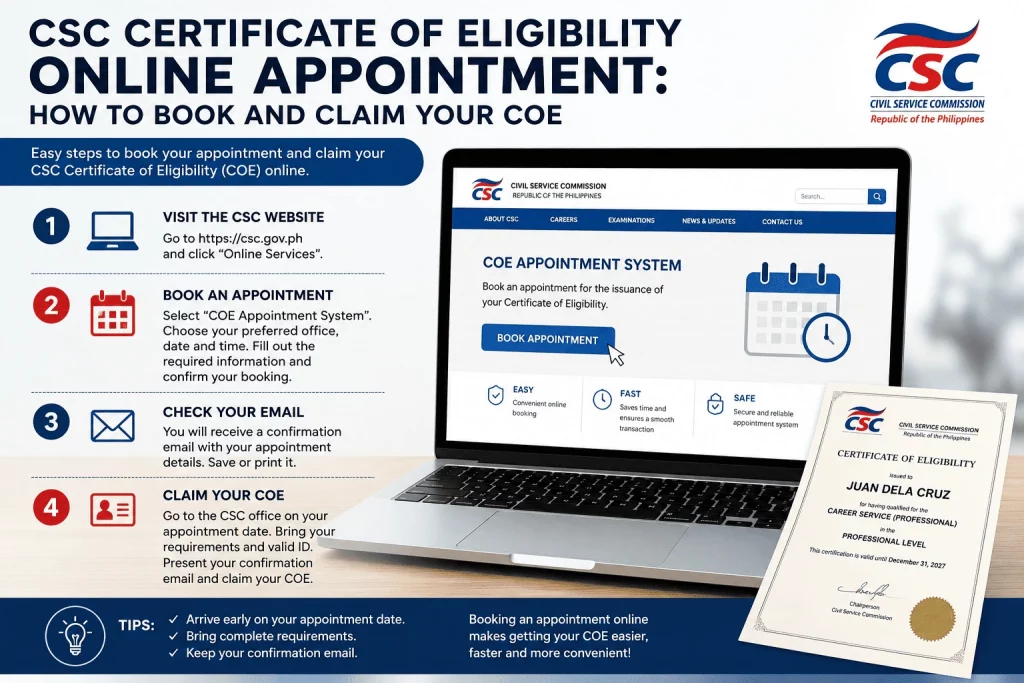
You passed the Civil Service Exam. Congratulations — but your work isn’t done yet. Before you can use your eligibility for a government job application, you need to physically claim your Certificate of Eligibility (COE) from the Civil Service Commission. And in most CSC offices today, walk-ins are no longer accepted.
You need to book an online appointment first.
This guide covers everything you need to know about the CSC Certificate of Eligibility online appointment process — which platform to use, how to book step by step, what documents to bring, what to do when slots are fully booked, and the major 2023 update that may mean you don’t need to visit a CSC office at all for certain transactions.
How Do You Book a CSC Certificate of Eligibility Online Appointment?
To book a CSC Certificate of Eligibility online appointment, go to services.csc.gov.ph (CSC eServe), create an account, log in, and select your preferred Regional Office and transaction type. For NCR, use the dedicated OSS at csc-ncr-oss.online. Some regional offices use third-party platforms like Picktime or Microsoft Outlook booking. Many CSC Regional Offices require online appointments. Applicants should verify the latest policy of their preferred CSC office before visiting. Prepare your valid IDs, CS Form 101-B, application receipt, 1×1 photo, and ₱100 processing fee before your scheduled date.
CSC Certificate of Eligibility Requirements
If you are wondering what to bring to get your CSC Certificate of Eligibility, prepare the following requirements before booking your appointment:
Basic Requirements
- Accomplished request form
- One (1) recent 1×1 ID photo
- Valid government-issued IDs
- Photocopies of IDs
- Appointment confirmation (if required by your CSC office)
- Processing fee
Additional Requirements for Married Applicants
- PSA Marriage Certificate
- Supporting IDs reflecting your married surname
Additional Requirements for Representatives
- Notarized Authorization Letter or Special Power of Attorney (SPA)
- Representative’s valid ID
- Photocopy of applicant’s ID
This section directly targets:
- requirements to claim csc certificate
- what to bring to get csc certificate
Quick Verdict
| Details | |
|---|---|
| ⭐ Booking Platform | CSC eServe (services.csc.gov.ph) — primary system for most regions |
| Processing Fee | ₱100 for Regular COE printed on security paper; Temporary COE is free |
| Processing Time | 1–2 weeks; same-day release for some offices |
| Walk-ins Accepted? | No — online appointment required at most CSC Regional Offices |
| Key 2023 Update | CSEVS screenshot now accepted in lieu of physical COE for government appointments |
| Bottom Line | Book your slot early — slots fill up fast, especially in NCR and densely populated regions |
What Is the CSC Certificate of Eligibility Online Appointment?
The CSC Certificate of Eligibility online appointment is the mandatory pre-scheduled booking you must secure before you can transact with a CSC Regional Office to request or claim your Certificate of Eligibility (COE).
Before the shift to online scheduling, applicants could simply walk into any CSC office. That changed when the Civil Service Commission implemented an appointment-based system across its regional and field offices to reduce congestion, eliminate queues, and improve service delivery.
Today, the appointment is required for the following transactions:
- Requesting a Regular COE printed on security paper (₱100)
- Claiming a Temporary COE (free; valid for two years)
- Requesting authenticated copies of your existing COE
- Applying for special eligibility (honor graduate, barangay officials, veterans, etc.)
- Requesting a certification of no eligibility (CnoE) for records-related purposes
Without a confirmed online appointment, you will not be entertained at the CSC Regional Office — regardless of how far you traveled or how early you arrived.
CSC eServe vs. OCSEAS: Which System Do You Use?
This is one of the most commonly confused points among civil service exam takers, and no other guide currently addresses it clearly.
CSC eServe (services.csc.gov.ph) is the portal for post-exam transactions — including booking your COE appointment, requesting records, and other civil service documentation needs. This is the platform you use after passing the exam.
OCSEAS (ocseas.csc.gov.ph) is the Online Civil Service Examination Application System. This is the portal you use before the exam — to register, reserve an exam slot, and submit your exam application.
| System | Platform URL | Purpose |
|---|---|---|
| CSC eServe | services.csc.gov.ph | COE appointment booking, record requests, post-exam transactions |
| OCSEAS | ocseas.csc.gov.ph | Civil service exam application and slot reservation |
If you are trying to book an appointment to claim your COE, you want eServe — not OCSEAS. Using the wrong portal is a common reason applicants get confused or end up on the wrong page.
Who Needs to Book a CSC Certificate of Eligibility Online Appointment?
You need to book a CSC online appointment if you fall under any of the following:
CSE Exam Passers:
- Career Service Professional exam passers (CSE-PPT or COMEX)
- Career Service Sub-Professional exam passers
- Fire Officer exam passers
- Penology Officer exam passers
- Foreign Service Officer exam passers
Special Eligibility Applicants:
- Honor graduates under RA 1080 applying for their COE
- Barangay officials applying for eligibility under RA 6656
- Barangay Health Workers and Barangay Nutrition Scholars
- Veterans and their relatives under RA 7041
- TESDA-certified skilled workers under EO 132
Existing Eligibles Who Need Additional Documents:
- Anyone requesting an authenticated copy of their COE
- Anyone whose original COE was lost and needs a replacement certification
- Anyone whose eligibility record is not yet on the CSEVS database
If you are a PRC board passer, the CSC does not issue a separate COE for you — your PRC ID and board certificate serve as your proof of eligibility. No CSC appointment is required for this.
What Are the Requirements Before Booking?
Before you book your appointment, make sure you have all the required documents ready. Arriving on your scheduled date without complete requirements means your transaction will not be processed and your slot will be forfeited.
For Regular COE Request (CSE Passers)
- Duly accomplished CS Form 101-B (Application for Certification — available at CSC offices or downloadable from csc.gov.ph)
- Two valid government-issued IDs (original and photocopy) — at least one with photo, signature, and date of birth
- One 1×1 ID photo with name tag and signature on white background
- Application receipt or CSC official receipt from your exam application (if available)
- Processing fee of ₱100
Accepted valid IDs include: Driver’s License, Passport, PRC License, UMID/GSIS ID, SSS ID, Voter’s ID, PhilHealth ID, PhilSys ID (National ID), Postal ID, Barangay ID, NBI Clearance, Police Clearance.
Note: If your ID does not show your date of birth, bring a copy of your PSA Birth Certificate in addition to your IDs.
For Special Eligibility Applications
Requirements vary by eligibility type. Common additional documents include:
- Diploma and Transcript of Records (for honor graduate eligibility)
- Barangay resolution or DILG certification (for barangay officials)
- Service record and appointment papers (for veterans and uniformed personnel)
- TESDA National Certificate (for skilled workers)
Always confirm the complete documentary requirements with your target CSC Regional Office before your appointment date.
For Authenticated COE Copies
- Original or existing COE
- Valid government-issued IDs
- ₱100 per copy
How to Book a CSC Certificate of Eligibility Online Appointment — Step by Step
Here is the step-by-step process for booking through CSC eServe, the primary national platform:
Step 1: Go to CSC eServe
Open your browser and go to https://services.csc.gov.ph. This is the official CSC eServe portal.
Step 2: Create an Account
If you are a first-time user, click Sign Up. Fill in your personal details — name, email address, and password. Verify your account through the confirmation link sent to your email before proceeding.
Step 3: Log In
Once your account is verified, log in using your registered email and password.
Step 4: Select Your Transaction
After logging in, you will see a list of available transactions. Select the transaction type that applies to you:
- Request for Certification of Eligibility — for claiming your COE
- Request for Authenticated Copy of COE — if you already have a COE and need authenticated copies
- Application for Special Eligibility — for honor graduates, barangay officials, etc.
Step 5: Choose Your CSC Regional Office
Select the CSC Regional Office where you want to transact. As of 2023, you can request your COE at any of the 16 CSC Regional Offices nationwide — you are no longer required to go to the office in the region where you took your exam.
Important:Processing procedures may vary by CSC office. Applicants should confirm with their Regional or Field Office before booking an appointment.
Step 6: Choose Your Preferred Date and Time
Select an available date and time slot from the calendar. Available slots are shown in real time. Once selected, confirm your booking.
Step 7: Save Your Appointment Confirmation
You will receive a confirmation via email. Save this or take a screenshot — you will need to present it at the CSC office on your appointment date.
Step 8: Prepare Your Documents and Appear on Your Scheduled Date
Compile all required documents before your appointment date. Arrive at the CSC Regional Office on time. Non-appearance forfeits your slot and requires rebooking.
CSC Online Appointment Links by Region
Different CSC Regional Offices use different booking platforms. Here is a consolidated reference table:
| Region | CSC Office | Booking Platform | How to Access |
|---|---|---|---|
| NCR | CSC National Capital Region | OSS (Dedicated Portal) | csc-ncr-oss.online |
| Region I | CSC RO I (La Union) | CSC eServe | services.csc.gov.ph |
| Region II | CSC RO II (Cagayan) | CSC eServe | services.csc.gov.ph |
| Region III | CSC RO III (Pampanga) | Picktime | picktime.com/cscro3 |
| Region IV-A | CSC RO IV-A (Quezon City) | Microsoft Outlook Booking | outlook.office365.com/book/ClientBookingServices@csc.gov.ph |
| Region IV-B | CSC RO IV-B (MIMAROPA) | CSC eServe | services.csc.gov.ph |
| Region V | CSC RO V (Bicol) | OnSched | bit.ly/onsched |
| Region VI | CSC RO VI (Iloilo) | Google Sites | sites.google.com/view/cscro6regionalservices/book-appointment |
| Region VII | CSC RO VII (Cebu) | CSC eServe | services.csc.gov.ph |
| Region VIII | CSC RO VIII (Leyte) | CSC eServe | services.csc.gov.ph |
| Region IX | CSC RO IX (Zamboanga) | CSC eServe | services.csc.gov.ph |
| Region X | CSC RO X (CDO) | CSC eServe | services.csc.gov.ph |
| Region XI | CSC RO XI (Davao) | Picktime | picktime.com/CivilServiceCommissionDavaoRegion |
| Region XII | CSC RO XII (Cotabato) | CSC eServe | services.csc.gov.ph |
| Region XIII | CSC RO XIII (CARAGA) | CSC eServe | services.csc.gov.ph |
| CAR | CSC CAR (Baguio) | CSC eServe | services.csc.gov.ph |
| BARMM | Bangsamoro | CSC eServe or agency portal | Check agency website |
Tip: Booking platforms may change without notice. Always verify with the specific Regional Office’s official Facebook page or website before your appointment date.
What to Do If CSC Online Appointment Slots Are Fully Booked
One of the most common frustrations among CSC applicants — especially in NCR and Region IV — is finding that all available appointment slots are fully booked, sometimes weeks or months in advance.
Here is what you can do:
Option 1: Check Back Regularly for Released Slots
CSC offices periodically release new appointment slots. Set a reminder to check the booking portal first thing in the morning — newly released slots are taken within minutes. Checking at 8:00 AM on weekdays gives you the best chance.
Option 2: Use the CSEVS Screenshot as an Interim Alternative
As of CSC Memorandum Circular No. 3, s. 2023, a screenshot of your eligibility record from the Civil Service Eligibility Verification System (CSEVS) is now an accepted substitute for a physical COE when applying for government positions. This means you may be able to proceed with a job application while waiting for your COE appointment slot.
To use CSEVS:
- Go to the CSC website at csc.gov.ph
- Navigate to CSEVS (Civil Service Eligibility Verification System)
- Search for your name and eligibility record
- Take a screenshot of your result
- Submit the screenshot to the hiring agency’s HR office
Important: The CSEVS covers CSE-PPT, COMEX, and Computer Assisted Test passers. It does not yet cover all special eligibilities. If your name does not appear in the CSEVS, contact your nearest CSC Regional Office for assistance.
Option 3: Try a Different Regional Office
Since 2023, you can claim your COE at any of the 16 CSC Regional Offices, regardless of where you took your exam. If NCR slots are full, try booking at a Regional Office in an adjacent region where slots may still be available.
Option 4: Reschedule if You Have an Existing Appointment
If you already have a booking but need to move it, log back into your booking portal and reschedule before the deadline. Note that appointments are not transferrable — only the registered account holder can use the slot.
Can You Claim Your COE at a Different CSC Regional Office?
Yes — and this is a major convenience update that most guides have not mentioned.
Since January 2023, the Civil Service Commission announced that civil service eligibles may now request and secure their COE and authenticated copies at any of CSC’s 16 Regional Offices, regardless of their place of examination.
This means if you took the CSE in Cebu but now live and work in Metro Manila, you can claim your COE at the CSC NCR Regional Office instead of travelling back to Region VII.
The Cross-Region (Conduit) Process
For applicants claiming their COE in a region different from where they took the exam, there is an additional step: backroom validation. The receiving Regional Office needs to coordinate with the Regional Office that has jurisdiction over your exam record.
At CSC NCR, for example, cross-region claimants should expect an additional three (3) hours of waiting time on top of the standard one-hour processing period to allow for validation.
What to bring for cross-region claiming:
- All standard COE requirements (IDs, CS Form 101-B, 1×1 photo, ₱100)
- A written request addressed to the CSC Regional Office that has jurisdiction over your testing center, asking them to forward your record to your preferred claiming office — some offices may request this in advance; confirm with the receiving RO before your appointment
Note: Only CSC Regional Offices entertain COE requests. Field Offices cannot process COE transactions. If you are unsure whether your preferred office is a Regional Office or a Field Office, check the CSC Directory at csc.gov.ph.
Is a CSEVS Screenshot Now Accepted Instead of a Physical COE?
Yes — and this is one of the most significant updates to the COE process that no competitor article currently covers.
Under CSC Memorandum Circular No. 3, s. 2023, issued on July 4, 2023, government agencies are now authorized to accept various forms of the Certificate of Eligibility for regular appointments — including photocopies, scanned copies, and even site or screen captures of the COE from the CSEVS.
This means that for the purpose of applying for and processing a government appointment, a CSEVS screenshot is legally valid. You do not necessarily need to secure a physical COE before applying.
What CSEVS Covers
The Civil Service Eligibility Verification System (CSEVS) covers:
- Career Service Examination – Pen and Paper Test (CSE-PPT) passers
- COMEX (Computerized Examination) passers
- Computer Assisted Test passers
What CSEVS Does Not Yet Cover
- NAPOLCOM eligibility
- PNP eligibility
- LTO eligibility
- CAAP eligibility
- MARINA eligibility
- Some special eligibilities
If your eligibility type is not in the CSEVS, you will still need to secure a physical COE through the standard appointment process.
Practical Implication
If you have passed the CSE-PPT and your record is in the CSEVS, you can:
- Access CSEVS at csc.gov.ph
- Search your eligibility record
- Screenshot the result
- Submit it to your hiring agency’s HR office as your proof of eligibility
This does not replace the COE permanently — you may still want to secure the physical security-paper copy for long-term use. But it removes the urgency of securing a physical COE before you can start applying for government jobs.
Temporary COE vs. Regular COE: Which Should You Get?
There are two types of Certification of Eligibility issued by the CSC:
| Temporary COE | Regular COE | |
|---|---|---|
| Cost | Free | ₱100 |
| Validity | 2 years from date of issuance | No expiration |
| Paper | Printed on CSC letterhead | Printed on security paper |
| Can Be Authenticated? | No | Yes |
| Accepted for Gov’t Job Applications? | Yes (while valid) | Yes |
| Best For | Immediate use for job applications while waiting for Regular COE | Long-term use, promotions, permanent records |
Our recommendation: If you only need it for an immediate government job application and your CSEVS record is unavailable, a Temporary COE will do for now. However, always secure a Regular COE eventually — it has no expiration, can be authenticated, and is accepted in all government transactions indefinitely.
What Happens If You Miss Your CSC Appointment?
Missing your scheduled CSC appointment has real consequences:
- Your appointment slot is forfeited — you lose that date and time permanently
- You must rebook through the same online system — there is no reinstatement process
- Appointments are not transferrable — another person cannot use your slot
- For NCR applicants who took their exam at a different Regional Office: you lose your priority window and must book again with the additional 3-hour cross-region waiting time
If you know in advance that you cannot make your appointment, reschedule through the booking platform before your scheduled date. Last-minute cancellations still result in forfeiture.
CSC Regional Office vs. Field Office: Where to Go for Your COE
This distinction causes significant confusion — and wasted trips.
COE transactions are processed at CSC Regional Offices only. CSC Field Offices — the smaller satellite offices located in cities and municipalities throughout each region — do not issue COE at this time.
| CSC Regional Office | CSC Field Office | |
|---|---|---|
| Issues COE? | ✅ Yes | ❌ No |
| Accepts COE appointment bookings? | ✅ Yes | ❌ No |
| Special eligibility applications? | ✅ Yes | ❌ No (forwards to RO) |
| Civil service exam records? | ✅ Yes | Limited |
Before booking your appointment, confirm that the office you selected is a Regional Office — not a Field Office. The CSC maintains a complete directory of all Regional and Field Offices at csc.gov.ph.
Pre-Appointment Checklist
Use this before heading to your CSC appointment:
- [ ] Appointment confirmation saved (screenshot or email printout)
- [ ] CS Form 101-B fully accomplished and signed
- [ ] Two valid government-issued IDs (originals + photocopies)
- [ ] PSA Birth Certificate copy on hand (if ID has no birthdate)
- [ ] One 1×1 ID photo with name tag and signature on white background
- [ ] ₱100 processing fee in cash (bring extra for incidentals)
- [ ] Application or official receipt from original exam (if available)
- [ ] Confirmed that the office is a CSC Regional Office (not a Field Office)
- [ ] If cross-region claiming: written request and extra time allowance for validation
Final Verdict
Getting your CSC Certificate of Eligibility is a non-negotiable step in your government career journey — and today, it starts with a successful online appointment booking.
The key takeaways from this guide:
Book early. Slots fill up fast, especially in NCR and Luzon. Monitor the portal in the early morning when new slots are released.
Use eServe (services.csc.gov.ph) for most regions. For NCR, use the dedicated OSS at csc-ncr-oss.online. Check your regional office’s Facebook page to confirm which platform they currently use.
Know the CSEVS shortcut. If your eligibility is in the CSEVS database, a screenshot may be enough to start your government job application while your COE appointment is still pending.
Go to a Regional Office, not a Field Office. This single distinction prevents one of the most common wasted trips among CSC applicants.
Who this guide is for:
- Fresh CSE passers preparing to claim their first COE
- Government job applicants who need an authenticated copy of their COE
- Special eligibility applicants (honor graduates, barangay officials, veterans)
- Applicants who relocated and want to claim their COE in a different region
People Also Ask
How do I book a CSC Certificate of Eligibility online appointment? Go to CSC eServe at services.csc.gov.ph, create or log into your account, select your transaction type (COE request or authenticated copy), choose your preferred Regional Office and available date, then confirm your booking. For NCR, use the dedicated scheduling portal at csc-ncr-oss.online. Save your confirmation email or screenshot before your appointment date.
What is the difference between CSC eServe and OCSEAS? CSC eServe (services.csc.gov.ph) is used for post-exam transactions like COE appointment booking and record requests. OCSEAS (ocseas.csc.gov.ph) is used for civil service exam applications and slot reservations before the exam. If you are claiming your COE, use eServe — not OCSEAS.
What do I do if CSC online appointment slots are fully booked? Check the portal regularly in the early morning when new slots are released. In the meantime, verify if your eligibility record appears in the CSEVS (Civil Service Eligibility Verification System) at csc.gov.ph — a CSEVS screenshot is now accepted as a valid substitute for a physical COE for government job applications under CSC MC No. 3 s. 2023. You can also try booking at a different Regional Office where slots may still be available.
Can I claim my COE at a different CSC Regional Office from where I took the exam? Yes. Since January 2023, the CSC allows eligibles to claim their COE at any of its 16 Regional Offices nationwide, regardless of where the exam was taken. If claiming outside your exam region, expect an additional 3-hour processing time for backroom validation. Bring all standard requirements and confirm the cross-region process with the receiving office beforehand.
What happens if I miss my CSC appointment? Your appointment slot is automatically forfeited. You must rebook through the same online system. Appointments are not transferrable, so another person cannot use your slot. If you know you cannot make your appointment in advance, reschedule through the booking portal before your scheduled date to avoid losing your slot.
Is a CSEVS screenshot now accepted instead of a physical COE? Yes, under CSC Memorandum Circular No. 3, s. 2023. Government agencies may now accept a site or screen capture of an applicant’s eligibility record from the CSEVS in lieu of a physical COE for regular government appointments. However, CSEVS currently covers only CSE-PPT, COMEX, and Computer Assisted Test passers — not all special eligibilities.
Can a representative claim my COE on my behalf? No. Passers must personally claim their Certification of Eligibility at the CSC Regional or Field Office concerned. Representatives are not allowed to claim on behalf of the eligible individual. You must appear in person on your scheduled appointment date with your valid IDs.
What is the difference between a Temporary COE and a Regular COE? A Temporary COE is free, printed on CSC letterhead, valid for two years from issuance, and cannot be authenticated. A Regular COE costs ₱100, is printed on security paper, has no expiration, and can be authenticated. Both are accepted for government job applications, but the Regular COE is the preferred long-term document for career government employees.
Frequently Asked Questions
1. Is there a deadline for claiming my CSC Certificate of Eligibility?
No. There is no deadline for claiming your COE. Your civil service eligibility does not expire — only the Temporary COE has a 2-year validity period. You may claim your Regular COE even years after passing the exam. However, it is advisable to claim it sooner rather than later to have it ready for job applications.
2. Can I book a CSC COE appointment at a Field Office?
No. COE transactions are processed only at CSC Regional Offices. Field Offices do not issue COEs and cannot process COE appointment bookings. Check the CSC Directory at csc.gov.ph to confirm whether your nearest office is a Regional Office or a Field Office before booking.
3. How long does it take to process a COE after my appointment?
Processing typically takes 1 to 2 weeks after your appointment date, depending on your Regional Office and the volume of requests. Some offices offer same-day release for certain transactions. For cross-region claimants, expect an additional 3 hours for backroom validation on top of the standard processing time.
4. What if my name does not appear in the CSEVS?
If your eligibility record is not found in the CSEVS, contact your nearest CSC Regional Office. Bring a government-issued valid ID and the required personal data for verification. Some records — especially those from older exams or special eligibilities — may not yet have been encoded into the CSEVS database.
5. Do I need a new appointment every time I request an authenticated copy of my COE?
Yes. Each transaction at the CSC requires a separate online appointment booking. If you need multiple authenticated copies, include all copies in a single appointment request where the system allows it. Confirm with your preferred Regional Office whether multiple copies can be processed in a single visit.
6. I am a PRC board passer. Do I need to book a CSC appointment for my eligibility?
No. PRC board passers are automatically granted civil service eligibility (RA 1080 / Bar-Board eligibility). The CSC does not issue a separate COE for board passers — your PRC ID and board certificate serve as your proof of eligibility. You do not need to book a CSC appointment for this purpose.
7. What is proof of eligibility for government jobs?
A CSC Certificate of Eligibility, CSEVS record, or other CSC-recognized eligibility document may serve as proof of eligibility when applying for government positions.
Related Topics
- How to Fill Out the Work Experience Sheet (WES) Correctly
- Common Work Experience Sheet Mistakes and How to Avoid Them
- Common PDS Mistakes: Avoid These CSC Form 212 Errors
- How to Fill Out the Work Experience Sheet (WES) Correctly
- How to Claim CSC Certificate of Eligibility: Step-by-Step Guide
- CSC Eligibility Requirements: Complete Guide for Government Job Applicants
References
- Department of Budget and Management (DBM). National Budget Circular No. 601 – Implementation of the Third Tranche Compensation Adjustment for Civilian Government Personnel pursuant to Executive Order No. 64, s. 2024.
- Civil Service Commission (CSC). Position Qualification Standards and Civil Service eligibility policies.
- Official Gazette of the Republic of the Philippines. Executive Orders, laws, and official government issuances relating to the Salary Standardization Law