The content of your resume can be excellent and still get passed over if the format works against you. Recruiters often spend only a few seconds scanning a resume before deciding whether to keep reading, and format determines how quickly they can find what they’re looking for in that narrow window. A confusing layout, a buried work history, or a structure that hides your strongest qualifications can cost you an interview regardless of how strong your actual experience is.
Format also affects something less obvious: applicant tracking systems (ATS) parse resumes structurally before a human ever sees them, and some formats are dramatically easier for these systems to read correctly than others. Choosing the wrong format doesn’t just risk a worse first impression — it can mean your resume never gets accurately parsed in the first place, regardless of how well-written the content inside it is.
Choosing the wrong format can also actively hide your strengths rather than simply failing to highlight them. A fresh graduate forcing their limited work history into a chronological format ends up leading with the weakest part of their profile; a career changer using a strict chronological format buries their transferable skills beneath a job title that doesn’t match the role they’re applying for. Format isn’t neutral — it actively shapes which parts of your background a reader encounters first, and in what order.
This guide breaks down the three main resume formats, when to use each one, and how to choose the right structure for your specific career stage and situation — with examples, a decision framework, and ATS formatting guidance you can apply immediately.
What is the best resume format? For most job seekers, the chronological resume format is best because it highlights work history clearly, is recruiter-friendly, ATS-friendly, and widely accepted across industries. Fresh graduates, career changers, and freelancers may benefit from a functional or combination format instead.
What Is a Resume Format?
A resume format is the structural template used to organize the information on your resume — how sections like contact information, summary, skills, work experience, education, and certifications are arranged and prioritized. The same set of qualifications can read completely differently depending on which format presents them, which is why format is a strategic decision, not just a stylistic one.
It’s worth distinguishing format from design. Format is the structural decision — which sections exist, in what order, with what relative emphasis. Design covers the visual execution within that structure — fonts, spacing, color, and layout details. Both matter, but format is the more consequential decision: a well-formatted resume with plain, unremarkable design will consistently outperform a beautifully designed resume built on the wrong structural format for your situation.
Why Resume Format Matters
First Impressions
Recruiters often spend only seconds reviewing a resume before deciding whether to continue reading. In that window, format determines whether your strongest qualifications are immediately visible or buried somewhere a rushed reader will never reach.
ATS Compatibility
Some formats parse far more reliably through applicant tracking systems than others. A visually striking resume with multiple columns, graphics, or unconventional section placement can confuse an ATS into misreading or dropping content entirely — meaning a human recruiter might never see information that’s actually on the page.
Highlighting Strengths
Different formats emphasize different qualifications. A chronological format puts your work history center stage, which is ideal if that history tells a strong, consistent story. A functional format shifts the spotlight to skills, which helps candidates whose skills are stronger than their formal job history. Choosing the format that highlights your actual strengths — rather than defaulting to whatever template looks nicest — is one of the most overlooked resume decisions job seekers make.
Think of format selection as answering a single question honestly: if a recruiter only reads the first third of your resume, what do you most want them to have seen? For most experienced professionals, the answer is a strong, recent work history — which points toward chronological. For a fresh graduate, the answer is often a specific skill or project — which points toward functional. For a career changer, it’s usually both at once — which is exactly the gap the combination format is built to close.
The 3 Main Resume Formats
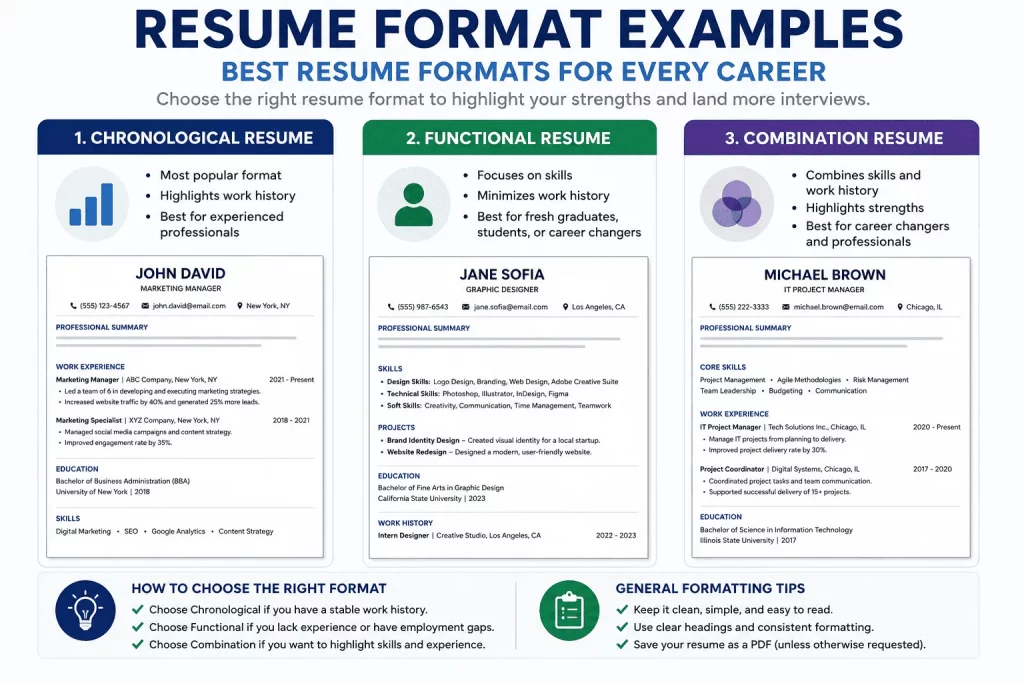
Chronological Resume Format
What it is: Lists your work history in reverse-chronological order, from your most recent position to your oldest.
This is the format most recruiters expect by default, and for good reason — it presents your career progression in the most intuitive order possible, letting a reader trace your growth from role to role without any extra interpretation required.
Best for: Experienced professionals, government applicants, and candidates with a steady, consistent career progression.
Structure:
- Contact Information
- Summary
- Work Experience
- Skills
- Education
Pros:
- ATS-friendly
- Easy to read
- Preferred by most recruiters
Cons:
- Employment gaps are clearly visible
- Less ideal for career changers whose most recent roles don’t match their target field
This visibility isn’t purely a downside — for candidates without gaps or major pivots, a clean chronological history is itself a selling point, since it demonstrates stability and consistent growth without you having to say so explicitly.
Chronological Resume Example:
Jane Santos Marketing Manager | jane.santos@email.com | (555) 123-4567
Summary Results-driven marketing manager with 7 years of experience leading integrated campaigns and growing lead generation by 80% year-over-year.
Work Experience Marketing Manager, ABC Company (2021–Present)
- Increased qualified lead volume by 80% through targeted audience segmentation.
Marketing Specialist, XYZ Corp (2018–2021)
- Managed social media campaigns that grew engagement by 45%.
Skills: SEO, Content Strategy, Google Analytics, Campaign Management
Education: BA in Marketing, State University
Why this works: The summary immediately states years of experience and a quantified achievement, the work experience section leads with the strongest recent result, and skills are placed after experience since, for an experienced professional, work history is the more persuasive section.
Functional Resume Format
What it is: Organizes the resume around skills and competencies rather than a chronological work history, with employment history condensed or moved toward the bottom.
This format exists specifically to solve a problem the chronological format can’t: what to do when your most persuasive qualifications aren’t reflected cleanly in a list of job titles and dates. By leading with skills and projects, it gives candidates a chance to make their case before a recruiter reaches — and potentially gets distracted by — a thin or unconventional work history.
Best for: Fresh graduates, students, career changers, and individuals with significant employment gaps.
Structure:
- Contact Information
- Summary
- Skills
- Projects
- Education
- Work History (brief)
Pros:
- Highlights skills over gaps in formal employment
- Useful when your strongest qualifications aren’t reflected in your most recent job title
Cons:
- Some recruiters view it skeptically, since it can read as an attempt to obscure work history
- Less ATS-friendly, since many systems are built to expect a chronological work history section
Because of this skepticism, functional resumes work best as a deliberate, temporary choice for a specific situation — early career, a significant gap, a major pivot — rather than a permanent default. Once you’ve built a few years of directly relevant, chronological work history, most candidates are better served switching to a combination or chronological format.
Functional Resume Example:
Marco Reyes Aspiring UX Designer | marco.reyes@email.com | (555) 987-6543
Summary Recent design graduate with strong skills in user research, wireframing, and prototyping, backed by a portfolio of three completed case studies.
Skills
- User Research & Usability Testing
- Wireframing (Figma, Adobe XD)
- Prototyping & Interaction Design
Projects
- Redesigned a nonprofit’s donation flow, improving prototype task completion by 30% in usability testing.
Education: BFA in Graphic Design, State University
Work History: Barista, Local Café (2023–2024)
Why this works: Skills and projects — the candidate’s strongest qualifications — appear before the thin, unrelated work history, giving the reader a reason to keep reading before reaching the barista role that would otherwise read as the resume’s headline.
Combination Resume Format
What it is: Blends the strengths of both formats — leading with a skills-focused section, then following with a full, standard work experience section in reverse-chronological order.
This format tends to be the best fit for candidates whose situation is genuinely more nuanced than “steady career” or “limited work history” — someone changing fields who still has a real, credible employment record worth showing, or a technical professional whose specific tool proficiency deserves top billing before the reader gets to the job-by-job detail.
Best for: Career changers, managers, technical professionals, and remote workers who need to showcase both relevant skills and a solid work history.
Structure:
- Contact Information
- Summary
- Core Skills
- Work Experience
- Education
Pros:
- Balanced presentation of both skills and experience
- Showcases expertise without hiding a legitimate work history
Cons:
- Tends to run longer than a single-format resume
- Requires more customization to get the balance between skills and experience right
That extra customization is the trade-off worth making for candidates whose situation genuinely calls for it — a rushed, poorly balanced combination resume (too many skills, too little supporting experience, or vice versa) underperforms a clean chronological resume, so this format rewards the time invested in getting the proportions right.
Combination Resume Example:
David Cruz Operations Manager Transitioning to Project Management | david.cruz@email.com | (555) 456-7890
Summary Former operations manager with 6 years of experience in process improvement and team leadership, transitioning into project management with a completed PMP certification.
Core Skills: Agile Methodology, Budget Management, Stakeholder Communication, Risk Assessment
Work Experience Operations Manager, Retail Co. (2019–Present)
- Reduced operating costs by 12% through improved scheduling and process redesign.
Education: BS in Business Administration, State University | PMP Certification (2026)
Why this works: The Core Skills section immediately establishes project management competency — the exact thing a hiring manager needs reassurance about for a career changer — before the work experience section proves a solid, credible professional track record in a different but clearly related field.
Atlas Resume Format Selector™
Use this quick-reference table to identify the format most likely to suit your situation before diving deeper into the decision framework below.
| Situation | Recommended Format |
|---|---|
| Fresh Graduate | Functional |
| Student | Functional |
| Experienced Professional | Chronological |
| Government Employee | Chronological |
| Career Changer | Combination |
| Freelancer | Combination |
| Consultant | Combination |
| Remote Worker | Combination |
The Selector is a fast starting point, not a rigid rule — always weigh it against the Decision Matrix below and your own specific work history before finalizing your choice.
Not sure which format to use? Build your resume with our Free Resume Builder Online | Create & Download PDF Resume and get a professional structure automatically.
Atlas Resume Format Decision Matrix™
If your situation doesn’t map cleanly onto the Selector table above, walk through this three-question decision tree instead.
Question 1: Do you have 3+ years of relevant experience?
- Yes → Use a Chronological format.
- No → Continue to Question 2.
Question 2: Are you changing careers?
- Yes → Use a Combination format.
- No → Continue to Question 3.
Question 3: Are you a student or fresh graduate?
- Yes → Use a Functional format.
- No → Default to a Chronological format.
This matrix resolves most edge cases the Selector table doesn’t directly cover — for example, an experienced professional pivoting into a new field should generally follow the Combination path from Question 2, even though “experienced professional” alone might otherwise point toward Chronological.
Worked example: Consider a candidate with 8 years of experience as a retail store manager applying to an operations coordinator role at a logistics company. Question 1 (3+ years of relevant experience?) is ambiguous here — they have 8 years of experience, but not directly in logistics. Moving to Question 2 (changing careers?) resolves the ambiguity: yes, this is a career change in substance even though both roles involve management and process oversight, so the Combination format is the right call — leading with transferable operations and leadership skills, backed by a full, credible work history.
Chronological vs Combination: Resolving the Close Calls
The two most commonly confused formats are chronological and combination, since both ultimately present a full work history — the difference is really about what comes before it. If you’re still unsure after the Decision Matrix, ask one more question: does your most recent job title alone accurately represent the role you’re applying for?
If yes, a straightforward chronological format is usually sufficient — your work history already tells the right story without needing a skills section to reframe it first. If no — your most recent title undersells your relevant qualifications, reflects a different specialization, or doesn’t obviously connect to the target role — a combination format’s upfront skills section does useful work that a chronological format’s structure can’t do on its own. When genuinely torn between the two, the combination format is the lower-risk choice: it includes everything a chronological resume includes, plus a skills section that can only add clarity, never subtract it.
Resume Format for Career Returners and Employment Gaps
Candidates returning to the workforce after an extended gap — for caregiving, health reasons, further education, or any other circumstance — face a specific formatting challenge: a strict chronological format makes the gap the most visually obvious thing on the page, often before a recruiter reads anything else.
A combination format usually serves this situation best, for the same reason it works for career changers: it lets you lead with current, relevant skills before the reader reaches the timeline where the gap becomes visible. Within the work history section itself, consider using years rather than exact months for employment dates (a common and generally accepted practice) and, where relevant, briefly noting any productive activity during the gap — caregiving, coursework, freelance work, volunteer commitments — rather than leaving it as an unexplained blank space.
The goal isn’t to hide the gap; ATS systems and recruiters both encounter employment gaps constantly, and an honestly framed gap rarely disqualifies a strong candidate on its own. The goal is simply to make sure the gap isn’t the first and only thing the format draws attention to.
How to Convert Between Formats
Many candidates don’t need to choose a format from scratch — they need to convert an existing resume from one format to another as their situation changes. The good news is that the underlying content (your summary, skills, and work history bullets) typically transfers directly; only the structure and ordering change.
Converting chronological to functional: Pull your strongest skills into a dedicated section near the top, condense your work history into a brief list of titles, employers, and dates near the bottom, and move any project or achievement detail that previously lived under a specific job into the skills section instead, framed around the competency rather than the employer.
Converting functional to combination: Keep your existing skills section largely intact, but restore a full, detailed work experience section beneath it — including the achievement-focused bullet points a functional format typically compresses or omits.
Converting chronological to combination: Add a concise “Core Skills” section directly beneath your summary, pulling the 6 to 10 skills most relevant to your target role, then leave your existing chronological work history section unchanged beneath it.
In every direction, the actual writing you’ve already done — your summary sentences, your quantified achievement bullets, your skills list — carries over. Format conversion is almost entirely a reorganization exercise, not a rewriting one.
Best Resume Formats by Career
Resume Format for Fresh Graduates
Recommended: Functional Resume
Why: Limited formal work experience makes a skills-and-projects-first structure more effective than a chronological history with only internships and part-time jobs to show.
Resume Format for Students
Recommended: Functional Resume
Why: Similar to fresh graduates, students benefit from leading with coursework, projects, and demonstrated skills rather than a thin work history.
Resume Format for Career Changers
Recommended: Combination Resume
Why: This format lets you lead with transferable skills relevant to the new field while still presenting a complete, credible work history. It’s especially effective when paired with a brief summary line that explicitly names the transition, so the combination structure and the narrative reinforce each other rather than leaving the reader to piece the story together alone.
Resume Format for Government Jobs
Recommended: Chronological Resume
Why: Government hiring processes typically expect a detailed, verifiable employment history in standard chronological order, often as a formal requirement of the application itself.
Resume Format for Teachers
Recommended: Chronological Resume
Why: Education hiring committees generally want to see a clear teaching history, including grade levels, subjects, and tenure at each school, best shown chronologically.
Resume Format for Nurses
Recommended: Chronological Resume
Why: Clinical hiring managers want to verify continuous, specific unit and facility experience, which a chronological structure presents most clearly.
Resume Format for Accountants
Recommended: Chronological Resume
Why: Finance and accounting roles are typically evaluated on a steady track record and increasing scope of responsibility, which reads most credibly in chronological order.
Resume Format for Virtual Assistants
Recommended: Combination Resume
Why: Virtual assistants often support multiple clients with varied skill sets, so leading with core skills alongside a solid work history helps demonstrate versatility.
Resume Format for Software Developers
Recommended: Combination Resume
Why: Technical roles benefit from a prominent skills section listing languages and frameworks, paired with a work history that proves hands-on application of those skills. Many technical hiring managers scan the skills section first specifically to confirm stack alignment before reading further, which makes its placement near the top especially valuable in this field.
Resume Format for Remote Jobs
Recommended: Combination Resume
Why: Remote postings often list specific self-management and collaboration skills as requirements, which a combination format can highlight before the reader reaches the work history section.
Create your resume using a format designed for your profession with our Free Resume Builder Online | Create & Download PDF Resume.
One-Page vs Two-Page Resume
One page is best for:
- Students
- Fresh graduates
- Early-career professionals with fewer than 5–7 years of experience
Two pages are best for:
- Managers and senior professionals
- Executives with extensive leadership history
- Technical specialists whose depth of expertise requires more space to demonstrate fully
As a general rule, let your actual, relevant experience determine the length rather than forcing content to fit — or artificially stretching — a specific page count. A one-page resume padded with filler reads worse than a well-organized page and a half, and a two-page resume crammed with irrelevant detail reads worse than a focused single page.
If you’re unsure which side of the line you fall on, apply a simple test: would cutting your resume down to one page require removing genuinely relevant, differentiating information, or only redundant and filler content? If it’s the former, a second page is justified. If it’s the latter, trim it — length alone has never made a resume more persuasive.
Do Large Companies’ ATS Platforms Prefer a Specific Format?
Most enterprise-grade ATS platforms — the systems used by large companies with high application volume — are built primarily to parse chronological and combination formats reliably, since these are by far the most common structures submitted. Functional resumes, while not universally rejected, are more likely to encounter parsing issues on these systems specifically because the work history section is compressed or reordered in a way the software isn’t optimized to expect.
This doesn’t mean functional resumes should never be used — it means candidates using one should be especially disciplined about the other ATS-friendly formatting rules in this guide (standard headings, no graphics, no tables), since the format itself already introduces more parsing risk than a chronological or combination structure would.
Resume Format Mistakes to Avoid
Using tables. Tables can shift or scramble entirely when parsed by an ATS, sometimes reordering content in ways that make the resume unreadable to the system even though it looks fine visually. This is one of the most common formatting mistakes in resumes built from visually appealing templates, since tables are often used behind the scenes to create clean-looking two-column layouts.
Using text boxes. Content placed inside text boxes is often skipped by ATS parsers entirely, meaning that information may never register even though a human reader can see it clearly. Contact information placed in a text box is a particularly costly version of this mistake, since it can mean a system never captures your phone number or email at all.
Using graphics. Icons, skill-level graphics, and decorative images add visual interest for a human reader but are typically invisible to an ATS — and can look unprofessional or gimmicky in more traditional or formal industries. A five-star graphic representing “Excel proficiency” conveys nothing to a parsing system that a simple word wouldn’t convey more reliably.
Using multiple columns. Multi-column layouts frequently get read out of order by ATS parsers, jumbling your information into an incoherent sequence even if it looks well-organized on screen. A resume that reads “Marketing Manager — 2019 Skills: SEO, Content — 2021” instead of the intended clean sequence is a direct result of this kind of parsing failure.
Overdesigning. Heavy design elements — colored backgrounds, elaborate section dividers, non-standard layouts — often prioritize visual flair over readability, working against both ATS parsing and quick human scanning. Design should support the content’s readability, not compete with it for the reader’s attention.
Hiding important information. Placing key qualifications in a sidebar, footer, or header can cause them to be missed by both hurried recruiters and certain ATS parsing methods that don’t reliably scan those areas. If a qualification matters, it belongs in the main body of the resume, not tucked into a decorative side panel.
Using fancy fonts. Decorative or script fonts can render incorrectly or fail to parse altogether in some ATS systems, and they generally read as less professional in formal industries regardless of parsing concerns. When in doubt, a standard, widely available font is always the safer choice over something distinctive but obscure.
ATS-Friendly Resume Formatting Tips
Use standard headings. Label sections with conventional titles — “Work Experience,” “Education,” “Skills” — rather than creative alternatives like “My Journey” or “What I Bring.” ATS systems are built to recognize standard section names, and creative labels risk the content underneath being missed entirely during parsing.
Reverse chronological order. Even within a functional or combination format, list any dated content (work history, education) from most recent to oldest, since this is the order both ATS systems and recruiters expect. Reversing this order, even unintentionally, can make a strong recent role look buried or secondary.
Use simple fonts. Stick to standard, widely supported fonts like Arial, Calibri, or Georgia. Unusual or decorative fonts risk rendering incorrectly or failing to parse in some systems, and mixing multiple fonts across a single resume — even standard ones — can read as inconsistent or careless.
Save as PDF (if allowed). PDF generally preserves formatting more reliably than other formats, though always check the specific job posting or portal — some older ATS platforms parse Word documents more reliably than PDFs, so follow any stated preference. When no preference is stated, PDF is usually the safer default for preserving your intended layout across different devices and systems.
Use clear section titles. Beyond standard naming, make sure section titles are visually distinct (bolded, appropriately sized) so both a scanning recruiter and a parsing ATS can quickly identify where each section begins and ends.
How AI Resume Screening Tools Read Different Formats
Beyond traditional ATS platforms, a growing number of hiring workflows now involve AI-assisted screening tools that summarize or evaluate resumes automatically, and generative search systems increasingly surface career advice and resume feedback drawn from structured, well-organized content. These systems generally handle the same formats well or poorly for the same underlying reasons as traditional ATS platforms: a single-column, clearly labeled, reverse-chronological structure is far easier to parse and summarize accurately than a multi-column, graphic-heavy layout.
This means the formatting choices that protect you from ATS parsing failures — standard headings, no tables, no text boxes, no decorative graphics — also protect you as AI-assisted screening becomes more common across the hiring process. There’s no separate, additional formatting standard required for AI-based tools specifically; the same clarity and structure that serves a human reader and a traditional ATS also serves any AI system reading the same document.
Resume Sections Checklist™
Essential sections:
- Contact Information
- Professional Summary
- Skills
- Work Experience
- Education
Optional sections (include if relevant):
- Certifications
- Projects
- Volunteer Experience
- Awards
Every resume should include all five essential sections regardless of format. Optional sections should only be added when they genuinely strengthen your case for the specific role — a certifications section is a clear asset for a technical role, for example, but padding an unrelated resume with a long, generic awards list can dilute rather than strengthen your overall presentation.
Optional sections earn their place the same way any skill or achievement bullet does — by being specifically relevant to the target role rather than generically impressive. A projects section is a strong addition for a fresh graduate applying to a technical role and an unnecessary one for a senior finance executive; a volunteer experience section can meaningfully round out a resume with a thin work history and add little for a candidate with fifteen years of directly relevant experience already on the page.
Why each essential section matters: Contact information ensures you can actually be reached — an easy detail to get wrong when copying between resume versions. Your professional summary gives a fast-reading recruiter immediate context before they invest time in the rest of the document. Skills and work experience together form the evidentiary core of the resume — what you can do, and proof that you’ve done it. Education, even when brief for experienced candidates, is still expected as a baseline credential check across nearly every industry and hiring process.
Format Considerations for Creative Industries
The general advice against graphics, color, and non-standard layouts in this guide applies to most industries — but creative fields (graphic design, advertising, some marketing and media roles) are a legitimate exception, where a resume with thoughtful visual design can itself function as a small design portfolio piece.
Even in creative fields, though, the underlying ATS risk doesn’t disappear — a heavily designed resume still risks parsing poorly if it’s the only version submitted through an online application system. The safest approach for creative candidates is to maintain two versions: a clean, ATS-friendly text-based resume for online applications and initial screening, and a visually designed version to share directly with a hiring manager, bring to an interview, or link to as a portfolio piece. This way, the format never has to compromise between passing an ATS filter and making a strong visual impression — each version does its own job.
Resume Format Readiness Assessment™
Score your current resume format against this checklist before submitting an application.
Do you have:
- Clear section headings
- Consistent formatting throughout
- An easy-to-read layout
- The most relevant information placed first
- No graphics or tables
Scoring:
- 90–100 = Excellent: All five present. Your format is ready to support your content.
- 70–89 = Good: Minor formatting inconsistencies remain, but the structure is fundamentally sound.
- 50–69 = Needs Improvement: Multiple formatting issues are likely interfering with both readability and ATS parsing.
- Below 50 = Rebuild Format: Start over with one of the three formats above rather than trying to patch the current structure.
Run this assessment before every major application cycle, not just once — formatting habits tend to drift over time as you copy-paste content between versions of your resume, and small inconsistencies (a font that changed in one section, spacing that shifted after an edit) are easy to miss without a deliberate review.
A score in the 70–89 range is worth a closer second look even though it’s technically “good” — often, the gap between 89 and 100 is a single overlooked inconsistency (a leftover text box, one section still using a different font) that takes only a minute to fix but meaningfully improves how the resume parses and reads.
Resume Format Match Score™
Where the Readiness Assessment checks whether your formatting is executed cleanly, the Resume Format Match Score™ checks something different: whether you picked the right format in the first place for your specific situation. A perfectly executed format is still a weak choice if it’s the wrong format for your career stage.
| Question | Points |
|---|---|
| Matches career stage | 40 |
| Highlights strongest qualification | 30 |
| ATS-friendly | 20 |
| Easy to scan | 10 |
Interpretation:
- 90–100 = Excellent Format Choice
- 70–89 = Good Choice
- Below 70 = Reconsider Format
How to score it: Award the full 40 points only if the format matches what the Selector or Decision Matrix above would recommend for your actual situation. Award the 30 points only if the format leads with your genuinely strongest qualification — work history for an experienced professional, skills for a fresh graduate, both for a career changer. Award the 20 points if the structure avoids tables, graphics, and multiple columns. Award the final 10 points if a recruiter could identify your job title, most recent employer, and top skill within a five-second scan.
A resume can score well on the Readiness Assessment — clean, consistent, ATS-friendly — and still score poorly here if it’s simply the wrong format for the person using it. Run both checks together: the Readiness Assessment confirms your execution is clean, and the Match Score confirms the format itself is the right strategic choice before you submit.
Good vs Bad Resume Format Example
Bad
- Dense, unbroken blocks of text with no visual separation between sections
- No clear section headings
- Multiple columns that can confuse both recruiters and ATS parsers
- Decorative graphics and icons scattered throughout
Good
- Clear, standard section headings
- A logical, easy-to-follow order (contact, summary, skills, experience, education)
- Consistent spacing and font use throughout
- An ATS-friendly, single-column structure
The difference between these two examples isn’t content quality — it’s whether the format helps or actively works against the content getting read and understood. The same set of qualifications, presented in the “Bad” structure versus the “Good” structure, can produce dramatically different results purely because of how easily each version can be scanned and parsed.
A second comparison, focused on section order:
- Bad: Education listed first for a candidate with 10 years of relevant work experience, pushing the actually persuasive content below the fold.
- Good: Work experience listed immediately after the summary, with education moved near the bottom where it belongs for an experienced candidate.
Section order is itself a formatting decision, not just a content one — placing your strongest, most relevant qualifications as early as possible in the document is one of the simplest formatting improvements available, regardless of which of the three main formats you’re using.
Resume Format Checklist™
Before submitting your resume, confirm each of the following:
- Correct format selected for your career stage and situation
- ATS-friendly layout (no tables, text boxes, or graphics)
- Consistent fonts used throughout
- Consistent spacing between and within sections
- All relevant sections included for your target role
- Contact details clearly visible near the top
- No formatting errors (broken alignment, inconsistent bullet styles, mismatched fonts)
Ready to apply? Build a professional resume in minutes using our Free Resume Builder Online | Create & Download PDF Resume.
Format Consistency Across Application Channels
Many candidates now submit the same resume through several different channels — a company’s online portal, a recruiter’s email, a LinkedIn profile update, a printed copy for an in-person interview — and it’s worth checking that your chosen format holds up across all of them. A resume that looks clean as a PDF attachment can sometimes render differently when copy-pasted into a LinkedIn “About” section or an online application’s plain-text resume field.
Before relying on a single version everywhere, test how your resume’s formatting survives being copy-pasted into a plain-text field. If bullet points, spacing, or section breaks get scrambled in that test, it’s a strong signal that your formatting is leaning on visual elements an ATS or a plain-text field won’t preserve — the same underlying risk this guide has covered throughout, just surfacing in a different channel.
Key Takeaways
- Chronological resumes work best for most applicants.
- Functional resumes help students and fresh graduates.
- Combination resumes work well for career changers and professionals shifting focus.
- ATS-friendly formatting improves visibility regardless of which format you choose.
- Choosing the right format strengthens your resume without changing a single word of its content.
Frequently Asked Questions
What is the best resume format?
For most job seekers, the chronological format is best because it’s ATS-friendly, widely accepted, and clearly highlights a steady work history. The right format ultimately depends on your specific career stage and situation.
Is a chronological resume better?
It’s generally the safest, most widely accepted default — but “better” depends on context. Fresh graduates, career changers, and candidates with significant employment gaps often benefit more from a functional or combination format instead.
Do recruiters like functional resumes?
Opinions vary. Some recruiters appreciate the skills-first emphasis, especially for candidates with limited work history, while others view functional resumes skeptically as a potential sign of something being hidden. It’s a reasonable choice for the specific situations it’s designed for, but not a universal default.
What resume format is best for fresh graduates?
A functional resume format is generally recommended, since it allows fresh graduates to lead with skills, coursework, and projects rather than a thin or nonexistent formal work history.
Should I use a two-page resume?
Two pages are appropriate for managers, executives, and technical specialists with extensive, relevant experience to document. Early-career professionals and students should generally stay within one page.
Are resume templates ATS-friendly?
It depends entirely on the specific template. Simple, single-column templates with standard section headings are typically ATS-friendly; templates with heavy graphics, multiple columns, or decorative elements often are not, regardless of how polished they look visually.
Can I use graphics on a resume?
Generally, no — graphics, icons, and decorative elements are often invisible to ATS parsers and can look unprofessional in more traditional or formal industries. Reserve visual design elements for portfolio pieces or personal websites instead, where format doesn’t need to pass through automated screening.
Which resume format works best for government jobs?
A chronological format is typically recommended for government roles, since these hiring processes usually require a detailed, verifiable employment history presented in a clear, standard order.
Can I switch formats between applications?
Yes, and many candidates should. There’s no rule requiring you to use the same format for every application — a candidate applying to both a traditional corporate role and a startup role, for example, might reasonably use a chronological format for the former and a combination format for the latter, tailoring the structure the same way you’d tailor the content.
Does resume format affect how many interviews I get?
Indirectly, yes. Format itself doesn’t guarantee an interview, but a poorly chosen or poorly executed format can prevent otherwise strong content from being read or parsed correctly — which means format acts as a gate that either lets your qualifications through or quietly blocks them, regardless of how compelling your summary, skills, and achievements actually are.
How do I know if my current resume format is actually working?
Track your application-to-interview ratio over a batch of applications rather than judging from a single rejection, since many factors beyond format influence any one outcome. If you’re consistently applying to roles you’re genuinely qualified for and getting few or no interview requests across a meaningful sample, run the Readiness Assessment above — a low score is a concrete, fixable signal worth addressing before you submit further applications in the same format.
Final Thoughts
Format is the frame your content sits inside, and even the strongest resume content underperforms when the frame works against it. Choose the format that matches your actual career stage and situation rather than whichever template looks most visually appealing, keep the structure ATS-friendly by avoiding tables, graphics, and multiple columns, and run your finished resume through the Readiness Assessment before every major application cycle. Get the format right, and every other improvement you make to your resume — a sharper summary, a stronger skills section, more quantified achievements — gets a fair chance to actually be read.
Related Guides
- Work Experience Examples for Resume: 200+ Examples by Profession
- Skills for Resume: 300+ Skills Examples for Every Profession
- Resume Summary Examples: 150 Professional Summary Examples for Every Job
- Resume Builder: Complete Guide to Creating a Professional Resume
- Resume Objective Examples: 150+ Examples for Every Job
- Application Letter for Fresh Graduates: Sample and Writing Guide
- Free Application Letter Generator for Government Jobs and Private Companies
- Application Letter for Administrative Assistant I: Complete Sample and Writing Guide
- Application Letter for Teacher I: Sample, Format, and Writing Guide
- Application Letter for Nurse I: Sample and Writing Guide