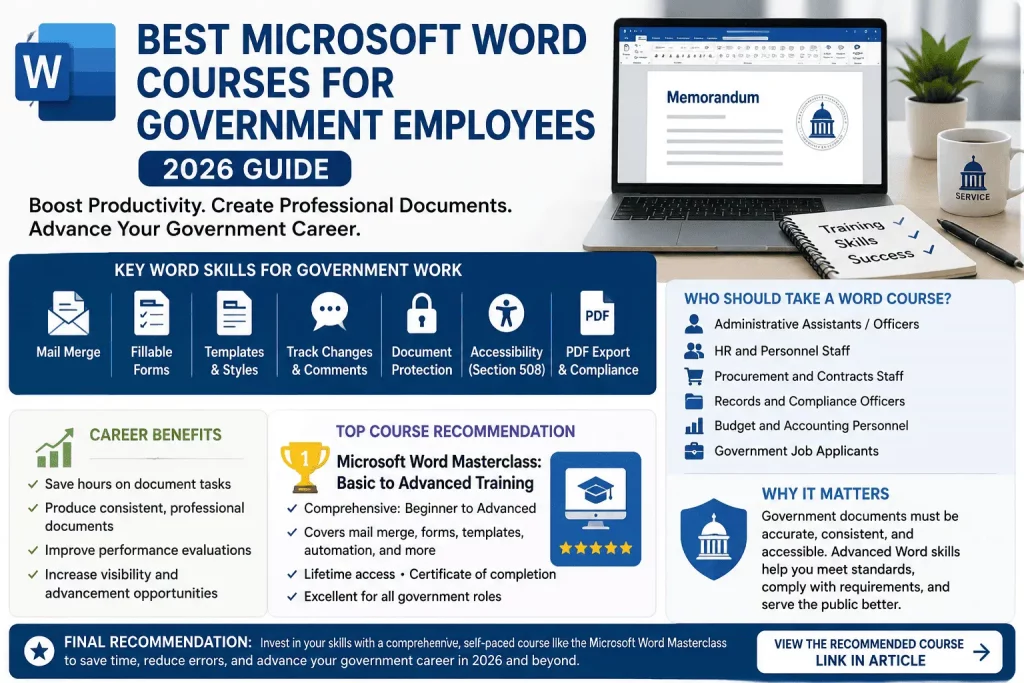
Quick answer
The best Microsoft Word courses for government employees in 2026 combine practical, job-relevant skills — mail merge, fillable forms, accessibility (Section 508/WCAG), templates, track changes, and document security — with flexible, self-paced formats that fit around shift work and approval-heavy schedules. For most public-sector professionals, a structured, all-in-one course like the Microsoft Word Masterclass on Udemy covers everything from formatting basics to advanced automation in a single, affordable package, making it one of the most efficient starting points available this year.
Government work runs on paperwork. Memos, policy documents, procurement records, public notices, grant applications, personnel files, meeting minutes, and compliance reports all pass through Microsoft Word before they reach a supervisor’s desk, a records office, or the public. Yet very few agencies actually train employees on Word beyond a brief onboarding walkthrough. Most public servants are left to figure out styles, templates, and formatting on their own — which means hours lost to manual formatting, inconsistent documents across departments, and avoidable accessibility violations.
This guide breaks down the best Microsoft Word courses for government employees in 2026, what to look for in a course if you work in the public sector, and how to pick the right one based on your role, whether that’s administrative support, HR, procurement, records management, or executive/legislative staff.
Key Takeaways
- Microsoft Word remains one of the most important workplace skills in government offices.
- Mail merge, templates, forms, and document protection provide the biggest productivity gains for public-sector employees.
- Administrative Assistants and Administrative Officers benefit the most from advanced Word skills, though HR, procurement, records, and budget staff rely on them just as heavily.
- Self-paced online courses let government employees learn around shift work and approval-heavy schedules, without disrupting the workday.
- The Microsoft Word Masterclass on Udemy is one of the most comprehensive options available in 2026, covering everything from formatting basics to mail merge, forms, and document automation.
Can Microsoft Word Skills Help You Get Promoted in Government?
Microsoft Word proficiency is often treated as a basic competency in government offices, but employees who master advanced document management, mail merge, templates, and collaborative editing tools frequently stand out during performance evaluations. It’s rarely the headline skill on a resume, yet it’s one of the few skills that shows up in almost every deliverable a public-sector employee produces.
These skills are especially valuable for:
- Administrative Assistant positions
- Administrative Officer positions
- Human Resource staff
- Records Officers
- Procurement personnel
- Executive Assistants
Employees who consistently produce professional, error-free documents often become the go-to staff for reports, memorandums, policy documents, and official correspondence. That reputation isn’t accidental — it’s built one clean, correctly formatted document at a time, and supervisors notice who they can hand a rush report to without worrying about formatting cleanup afterward.
Over time, this kind of visibility can support:
- Better performance ratings
- Additional responsibilities and cross-training opportunities
- Leadership or supervisory opportunities
- Promotion and plantilla position applications
In short, Word skills alone won’t guarantee a promotion, but they remove a common, avoidable obstacle — being seen as reliable and detail-oriented — that quietly influences who gets considered when a higher position opens up.
Career Benefits of Advanced Microsoft Word Skills
Employees with strong Microsoft Word skills often become the preferred staff members for:
- Report preparation
- Executive correspondence
- Committee documentation
- Records management
- Policy drafting
These responsibilities can lead to greater visibility, stronger performance evaluations, and additional career development opportunities.
Who Should Take a Microsoft Word Course?
A Microsoft Word course is especially useful for:
- Administrative Assistants
- Administrative Officers
- Executive Assistants
- Human Resource Officers
- Records Officers
- Procurement Staff
- Budget and Accounting Personnel
- Government Job Applicants
- Civil Service Exam Passers preparing for office work
If your job involves preparing reports, memorandums, official correspondence, forms, or policy documents, advanced Microsoft Word skills can significantly improve productivity and document quality. Even employees who feel “comfortable enough” with Word often discover, once they see the full feature set laid out in a structured course, how much time they’ve been losing to manual workarounds for tasks Word can automate in a few clicks.
Common Microsoft Word Tasks in Government Offices
Government employees use Microsoft Word daily for a fairly consistent set of document types across agencies. Recognizing this pattern is useful because it shows exactly which skills are worth prioritizing in a course.
Typical Word tasks in a government office include:
- Memorandums
- Office Orders
- Travel Orders
- Meeting Minutes
- Endorsement Letters
- Certifications
- Certificates
- Policy Documents
- Procurement Documents
- Project Reports
- Performance Reports
- Administrative Correspondence
Each of these document types has its own formatting conventions, and most agencies expect them to follow a consistent house style — specific fonts, margins, numbering formats, and signature blocks. A quality Microsoft Word course teaches the exact formatting, template-creation, and editing skills required to produce these documents efficiently, rather than leaving employees to rebuild the same layout from memory every time one is needed.
Why Microsoft Word Remains Essential in Government Offices
Despite the growth of cloud-based collaboration platforms, Microsoft Word remains the primary document creation tool across most government agencies.
Word is commonly used for:
- Administrative memorandums
- Board resolutions
- Personnel documents
- Procurement records
- Policy manuals
- Project reports
- Public notices
Many agencies maintain official templates and document standards built specifically around Microsoft Word, making proficiency in the software a practical workplace requirement.
Employees who understand advanced Word features can often complete document-related tasks faster while maintaining consistency, compliance, and professional standards across all official documents.
Microsoft Word Skills Employers Look for in Government Job Applicants
Many government job announcements include a computer literacy requirement, and Microsoft Word is almost always part of it — sometimes listed explicitly, sometimes assumed as a baseline qualification for administrative and clerical roles.
Microsoft Word skills that employers commonly value in government job applicants include:
- Professional document formatting
- Mail merge
- Template creation
- Track Changes and Comments
- Forms creation
- PDF conversion
- Document protection
- Report preparation
Applicants who can demonstrate these skills — whether through a certificate, a portfolio sample, or confident answers in an interview — often have an edge when competing for administrative and clerical positions, especially in agencies that receive a high volume of applications for the same posting. Listing “Microsoft Word” on a resume without specifics is easy to overlook; being able to describe exactly how you’ve used mail merge for mass correspondence or built a protected intake form is what actually differentiates a candidate.
Is Microsoft Word Important for Government Job Applications?
Yes. Many government positions require computer literacy and office productivity skills as part of the qualification standards, even when the job posting doesn’t spell out every software program by name.
Applicants for positions such as:
- Administrative Aide
- Administrative Assistant
- Administrative Officer
- Human Resource Assistant
- Clerk
- Records Officer
are often expected to know Microsoft Word, Excel, email systems, and basic document management practices, since these are the tools used for nearly every task the role involves from day one.
While a formal Word certification is not usually a mandatory requirement, demonstrating strong Word skills can improve a candidate’s standing during interviews and practical exams, particularly for agencies that include a hands-on document-formatting or typing test as part of the hiring process. For applicants preparing for the civil service exam or an upcoming government interview, building these skills ahead of time — rather than learning them on the job — can be the difference between meeting the minimum requirement and standing out as the more prepared candidate.
Why Learning Word Is One of the Highest-ROI Skills for Government Employees
Unlike many professional skills that require months of study, Microsoft Word can be learned in a matter of weeks and applied immediately in the workplace. There’s no waiting period between finishing a module and using it on a real document due the next morning.
Many government employees spend hours manually formatting reports, letters, and forms because they never received formal Microsoft Word training. Tasks such as mail merge, template creation, automated tables of contents, and fillable forms can dramatically reduce that workload — even a few hours of structured training can save dozens of hours of repetitive document work over the course of a year. For agencies that produce large volumes of reports, correspondence, and public documents, these gains translate into real time savings and more consistent, professional output.
That immediacy is what makes Word training different from a lot of professional development: the return on investment isn’t theoretical or years away. A skill learned on a Tuesday can be applied to Wednesday’s memo, and the time saved compounds every week after that, across every report, form, and piece of correspondence the skill touches.
For employees who want that return without piecing together scattered tutorials, a single structured course — like the Microsoft Word Masterclass on Udemy — condenses the exact skills covered above (formatting, templates, mail merge, forms, document protection) into one self-paced curriculum that can be completed around a normal government work schedule.
Example: Using Mail Merge in a Government Office
Imagine an HR office that needs to send 300 employee notices.
Without Mail Merge:
- Create 300 separate letters
- Manually edit names
- Higher risk of errors
With Mail Merge:
- Create one template
- Connect employee data
- Generate 300 personalized letters automatically
This process can reduce several hours of work to just a few minutes.
Why Government Employees Need Dedicated Word Training
Government documents carry a different weight than a typical office memo. They often become part of a permanent public record, are subject to Freedom of Information Act (FOIA) requests, must comply with accessibility law, and frequently pass through multiple layers of review before release. That changes what “knowing Word” actually means for someone in public service.
A private-sector employee might get away with sloppy formatting in an internal email attachment. A government employee producing a public notice, a board resolution, or a grant application usually cannot. Formatting errors, inconsistent headings, broken tables of contents, or inaccessible PDFs exported from Word can trigger real compliance problems, delay approvals, or create legal exposure for the agency.
Despite this, formal Word training is rarely built into government onboarding. Most employees learn by trial and error, YouTube snippets, or asking a coworker who happens to know a shortcut. That patchwork approach leaves gaps in exactly the areas that matter most for public-sector work: templates, styles, headers and footers tied to formatting standards, mail merge for mass correspondence, digital signatures, and document protection.
A structured course closes those gaps quickly. Instead of learning Word one frustrating task at a time, employees move through a logical sequence — formatting fundamentals, then styles and templates, then automation features like mail merge and forms, then collaboration tools like track changes and comments. That sequence mirrors how documents actually move through a government office: drafted, formatted to standard, routed for edits, finalized, and archived.
What Makes a Word Course Right for Public-Sector Work
Not every Word course is a good fit for someone in government. Many are built for freelancers, students, or general office workers and skip the features public-sector employees use daily. When evaluating a course, look for these characteristics.
Coverage of styles and templates, not just formatting shortcuts. Government offices rely heavily on standardized templates — letterhead, memo formats, report templates with mandated fonts and margins. A good course teaches how styles work under the hood (not just how to click “bold”), so you can build, edit, and maintain templates that stay consistent across an entire department.
Mail merge and mass correspondence. Notices to constituents, renewal letters, hearing notifications, and bulk certificates are all mail merge use cases. A course that treats mail merge as an afterthought will leave you improvising when a real mailing deadline hits.
Forms and fillable documents. Intake forms, applications, and internal requisition forms are everywhere in government work. Courses that cover Word’s Developer tab, content controls, and form protection save enormous time compared to redesigning paper forms in Excel or PDF software.
Track changes, comments, and version control. Government documents typically require multi-person sign-off. A course that covers track changes, comparing document versions, and locking sections for review directly maps to how approval chains work in the public sector.
Document security and protection. Restricting editing, marking documents as final, applying passwords, and understanding how metadata can leak sensitive information are all relevant to agencies that handle personnel records, procurement bids, or law enforcement documentation.
Accessibility basics. Section 508 in the U.S. (and equivalent accessibility mandates elsewhere) requires that public-facing documents be usable with screen readers. Alt text, heading structure, table headers, and color contrast are all things Word handles — if you know where to look.
Format flexibility. Government employees rarely get to sit through a live, scheduled class during work hours. Self-paced, on-demand video courses that can be completed in short sessions around meetings and shift changes are far more realistic than instructor-led cohorts with fixed schedules.
How We Evaluated These Microsoft Word Courses
To identify the best Microsoft Word courses for government employees, we evaluated each course using criteria that directly affect public-sector work.
Relevance to Government Office Tasks
Courses ranked higher if they covered skills commonly used in government agencies, including:
- Memorandums
- Official correspondence
- Mail merge
- Fillable forms
- Report preparation
- Document protection
Coverage of Advanced Features
Basic formatting is important, but advanced features create the biggest productivity gains.
We prioritized courses that teach:
- Styles and templates
- Mail merge
- Track Changes
- Fillable forms
- Automatic tables of contents
- Cross-references
- Accessibility tools
Flexibility and Accessibility
Government employees often have limited training time. Self-paced courses that can be completed around work schedules received higher ratings.
Course Updates
Recently updated courses were preferred because Microsoft 365 continues to evolve and introduce new features.
Value for Money
We considered course price, included resources, certificates, and lifetime access when determining overall value.
Top Microsoft Word Courses for Government Employees in 2026
Based on curriculum depth, relevance to office and administrative work, and how well each course maps to the tasks described above, here are the strongest options this year.
1. Microsoft Word Masterclass: Basic to Advanced Training
This is one of the most comprehensive all-in-one Word courses currently available, and it’s a strong match for government employees because it doesn’t stop at formatting basics. The curriculum covers cross-referencing, bookmarks, and automated tables of contents — all essential for long policy documents and reports. It also walks through building fillable forms, protecting documents from unauthorized edits, managing large documents with sections and page breaks, and performing mail merges for labels and form letters, which covers most of the recurring tasks in a government office.
The course also addresses integrating Word with Excel for linked data and charts, which is useful for anyone producing reports that pull numbers from spreadsheets — a common task in budget offices, program evaluation units, and grants management.
Best for: Employees who want one course that covers the full range of Word skills, from absolute basics to advanced document automation, without piecing together multiple resources.
2. Master Microsoft Word: Beginner to Advanced (Certification-Aligned)
This course is structured around the Microsoft Office Specialist certification tracks for Word, covering beginner, intermediate, and advanced material in a single package. For government employees whose agencies value formal certifications for professional development files or promotion packets, a certification-aligned course adds a credential on top of the skills themselves.
The instructor’s background as a long-time Microsoft-certified trainer means the material tends to be exam-accurate and methodical, which suits employees who prefer a structured, checklist-style approach to learning software.
Best for: Employees who want a recognized certification path alongside their Word training, particularly useful for performance reviews or internal promotion requirements that reward documented professional development.
3. Microsoft Word Masterclass 2026 — From Beginner to Pro
A more recently updated course built around the current Word/Microsoft 365 interface, this option is useful for employees whose agencies have already migrated to Word 365 or the newest desktop release. It covers navigation, formatting, styles, tables, SmartArt, charts, equations, and collaboration tools, along with exporting documents to PDF and other formats — a frequent requirement for public records that must be shared outside the agency’s internal systems.
Best for: Employees on newer Word/365 builds who want training that matches the current ribbon layout and toolset rather than an older interface.
4. Coursera Guided Project: Getting Started with Microsoft Word
For employees who only need a quick, hands-on refresher rather than a full course, Coursera’s guided project format walks through core tasks in a single sitting with a split-screen workspace, so you practice directly in Word while following along. It’s not comprehensive, but it’s a fast way to confirm the fundamentals before jumping into more advanced material.
Best for: New hires who need a fast orientation to Word before starting agency-specific document work, or employees brushing up before a formal course.
5. Free Udemy and Vendor Tutorials on Word Fundamentals
Several free courses and tutorial series cover Word basics at no cost, which can be a reasonable starting point for employees who only need occasional, light document work rather than advanced automation. These tend to be shorter and less structured than paid courses, and they generally skip advanced topics like mail merge, forms, and document protection, so they work best as a supplement rather than a complete training plan.
Best for: Employees testing whether they need deeper training at all, or those who only need occasional light formatting help.
Course Comparison Table
| Course | Skill Level | Covers Mail Merge | Covers Forms | Covers Certification Path | Best For |
|---|---|---|---|---|---|
| Word Masterclass: Basic to Advanced | Beginner–Advanced | Yes | Yes | No | All-around government office use |
| Master Word: Beginner to Advanced | Beginner–Advanced | Yes | Partial | Yes | Employees pursuing MOS certification |
| Word Masterclass 2026 | Beginner–Pro | Partial | Partial | No | Newer Word/365 interface users |
| Coursera Guided Project | Beginner | No | No | No | Fast onboarding refresher |
| Free tutorials | Beginner | Rarely | Rarely | No | Light, occasional Word use |
Microsoft Word Skills Checklist for Government Employees
Before enrolling in a course, use this checklist to identify which Microsoft Word skills you still need to develop.
| Skill | Beginner | Intermediate | Advanced |
|---|---|---|---|
| Format memorandums and reports | ✓ | ||
| Create reusable templates | ✓ | ||
| Use Track Changes and Comments | ✓ | ||
| Create mail merge letters | ✓ | ||
| Build fillable forms | ✓ | ||
| Generate automatic tables of contents | ✓ | ||
| Create cross-references and bookmarks | ✓ | ||
| Restrict document editing | ✓ | ||
| Produce accessible PDFs | ✓ | ||
| Link Word reports to Excel data | ✓ |
Employees who cannot confidently complete most intermediate-level tasks will benefit significantly from structured Word training.
Microsoft Word Features Government Employees Use Most
Government employees rarely use every feature available in Word. In practice, a small group of tools accounts for most daily document work.
The most commonly used features include:
- Styles and Formatting
- Headers and Footers
- Automatic Page Numbering
- Tables
- Mail Merge
- Track Changes
- Comments
- Fillable Forms
- Document Protection
- PDF Export
Employees who master these ten features can handle the majority of administrative, HR, procurement, and records-management tasks without relying on outside assistance.
How Microsoft Word Works With Other Government Office Software
Microsoft Word is rarely used alone.
Government employees commonly use Word together with:
- Microsoft Excel for reports and data tables
- Microsoft Outlook for correspondence
- Microsoft Teams for collaboration
- Adobe Acrobat for PDF workflows
- SharePoint for document management
Employees who understand how these tools work together often complete administrative tasks more efficiently.
Microsoft Office Specialist (MOS) Certification for Government Employees
Some government agencies recognize professional certifications as part of employee development programs. The Microsoft Office Specialist (MOS) certification validates proficiency in Microsoft Word and other Microsoft Office applications.
Benefits of MOS certification include:
- Demonstrates verified Microsoft Word competency
- Strengthens promotion and development portfolios
- Supports continuing professional development goals
- Improves confidence during interviews and practical assessments
- Provides an industry-recognized credential
While certification alone does not guarantee promotion, it can strengthen an employee’s professional profile when combined with strong workplace performance. Employees pursuing this path may want to prioritize a certification-aligned course, such as the Master Word: Beginner to Advanced option covered earlier, which maps directly to the MOS exam objectives.
Skills Every Government Employee Should Master in Word
Whatever course you choose, make sure it actually gets you to these outcomes. This list doubles as a self-check: if you can already do all of these confidently, a refresher course is optional; if several are unfamiliar, a structured course will pay for itself quickly.
Styles and consistent formatting. Understanding paragraph styles versus character styles, and how to modify a style so changes cascade through an entire document, saves enormous time on long reports and reduces formatting drift across a department’s documents.
Building and maintaining templates. Agencies often reuse the same letterhead, memo, or report shell hundreds of times a year. Knowing how to build a clean, protected template — rather than copying an old file and manually deleting content — prevents formatting errors from propagating.
Mail merge for correspondence and mass notices. Constituent letters, renewal notices, hearing schedules, and certificates are natural mail merge tasks. This alone can turn a multi-day mailing project into an afternoon task.
Creating fillable, protected forms. Intake forms, applications, and internal requisitions built directly in Word (using content controls under the Developer tab) are often faster to deploy than a full digital forms platform, especially for smaller offices without dedicated IT resources.
Track changes, comments, and comparing documents. Multi-reviewer sign-off is the norm in government document workflows. Knowing how to accept/reject changes cleanly, lock sections from editing, and compare two versions of a document avoids the common mistake of losing track of which version is final.
Tables of contents, cross-references, and bookmarks. Long policy manuals, budget documents, and reports benefit enormously from an automated table of contents that updates itself, plus cross-references that stay accurate even as pages shift.
Document protection and restricted editing. Marking a document as final, restricting formatting and editing to specific sections, and password-protecting sensitive files are all standard Word features that many employees never learn.
Exporting and converting formats cleanly. Producing a clean, accessible PDF from a Word document — without broken headings, missing alt text, or reflow issues — is a distinct skill from simply hitting “Save As.”
Basic accessibility tagging. Adding alt text to images, using proper heading levels (Heading 1, Heading 2, and so on instead of manually bolded text), and setting table headers correctly makes documents screen-reader compatible, which is often a legal requirement for public-facing material.
Recommended Learning Path for Government Employees
Not sure where to start? Follow this progression:
Week 1: Word Fundamentals
- Document formatting
- Paragraph styles
- Tables
- Headers and footers
Week 2: Productivity Features
- Templates
- Mail Merge
- Track Changes
- Comments
Week 3: Advanced Document Management
- Fillable forms
- Document protection
- Automatic tables of contents
- Cross-references
Week 4: Accessibility and Compliance
- Alt text
- Heading structures
- Accessible PDFs
- Section 508 best practices
Following this progression allows government employees to build practical workplace skills quickly while avoiding information overload.
Common Microsoft Word Mistakes Government Employees Make
Even experienced employees often make avoidable mistakes when preparing official documents.
Common issues include:
- Manually formatting headings instead of using Styles
- Creating tables of contents manually
- Ignoring Track Changes during reviews
- Using multiple fonts in one document
- Saving public documents without accessibility checks
- Creating separate letters instead of using Mail Merge
- Failing to protect forms from accidental editing
Learning how to avoid these mistakes can significantly improve document consistency and professionalism.
Best Courses by Government Role
Different roles inside a government agency lean on different parts of Word. Here’s how to match training to your actual day-to-day work.
Administrative and executive support staff typically need the broadest skill set: templates, mail merge, formatting consistency, and document routing for signatures. A comprehensive, all-in-one course like the Word Masterclass is the most efficient choice here, since it covers nearly every task this role encounters.
HR and personnel offices deal heavily in forms, confidential document protection, and mail merge for mass notices (benefits enrollment, policy updates, performance review templates). Prioritize a course with strong coverage of fillable forms and document security.
Procurement and contracts staff work with long, structured documents — RFPs, contracts, amendments — that rely on numbering, cross-references, and track changes across many review cycles. A course with solid coverage of long-document tools (TOC, section breaks, comparing versions) matters most here.
Records management and FOIA offices need strong accessibility and export skills, since these teams are often responsible for producing the final public-facing version of a document. Prioritize courses or supplementary modules covering accessible PDF export and heading structure.
Grants and budget offices frequently combine Word with Excel data, so a course that explicitly covers linking Word documents to Excel tables and charts (like the Word Masterclass) saves time compared to manually re-typing figures into reports.
Legislative and policy staff work with long documents that go through many rounds of tracked edits from multiple stakeholders. Comfort with track changes, comments, and document comparison tools is the priority skill set.
Free vs. Paid Word Courses: Which Should You Choose?
Free tutorials are genuinely useful for confirming the basics — navigating the ribbon, applying simple formatting, saving and sharing files. If your Word use is occasional and limited to short memos, a free resource may be enough.
Paid courses earn their cost in three specific ways for government employees. First, they cover advanced, time-saving features — mail merge, forms, document protection, automation — that free content usually skips because these topics take longer to teach well. Second, paid courses tend to be structured as a complete curriculum rather than scattered tips, which matters if you’re trying to build a skill set methodically rather than searching for answers task by task. Third, many paid platforms include lifetime access to course updates, so as Word’s interface evolves (as it did with the shift toward Word 365’s continuously updated ribbon), the course content updates with it.
For most government employees who produce more than the occasional memo, a single well-structured paid course, such as the Word Masterclass: Basic to Advanced, tends to be the more time-efficient choice, especially given typical course pricing relative to the hours it saves on formatting and document rework.
Accessibility and Section 508 Compliance Training
Accessibility deserves its own section because it’s one of the areas where government document standards diverge most sharply from private-sector norms. Under Section 508 of the Rehabilitation Act (and comparable accessibility regulations in other jurisdictions), public-facing electronic documents generally need to be usable by people relying on screen readers and other assistive technology.
In practice, this means a document’s headings need to use Word’s actual Heading styles rather than manually bolded and enlarged text, images need descriptive alt text, tables need properly marked header rows, and color should never be the only way information is conveyed (for example, red text alone to indicate a required field). None of this is difficult once you know where the settings live in Word, but it’s rarely covered in general-purpose office training.
Few standalone courses treat accessibility as a full module, so many government employees end up combining a general Word course with a short, focused accessibility tutorial or their agency’s internal 508 compliance training. If your role involves producing public notices, reports, or forms that go outside the agency, it’s worth confirming whether your chosen course includes an accessibility section, and supplementing with your agency’s compliance office resources if it doesn’t.
Using a Training Budget or Tuition Reimbursement
Many government agencies offer professional development funds, training stipends, or tuition reimbursement programs that cover exactly this kind of skills course. Before paying out of pocket, it’s worth checking a few things.
Ask your HR or professional development office whether individual online courses (rather than only accredited degree programs) qualify for reimbursement. Many agencies do cover platforms like Udemy or Coursera, especially when the course maps directly to job duties, but the approval process and documentation requirements vary by agency.
Keep a record of the course description, a certificate of completion, and how the skills apply to your role, since most reimbursement processes require justification tied to your position description or an approved individual development plan (IDP).
If your agency doesn’t have a formal process, many self-paced course platforms run frequent discounts, which makes it reasonable to self-fund a single well-reviewed course rather than waiting on a reimbursement process that could take months.
How to Get the Most Out of an Online Word Course
Buying or enrolling in a course is only the first step. A few habits make a measurable difference in how much actually sticks.
Practice inside real (non-sensitive) work documents as you go through each module, rather than only using the course’s sample files. Applying a new skill — say, converting a manually formatted list into a proper multilevel list style — to an actual document you maintain cements the skill far faster than passive video watching.
Complete the course in short, focused sessions rather than one long binge. Word skills are procedural memory as much as conceptual knowledge; spacing sessions out over a couple of weeks, with short practice between them, tends to produce better retention than a single weekend marathon.
Build a personal reference document as you learn, noting the specific menu paths for the features you’ll use most (for example, exactly where to find “Restrict Editing” or how to set up a new mail merge data source). Six months later, a two-line note in your own words is often faster to consult than re-watching a video.
If your agency uses a specific Word version or has specific template standards, adapt what you learn to match those standards immediately rather than defaulting to the course’s generic examples. This is especially relevant for formatting standards mandated by style guides many agencies maintain internally.
What to Avoid When Choosing a Course
A few red flags are worth watching for when comparing options, since not every listed “Word course” is actually built for someone doing serious document production.
Courses that only cover the ribbon interface without explaining underlying concepts. Knowing which button does what is less useful than understanding how styles, sections, and templates actually work together, since that understanding is what lets you troubleshoot a broken document instead of starting over.
Courses with no long-document content. If a course never touches tables of contents, section breaks, or cross-references, it was likely built for short personal documents, not the multi-page reports and policy documents common in government work.
Courses that ignore collaboration features entirely. Track changes, comments, and document comparison are core to how government documents move through review. A course that skips this section is missing a core part of the actual job.
Outdated courses with no recent updates. Word’s interface, especially on Microsoft 365, changes more often than many people expect. A course last updated several years ago may walk through menus and features that no longer match what’s on your screen.
Frequently Asked Questions
Which Microsoft Word course is best for Administrative Assistants?
Administrative Assistants typically benefit most from comprehensive Word training that includes document formatting, templates, mail merge, forms, and collaboration tools. Because these roles handle a wide variety of office documents, an all-in-one course generally provides better value than specialized training focused on a single feature.
Can Microsoft Word skills help during a government job interview?
Yes. Many agencies evaluate applicants on practical computer skills, either through direct interview questions or document-preparation exercises. Candidates who understand formatting, templates, mail merge, and document management often perform better in these assessments than applicants who only possess basic typing skills.
What Microsoft Word skills are most important for Administrative Officers?
Administrative Officers commonly use Word for reports, memorandums, policy documents, meeting minutes, and official correspondence. The most valuable skills include advanced formatting, styles, templates, Track Changes, mail merge, and document protection.
Do government employees need a special Word course, or will any general course work?
A general Word course covers the fundamentals well, but the best fit for government work specifically emphasizes mail merge, fillable forms, document protection, long-document tools (tables of contents, cross-references), and accessibility. Look for a course, like the Word Masterclass, that covers these features explicitly rather than only formatting basics.
Is a Microsoft Word certification worth it for a government job?
It depends on your agency and role. Certifications like Microsoft Office Specialist (MOS) can support promotion packets or professional development files in agencies that formally track continuing education, but the practical skills matter more day-to-day than the credential itself. If your agency rewards documented certifications, choose a certification-aligned course; otherwise, prioritize skill coverage over the certificate.
Which Word skills save government employees the most time?
Mail merge for mass correspondence, style-based templates for consistent formatting, and fillable forms for intake and request processes tend to produce the biggest time savings, since these are the tasks most often done manually and repetitively without training.
Final Recommendation
For most government employees, the single most time-efficient option is a comprehensive, self-paced course that covers the full range of skills used in public-sector document work — formatting and styles, templates, mail merge, fillable forms, long-document tools, and document protection — in one structured curriculum. The Microsoft Word Masterclass: Basic to Advanced Training fits that description closely, covering everything from foundational formatting to advanced automation and Excel integration, which maps well onto the day-to-day demands of administrative, HR, procurement, records, and policy roles across government agencies.
Whichever course you choose, prioritize one that treats Word as a document-production system rather than just a typing tool. The employees who stand out in a government office aren’t the ones who know the most keyboard shortcuts — they’re the ones whose documents are consistent, accessible, and ready to route for signature without three rounds of formatting fixes. A few focused hours of structured training is usually all it takes to get there.
Disclosure: This guide contains an affiliate link. If you enroll in a course through this link, we may earn a commission at no additional cost to you. This does not affect our editorial recommendations.
Related Topics
Leadership rarely develops in isolation — it usually pairs with a handful of other practical workplace skills. If you’re building out a broader professional development plan, these guides cover the skills that most often complement leadership training:
- Best Excel Courses for Government Employees (2026)
- Free Online Courses for Skill Upgrade in 2026: The Complete Global Guide
- Best Communication Skills Courses Online
- Best PowerPoint Courses Online
- Best Leadership Courses Online in 2026
- Best Project Management Courses Online in 2026
- Best Time Management Courses in 2026 (For Government Employees & Professionals)