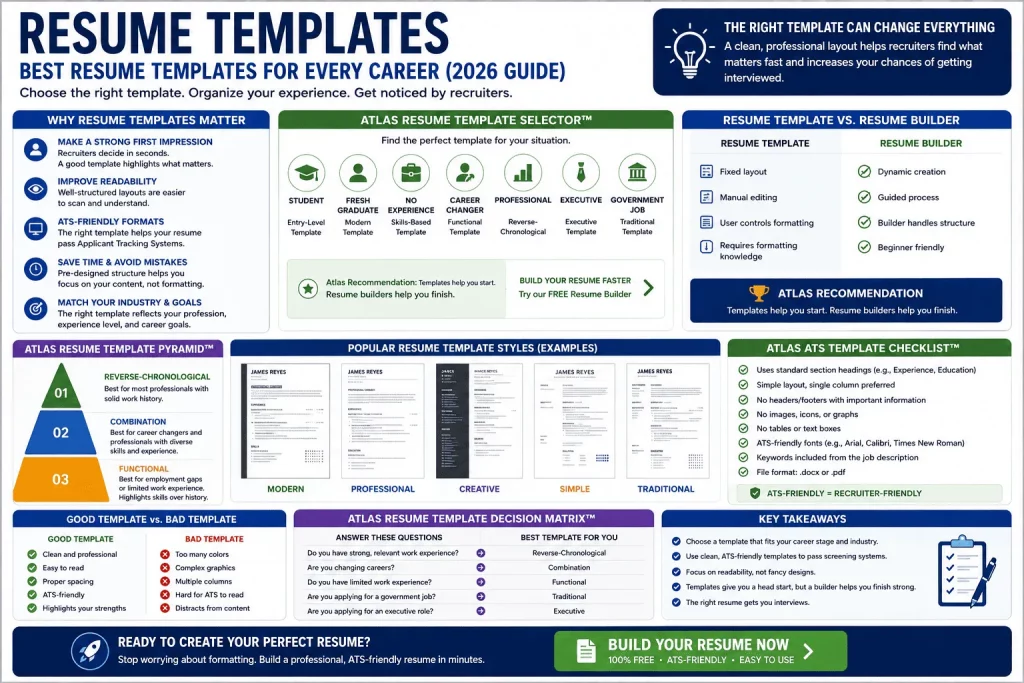
A resume template is the invisible structure behind almost every strong resume. Before a single word of your work history gets read, the layout of your resume has already shaped how easy — or how difficult — it is for a recruiter to find what they’re looking for. The right template turns a list of jobs and skills into a document that reads clearly in seconds. The wrong one, no matter how good your experience is, can bury your best qualifications under confusing formatting or get your resume rejected by an Applicant Tracking System before a human ever sees it.
This guide covers everything you need to know about choosing and using resume templates: why they matter, which type fits your career stage and industry, how to make sure a template is ATS-friendly, and when a resume builder is a better choice than a static template. You’ll also find proprietary frameworks for matching yourself to the right template and scoring your final resume before you submit it.
Why Resume Templates Matter
A resume template does more than make a document look nice. It determines the order information appears in, how much white space surrounds each section, and whether a reader — human or automated — can quickly locate your job titles, dates, and skills. Two candidates with identical experience can produce very different impressions depending entirely on how that experience is organized on the page.
Why Recruiters Spend Only Seconds Reviewing Resumes
Recruiters and hiring managers routinely review resumes in a matter of seconds during the first pass, especially for high-volume roles. In that short window, a cluttered or unconventional layout works directly against you — the reader simply doesn’t have time to hunt for information that isn’t where they expect it to be. A clean, well-organized template respects that time constraint by putting your name, target role, work history, and skills exactly where a recruiter’s eye expects to find them.
How Templates Improve Organization and Readability
A good template enforces consistency: matching font sizes for job titles, consistent spacing between sections, and a logical flow from your most important qualifications to supporting details. This consistency reduces the mental effort required to read your resume, which — combined with the time pressure recruiters operate under — directly affects whether your application gets a second look.
Why Choosing the Right Template Affects Interview Opportunities
Templates aren’t just aesthetic choices; they have functional consequences. A template built with complex graphics, tables, or multiple columns can confuse ATS parsing software, causing your information to be misread or dropped entirely before a recruiter ever opens the file. A template that doesn’t match the conventions of your industry — a highly creative layout for a government job application, for example — can also signal a mismatch before the content is even considered. Choosing the right template is one of the highest-leverage decisions you’ll make in the entire job search process.
What Is a Resume Template?
A resume template is a pre-designed layout that helps organize your work experience, skills, education, and achievements into a professional, consistent format — saving you from having to design a resume from scratch.
Benefits of using a resume template:
- ✓ Saves time
- ✓ Improves readability
- ✓ Creates a professional presentation
- ✓ Supports ATS optimization
- ✓ Helps job seekers avoid formatting mistakes
Resume Template vs. Resume Builder
Templates and builders solve a similar problem in different ways. Understanding the distinction helps you choose the right tool for your situation.
| Resume Template | Resume Builder |
|---|---|
| Fixed layout | Dynamic creation |
| Manual editing | Guided process |
| User controls formatting | Builder handles structure |
| Requires formatting knowledge | Beginner friendly |
Atlas Recommendation: Templates help you start. Resume builders help you finish.
A static template gives you a starting structure, but you’re responsible for maintaining formatting consistency as you add and remove content — a task that trips up even experienced job seekers. A resume builder automates that structural work, adjusting spacing, alignment, and section formatting as you type, which reduces the risk of formatting errors that could confuse an ATS or distract a recruiter.
👉 Create your resume faster using our Free Resume Builder Online | Create & Download PDF Resume.
Why Resume Templates Matter
First Impressions
A clean, well-structured template creates an immediate impression of professionalism before a recruiter reads a single line of content. Cluttered or inconsistent formatting creates the opposite impression, regardless of how strong the underlying experience is.
Professional Appearance
Templates enforce visual consistency — matching fonts, aligned margins, and evenly spaced sections — that would otherwise require design skill to achieve manually. This polish signals attention to detail, a quality most employers value regardless of role.
ATS Compatibility
Many templates, particularly simpler ones, are built specifically to parse correctly through Applicant Tracking Systems. Choosing a template designed with ATS compatibility in mind protects your resume from being misread or rejected by automated screening.
Easier Resume Creation
Rather than deciding on margins, fonts, and section order from scratch, a template provides a proven starting structure. This significantly reduces the time and decision fatigue involved in building a resume, especially for job seekers applying to multiple roles.
Better Information Organization
A well-designed template guides you toward including the right information in the right order — name and contact details, headline, summary, experience, skills, and education — rather than leaving you to guess at what belongs where.
The Atlas Resume Template Selector™
Choosing a template becomes much easier once you start from your specific situation rather than browsing a gallery of options. The Atlas Resume Template Selector matches common job-seeker situations to the template type that best fits them.
| Situation | Recommended Template |
|---|---|
| Student | Entry-Level Template |
| Fresh Graduate | Modern Template |
| No Experience | Skills-Based Template |
| Career Changer | Functional Template |
| Professional | Reverse-Chronological |
| Manager | Executive Template |
| Government Applicant | Traditional Template |
Find the row that matches your current situation before browsing templates by design. Matching your situation to the right structural type first, then choosing a specific design within that type, produces a far stronger result than picking a template based on appearance alone.
The Atlas Resume Template Pyramid™
Not all resume template types are equally suited to every job seeker. The Atlas Resume Template Pyramid ranks the three core structural types by how broadly applicable — and how safely ATS-compatible — they tend to be.
Tier 1 — Recommended: Reverse-Chronological Resume
Best for: most professionals, experienced workers, and candidates showing clear career progression. This format lists your most recent job first and works backward, which is the structure both recruiters and ATS software expect by default.
Tier 2 — Combination Resume
Best for: career changers and candidates with mixed experience. This format blends a skills-focused section with a chronological work history, allowing you to lead with transferable skills before showing your job timeline.
Tier 3 — Functional Resume
Best for: candidates with employment gaps or limited work experience. This format organizes content primarily around skills and competencies rather than a job-by-job timeline, though it’s worth noting that many recruiters view functional resumes with some skepticism, since the format can obscure a candidate’s actual work history.
The Atlas Resume Template Anatomy™
Regardless of which template type you choose, nearly every strong resume shares the same underlying skeleton. The Atlas Resume Template Anatomy maps out that standard flow — the order recruiters and ATS software both expect information to appear in, from top to bottom.
Name
   ↓
Headline
   ↓
Summary
   ↓
Work Experience
   ↓
Skills
   ↓
Education
This sequence isn’t arbitrary. Your name anchors the page. Your headline delivers your value proposition in a single glance. Your summary expands on that value in a few sentences. Your work experience carries the bulk of the evidence for your claims. Your skills section reinforces keyword relevance for ATS matching. And education closes the page, since for most experienced candidates it carries less weight than demonstrated work history.
Some template types adjust this order slightly — a Functional template, for example, may move Skills above Work Experience, and a Student template may move Education above Work Experience entirely. But the core anatomy above is the safest default for the majority of job seekers, and it’s worth treating any major deviation from it as a deliberate choice rather than an accident of a template’s default design.
Types of Resume Templates
Each resume template type serves a different combination of career stage, industry, and personal history. Below is a closer look at the six most common types, including their structure, who they suit best, and their tradeoffs.
Reverse-Chronological Resume Template
Best for: Experienced professionals, most industries.
Structure: Name → Headline → Summary → Work Experience → Skills → Education.
Pros: This is the format recruiters and ATS software are most familiar with, making it the safest default choice for most job seekers. It clearly shows career progression and is easy to scan quickly.
Cons: It can highlight employment gaps or a lack of relevant recent experience, since the most recent role is always front and center regardless of its relevance to the target job.
Functional Resume Template
Best for: Candidates with no experience, career changers.
Structure: Name → Skills → Projects → Education → Experience.
Pros: This format allows candidates to lead with relevant skills and projects rather than a thin or irrelevant work history, which can help minimize the visibility of employment gaps.
Cons: Because it de-emphasizes the work history timeline, some recruiters view functional resumes with suspicion, assuming the format is being used to hide a weak or inconsistent employment record — even when that’s not the case.
Combination Resume Template
Best for: Mid-career professionals, candidates with diverse skill sets.
Structure: Name → Headline → Skills Summary → Work Experience → Education.
Pros: This format offers the best of both approaches — it leads with relevant skills while still showing a clear, chronological work history, making it particularly effective for career changers who need to bridge two different professional identities.
Cons: It requires more careful editing to avoid redundancy between the skills section and the experience section, since both areas can end up repeating similar information if not managed carefully.
Modern Resume Template
Best for: Marketing, design, technology roles.
Pros: Modern templates often incorporate subtle design elements — accent colors, distinctive typography, or a sidebar layout — that suit industries where visual sensibility itself is a relevant qualification.
Cons: Design elements can create ATS parsing risk if not built carefully, and the same visual flair that works well in a creative field can look out of place or unprofessional in a more conservative industry.
Traditional Resume Template
Best for: Government jobs, banking, accounting.
Pros: A traditional, no-frills layout signals professionalism and conformity to industry norms in fields where conservative presentation is expected and valued. It also tends to be the most ATS-friendly template type by default, since it avoids design elements that commonly cause parsing errors.
Cons: In more design-forward industries, a traditional template can appear dated or fail to differentiate a candidate from the pool.
Executive Resume Template
Best for: Directors, managers, executives.
Pros: Executive templates are typically built to accommodate a longer career history, a dedicated section for board positions or major initiatives, and a more prominent summary section — all useful for senior candidates whose resumes need to convey scale and strategic impact rather than just task-level detail.
Cons: These templates can run longer than the standard one-page format, which is appropriate at the executive level but should be avoided by less senior candidates using the same template.
ATS-Friendly Resume Templates
What Is an ATS-Friendly Resume?
An Applicant Tracking System, or ATS, is software that many employers use to collect, sort, and rank resumes before a human reviewer ever sees them. These systems work by “parsing” a resume — extracting text and categorizing it into fields like job title, company, dates, and skills. An ATS-friendly resume is one built in a way that this parsing process works correctly: text extracts cleanly, section headings are recognized, and no critical information gets lost or scrambled in the process.
Formatting compatibility is the core issue here. Complex layouts — multiple columns, text boxes, embedded graphics, or unusual fonts — can confuse an ATS parser, sometimes causing entire sections of a resume to be misread or dropped. Even a strong, well-written resume can fail to advance in the hiring process if the underlying template isn’t built with parsing compatibility in mind.
Characteristics of ATS-Friendly Templates
- ✓ Simple design
- ✓ Standard headings (e.g., “Work Experience,” “Education,” “Skills”)
- ✓ No tables
- ✓ No graphics
- ✓ Readable fonts
Standard section headings matter more than they might seem. ATS software is often trained to recognize common labels like “Work Experience” or “Professional Experience,” but a creatively renamed section — “My Journey” instead of “Work Experience,” for example — can go unrecognized entirely, even if a human reader would understand it instantly.
The Atlas ATS Template Checklist™
Use this checklist to evaluate whether a template you’re considering is genuinely ATS-friendly before committing to it.
| Requirement | Pass/Fail |
|---|---|
| Standard headings | |
| ATS-friendly fonts | |
| No graphics | |
| No text boxes | |
| Keyword optimization |
Run through each row honestly. A template that fails even one or two of these checks — particularly “no text boxes” or “no graphics” — carries real risk of parsing errors, even if it looks polished on screen. When in doubt, choose the simpler option; ATS compatibility should take priority over visual complexity every time.
Resume Templates by Career Stage
Different career stages call for different template priorities. Below is an overview of what matters most at each stage.
Resume Templates for Students
Students typically have limited formal work experience, so the strongest templates for this stage emphasize education, coursework, extracurricular leadership, and relevant projects ahead of a thin work history section. An Entry-Level Template structure works well here, giving prominent placement to skills and academic achievements.
Resume Templates for Fresh Graduates
Fresh graduates benefit from a template that balances a completed degree with any internship or part-time work experience gained during school. A Modern Template often suits this stage well, since it can highlight relevant coursework and projects alongside a still-developing professional history.
Resume Templates for No Experience
Job seekers with no formal work experience at all benefit most from a Skills-Based (Functional) Template, which allows transferable skills, volunteer work, and personal projects to take center stage instead of a job history section that may otherwise appear sparse.
Resume Templates for Career Changers
Career changers need a template that bridges two different professional identities — prior experience in one field and a target role in another. A Functional or Combination Template works well here, allowing transferable skills to lead the page before the chronological work history explains the career transition in more detail.
Resume Templates for Experienced Professionals
Experienced professionals with a strong, consistent work history are best served by the Reverse-Chronological Template — the format both recruiters and ATS software default to expecting, and one that clearly showcases career progression over time.
Related: Resume Templates for Students
Resume Templates by Industry
Industry conventions matter as much as career stage when choosing a template. What reads as appropriately polished in one field can read as unprofessional — or overly plain — in another.
Teacher Resume Templates: Favor a clean, traditional layout with clear sections for certifications, classroom experience, and educational philosophy. Overly designed templates are uncommon in education hiring and can distract from qualifications.
Nurse Resume Templates: Prioritize a structured, easy-to-scan format that clearly lists certifications, clinical experience, and specializations. Healthcare recruiters often review high volumes of applications quickly, so clarity matters more than visual design.
Customer Service Resume Templates: A clean, reverse-chronological or combination template works well, with clear emphasis on metrics like satisfaction ratings or resolution times where available.
Accountant Resume Templates: A traditional, conservative template is generally expected in accounting and finance, reflecting the precision and formality associated with the field.
Administrative Assistant Resume Templates: A well-organized, reverse-chronological template that clearly highlights software proficiency and organizational skills tends to perform well in this field.
Government Job Resume Templates: Government applications often require the most conservative, text-based formatting of any industry, since many government ATS systems are particularly strict about parsing compatibility. A Traditional Template is almost always the safest choice.
(ApplySmart authority advantage: these industry recommendations reflect current hiring conventions and ATS behavior patterns observed across real job postings in each field.)
The Atlas Resume Template Decision Matrix™
When you need a fast answer to “which template should I use,” this decision matrix distills the choice down to a few key questions.
| Question | Template |
|---|---|
| No Experience? | Functional |
| Strong Work History? | Chronological |
| Career Change? | Combination |
| Government Job? | Traditional |
| Leadership Role? | Executive |
Work through these questions in order, since some situations overlap — a career changer with a strong recent work history, for example, might lean toward a Combination template even though “strong work history” alone would point toward Chronological. When two answers conflict, prioritize whichever factor is more central to how you’re presenting yourself to this specific employer.
Good vs. Bad Resume Templates
Bad Example characteristics:
- Too many colors
- Complex graphics
- Multiple columns
- Difficult ATS parsing
Good Example characteristics:
- Clean layout
- Clear sections
- ATS-friendly
- Professional appearance
The difference between a good and bad template often comes down to restraint. A resume doesn’t need visual flair to stand out — it needs to be immediately legible, both to a human recruiter skimming quickly and to an ATS parser extracting your information automatically. When evaluating any template, ask whether every design choice serves readability, or whether it exists purely for decoration.
Resume Template Mistakes to Avoid
Choosing Design Over Readability
A visually striking template that sacrifices clarity works against you. If a recruiter has to work to find your job titles or dates, the design has failed at its actual job.
Using Excessive Graphics
Icons, charts, and decorative elements can look appealing but frequently cause ATS parsing errors, and they rarely add real informational value for a human reader either.
Overcomplicated Layouts
Multiple columns, nested tables, and unconventional section placement can confuse both software and human readers. Simpler, more linear layouts consistently perform better across both audiences.
Ignoring ATS Requirements
Even a beautifully designed template is a liability if it can’t be parsed correctly. Always verify ATS compatibility before finalizing a template choice, regardless of how polished it looks.
Using Outdated Templates
Templates with dated design conventions — small margins, outdated fonts, or an objective statement instead of a modern headline — can make an otherwise strong resume feel out of step with current hiring norms.
The Atlas Resume Template Score™
Use this simple scoring framework to evaluate any template you’re considering before committing to it.
| Criteria | Points |
|---|---|
| ATS-Friendly | 20 |
| Professional Layout | 20 |
| Easy to Read | 20 |
| Appropriate for Industry | 20 |
| Highlights Qualifications | 20 |
A template scoring 80–100 is a strong, safe choice for most applications. A template scoring below 60 likely has structural issues — excessive graphics, non-standard headings, or a layout mismatched to your industry — that are worth addressing before you commit significant time to filling it in.
Resume Template Checklist™
Before submitting any resume built from a template, confirm the following:
- ✓ ATS-friendly
- ✓ Professional appearance
- ✓ Easy navigation
- ✓ Correct format
- ✓ Industry-appropriate
Resume Template Examples
Seeing template types in context makes it easier to visualize which one fits your situation. Below is a quick reference for what each example typically includes.
Student Template: Leads with education and relevant coursework, followed by extracurricular leadership, skills, and any part-time or volunteer experience.
Fresh Graduate Template: Balances a completed degree with internship experience, relevant projects, and early-career skills, typically using a Modern layout style.
Professional Template: A reverse-chronological layout leading with a headline and summary, followed by a detailed work history and a supporting skills section.
Executive Template: A longer-form layout accommodating an extended career history, board positions, and a prominent leadership-focused summary section.
Government Template: A conservative, text-based layout using standard section headings and no design elements, built specifically for maximum ATS compatibility.
Why a Resume Builder Is Better Than Downloading Templates
For most job seekers, a resume builder offers real advantages over downloading and manually editing a static template file.
Faster creation: A builder walks you through each section in sequence, removing the need to figure out formatting or layout decisions on your own.
ATS optimization: Reputable resume builders are typically designed and tested for ATS compatibility, removing the guesswork involved in manually verifying a downloaded template.
Consistent formatting: As you add or edit content, a builder automatically maintains consistent spacing, fonts, and alignment — a common failure point when editing static template files by hand.
Guided writing: Many builders offer prompts or suggestions for phrasing bullet points, which can be especially useful for job seekers unsure how to describe their experience effectively.
Easier customization: Switching between template styles, reordering sections, or adjusting layout for a different job application is typically much faster within a builder than by manually reformatting a downloaded file.
👉 Create a professional resume instantly using our Free Resume Builder Online | Create & Download PDF Resume.
Resume Templates vs. Resume Examples
It’s worth clarifying a common point of confusion: a resume template and a resume example are not the same thing. A template is a blank or lightly filled structural layout you build your own content into. A resume example is a fully completed sample resume — often for a specific profession or career stage — that demonstrates what strong content and phrasing look like within a given structure.
Templates answer the question “how should my resume be organized?” Examples answer the question “what should my resume actually say?” Using both together — a solid template for structure, paired with strong examples for wording and phrasing — produces the strongest result.
Related: Resume Headline Examples, Resume Summary Examples, Resume Objective Examples, Work Experience Examples
Atlas Authority Assets Included
This guide is built around seven original frameworks designed to simplify resume template selection from start to finish:
- Atlas Resume Template Selector™
- Atlas Resume Template Pyramid™
- Atlas Resume Template Anatomy™
- Atlas ATS Template Checklist™
- Atlas Resume Template Decision Matrix™
- Atlas Resume Template Score™
- Resume Template Checklist™
Together, these tools cover the full decision-making process — from identifying which template type fits your situation, to understanding its underlying structure, to verifying ATS compatibility, to scoring your final choice before you submit your resume.
How Template Choice Interacts With Resume Length
Template choice and resume length are closely linked, even though they’re often considered separately. A Reverse-Chronological template for an early-career candidate should typically stay to one page, since a longer career history hasn’t yet accumulated. An Executive template, by contrast, often extends to two pages to accommodate a longer track record, board positions, and strategic achievements that wouldn’t fit within a single page without cramming.
A common mistake is forcing a one-page template to hold two pages’ worth of content by shrinking fonts and margins to fit — a change that often makes the resume harder to read and can trigger ATS parsing issues if margins fall below standard thresholds. If your content doesn’t fit comfortably within your chosen template’s intended length, it’s usually a sign to either trim content to its most relevant highlights or move to a template built for a longer format, rather than compressing everything into a space that wasn’t designed to hold it.
How to Customize a Template Without Breaking ATS Compatibility
Many job seekers want to personalize a template beyond its default appearance, which is reasonable — but customization carries some risk if done carelessly. A few safe ways to personalize a template without compromising ATS compatibility:
- Adjust font choice within standard, widely supported fonts (such as Arial, Calibri, or Georgia) rather than switching to decorative or unusual typefaces.
- Use a single accent color sparingly — for your name or section headers, for example — rather than applying color throughout the document.
- Adjust section order to prioritize your strongest qualifications first, as long as standard section headings remain intact.
- Avoid converting any section into a table or text box, even if it looks cleaner visually, since these elements are among the most common causes of ATS parsing failures.
The safest approach is to treat a template’s core structure — standard headings, single-column layout, readable fonts — as fixed, while allowing yourself flexibility within that structure to reflect your personal style and the specific role you’re targeting.
The Psychology of Resume Layout and Recruiter Scanning Behavior
Recruiters read resumes the way most people read a webpage: in an F-shaped or Z-shaped scanning pattern, moving quickly across the top of the page and then down the left margin, pausing only where something catches their attention. A resume template that respects this pattern — clear headers along the left edge, consistent vertical spacing, and your strongest qualifications positioned near the top — works with a recruiter’s natural reading behavior instead of against it.
This is part of why heavily designed templates can underperform even when they look impressive. A sidebar layout that places your work experience in a narrow column on the right, for example, disrupts the scanning pattern recruiters default to, forcing them to slow down and actively search for information they’d otherwise absorb automatically. A simpler, more linear layout may look less distinctive, but it reduces the cognitive effort required to extract your qualifications — which, given how little time most resumes get, is almost always the better trade.
The same principle applies to visual hierarchy. A template that uses size and weight consistently — larger, bolder text for job titles, smaller regular text for descriptions — helps a recruiter’s eye immediately distinguish between different types of information. A template with inconsistent or overly uniform text sizing removes that visual shortcut, making every line equally hard, or equally easy, to skim past.
Choosing Between Word, Google Docs, and PDF Formats
Beyond visual layout, the file format your template is built in — and the format you ultimately submit — can affect both ATS compatibility and how your resume displays across different systems.
Word (.docx): Widely compatible with most ATS systems, since this format was the long-standing default for resume submissions. Word documents parse reliably as long as the underlying template avoids text boxes, tables, and embedded graphics.
Google Docs: Convenient for editing and collaboration, but should generally be downloaded and exported to PDF or Word format before submission, since some ATS systems don’t handle native Google Docs links or files well.
PDF: Increasingly the preferred format for direct human review, since it preserves formatting exactly as designed regardless of the reader’s device or software. However, some older or less sophisticated ATS systems parse PDFs less reliably than Word documents, particularly if the PDF was generated from a heavily designed template with non-standard fonts or layout elements.
General guidance: Unless a job posting specifies a required format, submitting a clean, simply formatted PDF is a safe default for most modern ATS systems and offers the most reliable visual presentation for human reviewers. If you’re applying through an older company career portal or a system you’re unfamiliar with, a Word document remains the safer fallback.
Additional Industries and Their Template Conventions
Beyond the core industries already covered, a few additional fields have their own template expectations worth understanding.
Marketing and Creative Roles: A Modern template with subtle design elements is generally well received, particularly for roles that involve visual communication. That said, restraint still matters — the template should demonstrate design sensibility without sacrificing readability or ATS compatibility.
Sales Roles: A results-focused Reverse-Chronological template works well, with template structure that makes it easy to highlight quota attainment, revenue figures, and account growth prominently near the top of each role.
IT and Software Roles: A clean, Reverse-Chronological or Combination template is standard, often paired with a dedicated technical skills section listing programming languages, frameworks, and tools — a structural element worth prioritizing in template selection for this field.
Legal Roles: Similar to government and finance, legal hiring tends to favor Traditional templates with conservative formatting, reflecting the formality expected throughout the legal profession.
Nonprofit and Public Service Roles: A Combination template often works well here, allowing candidates to highlight mission-driven skills and volunteer experience alongside a more traditional work history.
How Long Should a Resume Template Be?
Template length should scale with career stage, not personal preference. Students, fresh graduates, and early-career professionals should generally aim for a single page, since a longer document risks diluting a still-developing work history with less relevant filler content. Mid-career professionals with a decade or more of relevant experience can reasonably extend to two pages, provided every section still earns its place. Executive templates, given the scope of leadership roles they need to represent, most often run to two full pages, occasionally reaching a third for candidates with extensive board or advisory experience.
Regardless of career stage, resist the temptation to pad a resume to reach a target page count. A tightly written one-page resume for an experienced professional will generally outperform a loosely written two-page resume padded with low-relevance detail.
Resume Template Trends to Know in 2026
Resume conventions shift gradually, but a few trends are worth factoring into your template choice this year.
Skills-first layouts are gaining ground. More templates now place a concise skills or core competencies section near the top of the page, just below the headline and summary, reflecting how quickly recruiters look for keyword matches before reading further into the work history.
Minimalism continues to outperform heavy design. As more employers rely on ATS software for initial screening, templates with restrained, text-forward layouts continue to outperform heavily designed alternatives — even in creative fields where a portfolio, rather than the resume itself, is expected to carry the visual presentation.
Quantified achievement lines are increasingly expected. Templates are adapting to make room for measurable results within work experience bullets, rather than long paragraph-style job descriptions. This mirrors broader hiring trends favoring resumes that read as a sequence of accomplishments rather than a list of duties.
Mobile-readability is a growing consideration. With more recruiters reviewing applications on phones or tablets during early screening, templates with excessively wide layouts or small fonts are becoming less practical. A simple, single-column format tends to display more reliably across devices.
None of these trends replace the fundamentals covered throughout this guide — ATS compatibility, clarity, and industry fit still matter most. But they’re useful signals when choosing between two otherwise similar template options.
Common Questions to Ask Before Downloading Any Template
Before committing time to filling in a downloaded template, run through a short internal checklist: Does this template use standard section headings, or has the designer renamed them creatively? Is the layout single-column, or does it rely on a sidebar or multiple columns? Are there embedded graphics, icons, or a photo — elements that add visual interest but carry real ATS risk? Is the font a standard, widely supported typeface, or something decorative that might not render consistently across systems?
Answering these questions before you invest hours customizing a template can save significant rework later. It’s far easier to reject an unsuitable template at the outset than to discover ATS parsing issues after you’ve already submitted dozens of applications built on it.
Key Takeaways
- Resume templates improve presentation and organization, giving recruiters a fast, clear read on your qualifications.
- ATS-friendly templates increase hiring opportunities by ensuring your resume is parsed correctly before a human ever reviews it.
- Different career stages require different templates — a student, a career changer, and an executive each need a different structural approach.
- Template choice should match your goals and industry, since conventions vary significantly between fields like government and design.
- Resume builders simplify the entire process by handling formatting automatically and reducing the risk of ATS-breaking errors.
Frequently Asked Questions
What is the best resume template?
The best resume template depends on your career stage and industry, but the Reverse-Chronological template is the safest default for most experienced professionals, since it’s the format both recruiters and ATS software expect. Students, career changers, and those with limited experience may benefit more from a Functional or Combination template instead.
Are resume templates ATS-friendly?
Not all resume templates are ATS-friendly. Templates with simple, single-column layouts, standard section headings, and no graphics or text boxes tend to parse correctly through Applicant Tracking Systems. Templates with complex design elements — multiple columns, tables, or embedded graphics — carry a higher risk of parsing errors.
What resume template do recruiters prefer?
Most recruiters prefer clean, easy-to-scan templates that clearly organize work experience, skills, and education using standard section headings. A Reverse-Chronological or Combination template with minimal design elements is generally well received across most industries.
Which template is best for students?
An Entry-Level or Skills-Based Template works best for students, since it emphasizes education, coursework, and extracurricular leadership ahead of a limited work history section.
Which template is best for government jobs?
A Traditional Template is best for government job applications, since these roles often involve especially strict ATS systems that require simple, text-based formatting with standard section headings and no design elements.
Should I use a free resume template?
A free resume template can work well as long as it’s genuinely ATS-friendly — simple layout, standard headings, no graphics or tables. Not all free templates are built with ATS compatibility in mind, so it’s worth verifying a template against the Atlas ATS Template Checklist before using it for real applications.
Is a resume builder better than a template?
For most job seekers, yes. A resume builder combines the structural benefits of a template with guided formatting and built-in ATS optimization, reducing the risk of formatting errors that commonly occur when editing a static template file by hand. Templates remain useful for job seekers who want more manual control over design, but builders are generally faster and safer for most applications.
How do I know if my current resume template is hurting my chances?
A few warning signs suggest your template may be working against you: if you’re not getting callbacks despite relevant experience, if your resume uses multiple columns or heavy graphics, or if you’ve never checked it against an ATS compatibility tool. Running your resume through the Atlas ATS Template Checklist and Atlas Resume Template Score above is a fast way to diagnose whether the template itself — rather than your experience — is the issue.
Can I use the same resume template for every job application?
You can use the same base template, but it’s worth adjusting section order, emphasis, and included content to match each specific job posting. The underlying structure — fonts, headings, overall layout — can stay consistent, but tailoring which achievements and skills are most prominent for each role improves both ATS relevance and recruiter impression.
A Final Word on Choosing Your Template
The right resume template is the one that gets out of the way — one that lets a recruiter find your qualifications instantly and lets an ATS parse your information correctly, without drawing attention to itself through unnecessary design. Start with the Atlas Resume Template Selector to identify the structural type that fits your situation, verify it against the Atlas ATS Template Checklist, and score the final result with the Atlas Resume Template Score before you submit. A template chosen this deliberately does far more for your job search than one chosen for its visual appeal alone.
👉 Ready to build a professional, ATS-friendly resume? Use our Free Resume Builder Online | Create & Download PDF Resume to get started in minutes.
Related Guides
- Resume Headline Examples: 300+ Professional Resume Headlines for Every Job
- Resume Action Verbs: 500+ Powerful Resume Verbs for Every Profession
- Resume Achievements Examples: 300+ Achievement Statements for Every Profession
- Resume Format Examples: Best Resume Formats for Every Career
- Work Experience Examples for Resume: 200+ Examples by Profession
- Skills for Resume: 300+ Skills Examples for Every Profession
- Resume Summary Examples: 150 Professional Summary Examples for Every Job
- Resume Builder: Complete Guide to Creating a Professional Resume
- Resume Objective Examples: 150+ Examples for Every Job
- Application Letter for Fresh Graduates: Sample and Writing Guide
- Free Application Letter Generator for Government Jobs and Private Companies
- Application Letter for Administrative Assistant I: Complete Sample and Writing Guide
- Application Letter for Teacher I: Sample, Format, and Writing Guide
- Application Letter for Nurse I: Sample and Writing Guide