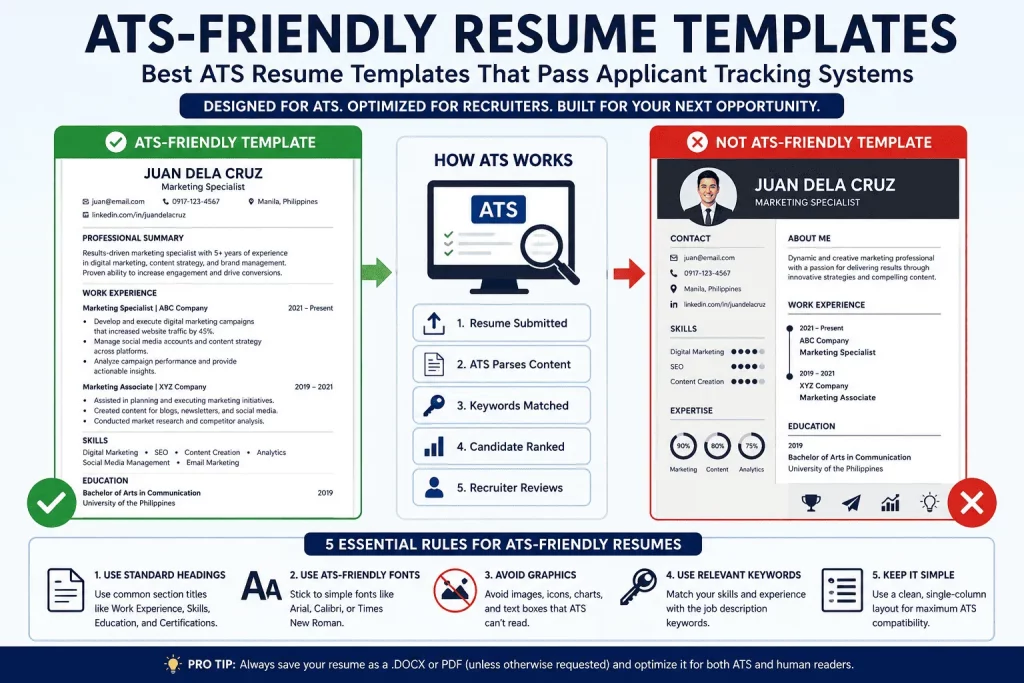
Many resumes are filtered out before a recruiter ever sees them.
Before a hiring manager ever opens your file, it usually passes through a piece of software called an Applicant Tracking System — an ATS. This software scans, sorts, and scores every resume that comes through a job posting, and it decides, often within seconds, whether your application is worth a recruiter’s attention at all. Industry estimates suggest that the vast majority of mid-size and large companies now use some form of ATS to manage incoming applications, which means the real first “interview” you face isn’t with a person — it’s with an algorithm.
This is where resume templates come in, and why the wrong template can quietly sabotage an otherwise strong candidate. A resume built with fancy columns, graphics, icons, or decorative fonts might look impressive to a human eye, but many ATS platforms struggle to parse that kind of layout correctly. Job titles get scrambled. Dates disappear. Skills sections get skipped entirely. The system doesn’t reject you outright — it simply fails to read you correctly, and an inaccurate profile means a lower match score, which means you never make it to the recruiter’s desk.
This is a frustrating reality for job seekers, because it means two candidates with nearly identical qualifications can have wildly different outcomes based purely on how their resume was formatted. One applicant, using a clean single-column layout with standard headings, gets parsed correctly, matched accurately against the job requirements, and surfaced near the top of the recruiter’s shortlist. Another applicant, using a visually striking two-column “designer” template downloaded from a template marketplace, gets parsed incorrectly — their most recent job title ends up merged with a bullet point from their skills section, their dates of employment vanish, and their actual years of experience are misread by the system. The second candidate might be more qualified on paper, but the ATS never gives them the chance to prove it.
ATS-friendly formatting solves this problem at the source. It’s not about making your resume boring — it’s about making your resume legible to the software that stands between you and the interview, while still remaining clean and professional for the human reader who eventually sees it. A well-built ATS-friendly template doesn’t sacrifice polish; it simply channels that polish into things the system and the recruiter can both actually process — clear structure, purposeful word choice, and consistent formatting — rather than into visual flourishes that create more risk than reward.
It’s also worth understanding that ATS platforms vary widely in sophistication. Some large enterprise systems use fairly advanced parsing logic and can tolerate minor design elements without much trouble. Others, particularly older or lower-cost systems still widely used by small and mid-size employers, are far more rigid, and even a mildly unconventional layout can cause significant data loss. Because you rarely know in advance which type of system a given employer is running, the safest strategy is to build every resume as if it will be read by the strictest possible parser. That’s the philosophy behind every recommendation in this guide.
In the sections that follow, we’ll break down exactly what makes a resume template ATS-friendly, walk through the best template types for different career stages and industries, and give you practical, repeatable frameworks — the Atlas ATS Success Framework™, the Atlas ATS Template Pyramid™, and the Atlas ATS Compatibility Score™ among them — to test and score your own resume before you hit submit.
What Is an ATS-Friendly Resume Template?
An ATS-friendly resume template is a resume layout designed to be accurately parsed by Applicant Tracking Systems, allowing your qualifications, skills, and experience to be read correctly by hiring software. It typically uses a single-column structure, standard section headings, widely supported fonts, and plain text formatting instead of graphics, tables, or decorative design elements.
Key characteristics of an ATS-friendly resume template:
- Simple, single-column layout
- Standard, recognizable headings
- ATS-friendly fonts
- No graphics, icons, or photos
- No tables or text boxes
- Strategic keyword optimization aligned to the job description
If a template checks all of these boxes, it’s built to survive the parsing stage — the first and most important filter in the modern hiring process.
What Is an Applicant Tracking System (ATS)?
An Applicant Tracking System is software used by employers to manage the recruitment process from the moment a job is posted to the moment a candidate is hired. Instead of a recruiter manually reading through hundreds or thousands of resumes, the ATS does the initial heavy lifting.
Here’s what an ATS actually does behind the scenes:
- It’s used by employers of nearly every size, from small businesses using lightweight tools to global corporations running enterprise-grade recruitment platforms.
- It screens resumes automatically, extracting text and structuring it into a searchable candidate profile.
- It matches candidates to job requirements, comparing the parsed resume content against the keywords, skills, and qualifications listed in the job posting.
The system essentially converts your resume into structured data. Your name, contact details, work history, education, and skills all get filed into specific fields. If your resume’s formatting confuses the parser, that data ends up in the wrong field — or missing altogether — and the system can’t accurately evaluate you, no matter how qualified you actually are.
Think of it less like a person skimming a page and more like a form being auto-filled from a document. When the document is structured predictably — one column, clear labels, plain text — the auto-fill works cleanly. When the document is structured like a graphic-design layout, the auto-fill guesses, and guesses are where qualified candidates quietly fall through the cracks.
It’s also worth noting that an ATS isn’t a single piece of software used identically by every company. There are dozens of different platforms on the market, each with its own parsing engine, its own scoring logic, and its own quirks. Some companies configure their systems to reject applications outright if certain fields — like a valid email address or a clearly labeled work history — can’t be detected. Others simply rank imperfectly parsed resumes lower without rejecting them outright. Either way, the practical result for the applicant is the same: formatting mistakes translate directly into lost opportunities, often without any visible sign that anything went wrong. You rarely get a notification saying “your resume didn’t parse correctly” — you just don’t hear back.
How ATS Works: The 5-Step Process
Understanding the ATS pipeline helps explain why formatting matters so much. Here’s the typical flow:
Step 1 — Resume Submission You upload or email your resume through the company’s careers portal, a job board, or a direct application link.
Step 2 — ATS Parsing The system extracts the raw text from your file and attempts to categorize it into structured fields: contact info, work experience, education, skills, and certifications.
Step 3 — Keyword Matching The parsed content is compared against the keywords and qualifications the employer set for the role — things like job titles, required skills, certifications, years of experience, and specific tools or software.
Step 4 — Candidate Ranking Based on how well your resume matches the criteria, the ATS assigns a relevance score and ranks you against other applicants.
Step 5 — Recruiter Review Only the highest-ranked (or most relevant) candidates typically get surfaced to a human recruiter for manual review. Everyone else risks sitting unseen in the system.
Every one of these five steps depends on accurate parsing in Step 2. If your template breaks the parsing process, nothing downstream works correctly — your keywords won’t match, your ranking will suffer, and a recruiter may never see your name at all.
Top ATS-Friendly Resume Templates to Consider
When crafting an ATS-friendly resume, utilizing templates from reputable sources can make a significant difference. Platforms like Jobscan and Resumake offer customizable templates designed to optimize your chances of passing Applicant Tracking Systems. Additionally, Zety and ResumeGenius provide user-friendly options that align with industry standards, ensuring your resume stands out on job boards like LinkedIn, Indeed, Glassdoor, and CareerBuilder.
Industry Perspective on ATS-Friendly Resumes
In the competitive job market, utilizing ATS-friendly resume templates is crucial. Employers increasingly rely on ATS to filter candidates, making it essential for job seekers to understand how these systems work. A well-structured resume that aligns with ATS algorithms can significantly improve a candidate’s chances of being noticed by hiring managers.
Decision Framework for Choosing ATS-Friendly Templates
When selecting an ATS-friendly resume template, consider the following criteria:
- Simplicity: Choose a clean design without excessive graphics or images.
- Keyword Optimization: Ensure the template allows for easy integration of industry-specific keywords.
- Standard Formatting: Use standard headings (e.g., ‘Work Experience’, ‘Education’) to enhance readability.
- Compatibility: Test the template with ATS software to ensure it parses correctly.
Following this framework can help you create a resume that stands out in the ATS screening process.
The Atlas ATS Parsing Anatomy™
Here’s the full journey your resume takes from the moment you hit submit to the moment a recruiter’s eyes land on it — laid out as a single continuous flow:
Resume Submitted
        ↓
ATS Parses Resume
        ↓
Keywords Matched
        ↓
Candidate Ranked
        ↓
Recruiter Review
        ↓
Interview
Every arrow in this chain represents a point where a formatting mistake can quietly break the sequence. A resume that fails to parse cleanly at Step 2 never gets a fair shot at Step 3’s keyword matching — and a resume that isn’t matched accurately at Step 3 can’t earn the ranking it deserves at Step 4, no matter how strong the candidate actually is. The entire chain is only as strong as its weakest link, and for most applicants, that weak link is formatting, not qualifications. This is exactly why ATS-friendly template design matters at the foundation level, before you ever get to tailoring keywords or polishing your professional summary — a resume that breaks at Step 2 never gets the chance to be evaluated on its merits at all.
Don’t let a formatting error break the chain. Build your resume on a template that’s already validated to pass every step of this journey — try our Free Resume Builder.
Why ATS-Friendly Templates Matter
The stakes of resume formatting go beyond aesthetics. Here’s what a properly structured, ATS-compatible template actually does for your job search:
Increase Resume Visibility A resume that parses cleanly is more likely to surface in recruiter searches and rank higher against the job’s criteria, simply because the system can “see” your qualifications properly.
Improve Parsing Accuracy Standard formatting ensures your job titles, company names, dates, and skills land in the correct fields instead of getting jumbled, merged, or dropped.
Prevent Missing Information Complex layouts — particularly multi-column designs and text boxes — can cause entire sections of your resume to be skipped by the parser. An ATS-friendly template prevents this kind of data loss.
Increase Interview Opportunities When your resume is parsed accurately and matched correctly against the job description, your odds of clearing the automated screening stage — and reaching an actual interview — go up significantly.
In short: template choice isn’t a cosmetic decision. It’s a functional one that determines whether your qualifications are even considered.
There’s also a compounding effect worth understanding. Many job seekers apply to multiple positions using the same base resume, adjusting only small details for each application. If your core template has a structural flaw — say, a two-column layout or a graphics-heavy header — that flaw follows you into every single application you submit, quietly reducing your odds across the board rather than affecting just one job posting. Fixing the template once, at the foundation, protects every future application built on top of it. This is exactly why it’s worth investing the time to get your base template right before you start customizing content for individual roles, rather than discovering a formatting issue only after weeks of silence from employers.
The Atlas ATS Success Framework™
To make ATS optimization repeatable and easy to apply, we’ve distilled the process into five core rules. This is the foundation every ATS-friendly resume template should be built on.
Rule 1: Use Standard Headings
ATS software is trained to recognize common section titles. Stick to conventional headings rather than creative alternatives:
- Work Experience
- Skills
- Education
- Certifications
Clear, standard headings act as signposts for the parser, telling it exactly what type of content follows.
Rule 2: Use ATS-Friendly Fonts
Fonts that render consistently across systems and are easy for parsing software to read include:
- Arial
- Calibri
- Helvetica
- Times New Roman
Avoid decorative, script, or overly stylized fonts. They may look distinctive to a human reader, but they increase the risk of parsing errors.
Rule 3: Avoid Graphics
Visual elements that are common in “designer” resume templates can actively work against you in an ATS environment. Avoid:
- Icons
- Charts
- Photos
- Skill bars or progress graphics
These elements are often ignored entirely by the parser — or worse, they can break the surrounding text extraction.
Rule 4: Use Relevant Keywords
Your resume should mirror the language of the job description as closely and naturally as possible. Match job titles, required skills, tools, and qualifications directly from the posting into your resume content — without resorting to unnatural keyword stuffing.
Rule 5: Keep Formatting Simple
Single-column layouts consistently perform best across the widest range of ATS platforms. When in doubt, simplify further.
Together, these five rules form the backbone of every genuinely ATS-friendly resume template — regardless of your industry, career stage, or the specific tool you use to build your resume.
The Atlas ATS Template Pyramid™
Not every ATS-friendly template is created equal. Some formats are safer bets than others depending on your industry and how conservative or advanced the hiring company’s software is. The Atlas ATS Template Pyramid™ ranks templates into three tiers based on ATS compatibility and risk level.
Tier 1 (Highly Recommended): Single-Column ATS Template
The single-column layout is the gold standard for ATS compatibility. It reads top to bottom, left to right, exactly the way parsing software expects, with no risk of the parser misreading spatial arrangement as content order. There’s essentially no downside to this format from a compatibility standpoint — the only trade-off is that it offers less visual differentiation than more design-forward templates, which matters less than most applicants assume, since the content itself is what ultimately gets you the interview.
Best for:
- Most job seekers, regardless of industry
- Corporate jobs
- Government jobs
Tier 2: Clean Professional Template
A slightly more refined layout that still avoids risky design elements but introduces subtle visual hierarchy — bolded headers, minimal spacing adjustments, and light section dividers. This tier is a good fit once you have enough professional experience that visual organization genuinely helps a reader scan your career progression quickly, without introducing any of the higher-risk elements — like columns or graphics — that jeopardize parsing accuracy.
Best for:
- Experienced professionals
- Managers
Tier 3: Modern ATS-Compatible Template
A modern-leaning template that incorporates a bit more visual personality while staying within ATS-safe boundaries — such as a single accent color for headings or a subtle horizontal rule, without introducing columns, tables, or graphics. This tier works well in industries where a bit of visual polish is culturally expected, but it comes with the highest degree of risk within the “safe” range of the pyramid, so every design choice should be tested carefully rather than assumed to be compatible.
Best for:
- Marketing
- Technology
- Creative industries
The higher you go in the pyramid, the more visual flexibility you gain — but also the more careful you need to be about which specific design elements you introduce. When in doubt, default to Tier 1. If you’re applying to a large volume of positions across different companies and industries, and you don’t have visibility into which ATS platform each employer uses, Tier 1 remains the statistically safest choice regardless of your industry or career stage.
ATS-Friendly Resume Template Examples
Different applicants need different structures. Below are the most common ATS-friendly template types, organized by who they serve best.
Basic ATS Resume Template
Best for: Most applicants
Structure:
- Name
- Contact Information
- Professional Summary
- Work Experience
- Skills
- Education
This is the safest, most universally compatible structure, and it’s the template that should serve as your fallback whenever you’re unsure which specialized version fits your situation. It works because every element is arranged in a linear, top-to-bottom order that mirrors exactly how an ATS parser reads a document — no guessing about which column comes first, no ambiguity about where one section ends and the next begins. Even experienced professionals with more elaborate resumes often perform better going back to this simpler structure than adding visual complexity that isn’t strictly necessary.
ATS Resume Template for Students
Best for: Students and fresh graduates
This version typically emphasizes education, relevant coursework, academic projects, and internships near the top of the resume, since formal work experience may be limited. Because students often have thinner work histories, the parsing engine has less content to evaluate overall, which makes it even more important that what is there is captured accurately. A dedicated “Projects” or “Academic Achievements” section — clearly labeled with a standard heading — gives the ATS more structured content to match against internship or entry-level job postings, many of which explicitly list coursework, GPA thresholds, or relevant class projects as part of the qualification criteria.
ATS Resume Template for No Experience
Best for: Entry-level applicants
Designed around a skills-first structure, this template leads with transferable skills, volunteer work, training, and certifications to compensate for a thin work history. The goal here is to give the ATS as many relevant keyword matches as possible even in the absence of a long employment history. A well-organized “Skills” section near the top of the page — listing specific, job-relevant competencies rather than vague generalities — often does more heavy lifting for entry-level applicants than any other part of the resume, since it directly mirrors the keyword-matching logic most ATS platforms rely on.
ATS Resume Template for Career Changers
Best for: Career transitions
This format uses a hybrid or combination structure, pairing a skills summary at the top with a condensed work history below — helping the ATS and the recruiter both understand how past experience translates to the new field. Career changers face a unique challenge: their most recent job titles may not match the keywords the ATS is scanning for at all. A strong skills summary bridges that gap by explicitly naming the transferable competencies and tools relevant to the target role, giving the parser something concrete to match even when the job title history doesn’t align on its own.
ATS Resume Template for Professionals
Best for: Experienced workers
A chronological format that leads with the most recent and most relevant roles, supported by measurable achievements and a clear career progression. This is the template most recruiters expect to see from mid-career and senior applicants, and it maps cleanly onto how most ATS platforms are configured to evaluate “years of experience” and “career trajectory” as ranking factors. Each role should include specific, quantifiable outcomes — using numbers, percentages, or scale wherever possible — since many modern ATS platforms are increasingly capable of picking up on metrics as a signal of impact, not just keyword presence.
ATS Resume Template for Managers
Best for: Supervisors, team leads, managers
This template places heavier emphasis on leadership scope — team size, budget responsibility, and cross-functional impact — while still keeping the formatting simple and ATS-safe. Because many management-level job postings specifically list leadership keywords such as “team management,” “budget oversight,” or “cross-functional collaboration” as core requirements, this template intentionally surfaces that language early and often throughout the work experience section, rather than burying it in dense paragraph form.
ATS Resume Template for Government Jobs
Best for: Public sector applicants
Government hiring systems are often among the strictest when it comes to formatting compliance. This template uses the most conservative structure available: single column, standard headings, no graphics, and detailed, literal descriptions of duties and qualifications — since government ATS platforms frequently rely on exact keyword matching against position requirements rather than more flexible semantic matching. Duties and responsibilities should be spelled out clearly and specifically, mirroring the exact terminology used in the official qualification standards or position description whenever accurate and applicable, rather than paraphrased loosely.
If you’re applying to Philippine government positions specifically, formatting compliance matters just as much as content — many public sector application systems are configured for strict, literal keyword matching against the qualification standards listed in the vacancy announcement, so precision in how you describe your duties, eligibility, and educational attainment can directly affect whether your application clears the initial screening stage.
The Atlas ATS Compatibility Score™
Before you submit any resume, it helps to score it objectively. Use this simple framework to evaluate your current resume’s ATS readiness.
Evaluate Your Resume
| Criteria | Points |
|---|---|
| Standard Headings | 20 |
| ATS-Friendly Fonts | 20 |
| Single Column Layout | 20 |
| Keyword Optimization | 20 |
| Clean Formatting | 20 |
Scoring:
- 90–100 = Excellent — Your resume is well-optimized for ATS parsing and keyword matching.
- 70–89 = Good — Minor adjustments could improve your parsing accuracy or match rate.
- Below 70 = Needs Improvement — Significant formatting or keyword issues are likely reducing your visibility to recruiters.
Run this quick audit on your resume every time you tailor it for a new job posting. A resume that scored 95 for one role might score lower for another if the keyword alignment shifts.
ATS-Friendly vs ATS-Unfriendly Resume Templates
Here’s a side-by-side breakdown of what separates a template that performs well from one that quietly costs you interviews.
ATS-Friendly
- Single column
- Standard headings
- Plain formatting
- Keyword-rich
- Text-based design
ATS-Unfriendly
- Tables
- Graphics
- Icons
- Multiple columns
- Text boxes
- Fancy layouts
The pattern here is consistent: anything that forces the parser to interpret spatial layout instead of reading straightforward, linear text introduces risk. Multi-column resumes are a particularly common trap — they look sleek in a design tool, but many parsers read straight across the page, jumbling content from the left and right columns into a nonsensical mix of unrelated phrases.
Ready to skip the guesswork? Create an ATS-friendly resume instantly using our Free Resume Builder — every template is pre-formatted to pass ATS parsing correctly.
The Atlas ATS Red Flag Detector™
Use this checklist to quickly identify whether your current resume is putting your ATS compatibility at risk. If your resume contains any of the following, your parsing accuracy — and therefore your visibility to recruiters — may be reduced:
- 🚩 Photos
- 🚩 Skill bars
- 🚩 Multiple columns
- 🚩 Tables
- 🚩 Infographics
- 🚩 Icons
If you spot even one of these red flags, it’s worth rebuilding your resume on a Tier 1 template from the Atlas ATS Template Pyramid™ before your next application round.
Common ATS Resume Mistakes
Even well-intentioned applicants make formatting choices that quietly undermine their ATS performance. Here are the most common mistakes to avoid.
Using Graphics Instead of Text
Icons for contact details, skill-level graphics, or embedded charts might look modern, but ATS software generally can’t interpret visual data. If a piece of information exists only as an image or graphic, the system may never register it at all. This is especially damaging when applicants use a small phone or email icon next to their contact information instead of typing it as plain text — if the parser can’t read the icon, it may fail to capture your contact details entirely, which means even a perfect match on qualifications won’t matter, because the recruiter has no way to reach you.
Stuffing Keywords
Cramming as many keywords as possible into your resume — including in white text, hidden sections, or unnatural repetition — is a mistake for two reasons. First, many modern ATS platforms are increasingly capable of flagging manipulative keyword stuffing, sometimes penalizing the resume’s score rather than boosting it. Second, even if it slips past the software, a human recruiter reading an unnatural, keyword-bloated resume will notice immediately, and it undermines your credibility right at the moment you’re trying to make a strong impression. The better approach is natural integration: work the exact terminology from the job posting into your actual accomplishments and responsibilities, rather than listing keywords in isolation.
Using Creative Section Names
Clever or personalized headings can confuse the parser, which is trained to recognize standard terminology.
Bad:
- My Journey
- Career Highlights
Good:
- Work Experience
- Professional Experience
Save the creativity for your cover letter or your professional summary — not your section headers. The section headings are functional signposts for the software, not a place to express personal branding or style.
Using Unreadable Fonts
Script fonts, extremely thin fonts, or overly stylized typefaces can fail to render correctly when converted to plain text by an ATS parser, resulting in garbled or missing content. Even fonts that look perfectly readable on screen in a design tool can convert poorly when the underlying document is processed by parsing software, particularly if the font isn’t a standard system font. When in doubt, test your resume by copying the text out of the document and pasting it into a plain text editor — if the copied text is clean, accurate, and in the correct order, that’s a strong sign your font and formatting choices are ATS-safe.
Uploading Incorrect File Types
Not every file format is treated equally by every ATS. Image-based PDFs (scanned resumes saved as PDFs), for instance, often can’t be parsed as text at all, since the system sees a picture rather than selectable, extractable text. Similarly, some older or less common file formats may not be supported by a given company’s ATS platform at all. Stick to standard, text-based file formats unless the job posting specifically instructs otherwise, and when a specific format is requested — whether that’s a particular file type or a naming convention — follow those instructions exactly, since some systems are configured to flag or reject non-compliant submissions automatically.
Comparison Table
| Template Name | ATS Compatibility | Customization | Best For | Price |
|---|---|---|---|---|
| Simple Resume Template | High | Limited | Entry-Level Applicants | Free |
| Modern Professional | Medium | High | Corporate Professionals | $19.99 |
| Creative Design | Low | Very High | Designers & Creatives | $29.99 |
| Classic Format | High | Moderate | Government & Traditional Roles | $14.99 |
| Minimalist Style | Medium | High | Modern Job Seekers | $9.99 |
ATS-Friendly Resume Checklist
| Checklist Item | Status |
|---|---|
| Use a standard font (Arial, Calibri, or Times New Roman) | ✅ |
| Avoid using images, icons, or graphics | ✅ |
| Use clear headings and section titles | ✅ |
| Include relevant keywords from the job description | ✅ |
| Save your resume as a DOCX or PDF file | ✅ |
| Keep formatting simple with bullet points and clean spacing | ✅ |
| Limit the use of special characters and symbols | ✅ |
| Maintain consistent formatting throughout the document | ✅ |
Pros and Cons Table
| Pros | Cons |
|---|---|
| ✅ Increases your chances of passing Applicant Tracking Systems (ATS) | ❌ May lack creative or visually distinctive design elements |
| ✅ Easy to customize for different job applications | ❌ Limited formatting and design flexibility |
| ✅ Optimized for relevant keywords and ATS scanning | ❌ Can appear generic compared to highly designed resumes |
| ✅ Structured layout improves readability and organization | ❌ May not stand out as much to human recruiters |
| ✅ Compatible with most online job application systems | ❌ Less suitable for creative industries such as design or marketing |
ATS Resume Templates by Career Stage
Your career stage significantly influences which ATS-friendly structure will serve you best.
Students
Overview: Emphasize education, coursework, extracurricular leadership, and any internships or part-time work. Keep the layout in a single column with a straightforward reverse-chronological education section at the top.
Fresh Graduates
Overview: Similar to the student template, but with slightly more emphasis on internships, capstone projects, and any early professional experience gained during or immediately after school.
No Experience
Overview: A skills-based or functional structure that foregrounds transferable skills, certifications, and relevant training ahead of a thin or nonexistent work history section.
Career Changers
Overview: A combination format blending a skills summary with a condensed, relevant-only work history — helping both the ATS and the recruiter connect the dots between your past roles and your new target field.
Experienced Professionals
Overview: A traditional reverse-chronological format that leads with your most recent, most relevant roles, supported by quantifiable achievements.
Executives
Overview: A polished, achievement-driven format that still respects ATS-safe formatting rules, typically opening with an executive summary that captures scope of leadership, strategic impact, and key wins before diving into role-by-role history.
ATS Resume Templates by Industry
Industry context also shapes which template style is most appropriate — both for ATS parsing and for matching recruiter expectations in that field.
Healthcare
Structured, credential-heavy formatting with clear certification and licensure sections, since healthcare ATS platforms frequently screen for specific licenses and compliance requirements. A dedicated, clearly labeled “Licenses & Certifications” section is essential here — burying license numbers or expiration dates inside a paragraph makes them much harder for the parser to isolate and verify against the job’s minimum requirements.
Education
Emphasis on credentials, certifications, and teaching or training experience, typically in a straightforward chronological format. Education-sector ATS platforms commonly screen for specific certifications, grade-level experience, and subject specializations, so these details should appear as distinct, scannable line items rather than folded into general narrative descriptions.
Finance
Conservative, single-column formatting with strong emphasis on quantifiable results, certifications, and compliance-related keywords. Finance roles are particularly metrics-driven, and resumes that quantify impact — portfolio size managed, percentage of cost savings achieved, audit accuracy rates — tend to perform better both in ATS keyword matching and in the eyes of the recruiters who eventually review the shortlist.
Information Technology
A skills-forward format that clearly lists technical proficiencies, programming languages, tools, and certifications — since IT-focused ATS platforms often screen heavily on specific technical keyword matches. Because technical hiring frequently uses exact-match logic on tool and language names, it’s worth listing both the full name and the common abbreviation of key technologies where applicable, since job postings aren’t always consistent about which version they use.
Customer Service
A results-oriented format highlighting metrics like customer satisfaction scores, resolution times, and volume handled, using standard headings throughout. Numbers matter enormously in this category — a bullet point that says “handled customer inquiries” carries far less weight, both to the ATS and to a recruiter, than one that specifies a resolution rate, a satisfaction score, or a call volume figure.
Government Jobs
The most conservative template style of all — single column, standard section names, literal and detailed duty descriptions, and close keyword alignment with the qualification standards published in the job vacancy. (This is an area of particularly strong relevance for public sector applicants navigating Philippine government hiring processes, where formatting compliance and precise alignment with published qualification standards can directly affect whether an application even reaches the shortlisting stage.)
The Atlas ATS Template Decision Matrix™
Not sure which template fits your situation? Use this quick-reference matrix to match your circumstances to the right template type.
| Situation | Recommended ATS Template |
|---|---|
| Student | Entry-Level ATS Template |
| Fresh Graduate | Modern ATS Template |
| No Experience | Skills-Based ATS Template |
| Career Changer | Combination ATS Template |
| Professional | Chronological ATS Template |
| Government Job | Traditional ATS Template |
This matrix is designed to remove the guesswork from template selection. When your situation matches more than one row — for example, a fresh graduate applying to a government position — default to the more conservative option, which in this case would be the Traditional ATS Template.
Not sure which template applies to you? Try our Free Resume Builder
ATS-Friendly Resume Templates vs Resume Builders
Once you understand what makes a template ATS-friendly, the next decision is how you build it: a downloadable template, or a guided resume builder tool.
Template Advantages
- Free
- Easy to download
Downloadable templates are a good option if you’re comfortable manually maintaining consistent formatting and want full control over the document from the start.
Resume Builder Advantages
- ATS optimization built-in
- Consistent formatting
- Guided content creation
- Faster resume development
A resume builder removes much of the formatting risk entirely, since the underlying structure is already validated for ATS compatibility — you simply fill in your information. This is especially useful for applicants who are less familiar with resume formatting conventions or who need to produce multiple tailored versions quickly for different job applications.
How to Test If Your Resume Is ATS-Friendly
Even after choosing a solid template, it’s worth running a final check before you submit. Follow this five-step process.
Step 1 — Review Formatting Look for columns, tables, text boxes, graphics, or icons anywhere in the document. Remove or simplify anything that doesn’t pass the Atlas ATS Red Flag Detector™ checklist above.
Step 2 — Check Headings Confirm that every section uses a standard, recognizable heading — Work Experience, Skills, Education, Certifications — rather than a creative or non-standard label.
Step 3 — Match Keywords Compare your resume content against the specific job description you’re applying to. Ensure your job titles, required skills, and key qualifications appear naturally throughout the document.
Step 4 — Export Correctly Save and export your resume in the file format specified by the job posting. When no format is specified, a clean, text-based file is generally the safer default over an image-based export.
Step 5 — Perform ATS Review Run your resume through the Atlas ATS Compatibility Score™ one final time, and if possible, test it in an ATS scanning tool before submission to confirm the parsed output matches what you intended.
The Atlas ATS Resume Checklist™
Before you submit any resume, run through this final checklist:
- ✓ Standard headings
- ✓ ATS-friendly font
- ✓ No graphics
- ✓ No tables
- ✓ Keyword optimized
- ✓ Single-column design
- ✓ Correct file format
If every item on this checklist is confirmed, your resume is structurally ready to move through the ATS parsing and matching stages without unnecessary friction.
Key Takeaways
- ATS systems screen most resumes before recruiters ever see them.
- ATS-friendly templates improve parsing accuracy, which directly affects your visibility in recruiter searches.
- Single-column layouts consistently perform best across the widest range of ATS platforms.
- Standard headings increase compatibility by helping the parser correctly categorize your content.
- Resume builders simplify ATS optimization by handling formatting risk for you, letting you focus on content.
Frequently Asked Questions
What is an ATS-friendly resume template?
An ATS-friendly resume template is a resume layout built specifically to be read accurately by Applicant Tracking Systems. It uses single-column formatting, standard section headings, common fonts, and text-based content instead of graphics, tables, or multi-column designs — ensuring your qualifications are parsed correctly and matched properly against job requirements.
Do ATS systems reject colorful resumes?
Color itself generally doesn’t cause an outright rejection, but it depends on how the color is implemented. A resume that uses color purely for subtle accents — like a heading color — is usually fine. However, if color is used within complex design elements like graphics, charts, or heavily styled boxes, it increases the risk of parsing errors, since the underlying formatting is more likely to confuse the software.
Are two-column resumes ATS-friendly?
Two-column resumes carry real risk. Many ATS parsers read text left to right across the entire page rather than following the visual columns, which can merge unrelated content from both columns into a jumbled, unreadable block of text. A single-column layout remains the safer, more universally compatible choice.
What font is best for ATS resumes?
Widely supported, standard fonts perform best, including Arial, Calibri, Helvetica, and Times New Roman. These fonts render consistently across different systems and are reliably interpreted by parsing software, unlike decorative or script-style fonts.
Are ATS-friendly templates good for government jobs?
Yes — and in many cases, they’re essential. Government hiring systems often use some of the strictest, most literal keyword-matching processes of any sector. A conservative, single-column, standard-heading template with detailed, literal descriptions of your duties and qualifications typically performs best in this context.
Can ATS read PDF files?
Most modern ATS platforms can read text-based PDFs without issue. The problem arises with image-based or scanned PDFs, where the content exists as a picture rather than selectable text — these often can’t be parsed at all. If a job posting doesn’t specify a required format, a clean, text-based PDF or a Word document are typically the safest choices.
Is a resume builder better than a downloadable template?
It depends on your priorities. A downloadable template is free and quick to grab, but you’re responsible for maintaining ATS-safe formatting as you edit it. A resume builder tool typically has ATS optimization built directly into its structure, offers consistent formatting automatically, and can speed up the process of creating multiple tailored resume versions — which makes it a strong option for applicants who want to minimize formatting risk.
Do I need a different resume template for every job I apply to?
Not necessarily a different template, but you should tailor the content for each application. Using a consistent, proven ATS-friendly template as your base and adjusting the keywords, professional summary, and highlighted skills to match each specific job description is generally more effective than redesigning the layout every time. Consistency in formatting reduces the risk of introducing new parsing errors, while keyword tailoring keeps your match score high for each individual posting.
How many pages should an ATS-friendly resume be?
Length depends more on your experience level than on ATS requirements directly, though most ATS platforms don’t have a strict page limit built into the parsing logic itself. As a general guideline, one page tends to suit students, fresh graduates, and entry-level applicants, while one to two pages is appropriate for most mid-career professionals. What matters most for ATS purposes isn’t the page count — it’s making sure every page maintains the same single-column, standard-heading structure throughout, since inconsistent formatting across pages can still cause parsing issues.
What makes a resume ATS-friendly?
An ATS-friendly resume typically uses standard fonts, avoids complex formatting, and includes relevant keywords.
Can I use graphics in my ATS resume?
It’s best to avoid graphics as they can confuse ATS software. Stick to text-based elements.
How do I know if my resume is ATS-compatible?
Use online tools that simulate ATS scanning to check if your resume is parsed correctly.
Conclusion
Getting past an Applicant Tracking System isn’t about tricking software — it’s about communicating clearly, in a format that both machines and humans can read without friction. A single-column layout, standard headings, ATS-friendly fonts, and honest keyword alignment with the job description will consistently outperform a visually elaborate resume that a parser can’t interpret correctly.
Use the Atlas ATS Success Framework™ as your foundation, the Atlas ATS Template Pyramid™ to choose the right level of design flexibility for your industry, and the Atlas ATS Compatibility Score™ to audit your resume before every submission. Together, these tools take the guesswork out of resume formatting and put the focus back where it belongs — on your actual qualifications.
Ready to put this into practice? Create an ATS-friendly resume instantly using our Free Resume Builder — pre-formatted, ATS-tested, and ready to tailor for your next application.
Related Guides
- Resume Templates: Best Resume Templates for Every Career
- Resume Headline Examples: 300+ Professional Resume Headlines for Every Job
- Resume Action Verbs: 500+ Powerful Resume Verbs for Every Profession
- Resume Achievements Examples: 300+ Achievement Statements for Every Profession
- Resume Format Examples: Best Resume Formats for Every Career
- Work Experience Examples for Resume: 200+ Examples by Profession
- Skills for Resume: 300+ Skills Examples for Every Profession
- Resume Summary Examples: 150 Professional Summary Examples for Every Job
- Resume Builder: Complete Guide to Creating a Professional Resume
- Resume Objective Examples: 150+ Examples for Every Job
- Application Letter for Fresh Graduates: Sample and Writing Guide
- Free Application Letter Generator for Government Jobs and Private Companies
- Application Letter for Administrative Assistant I: Complete Sample and Writing Guide
- Application Letter for Teacher I: Sample, Format, and Writing Guide
- Application Letter for Nurse I: Sample and Writing Guide