Quick Answer
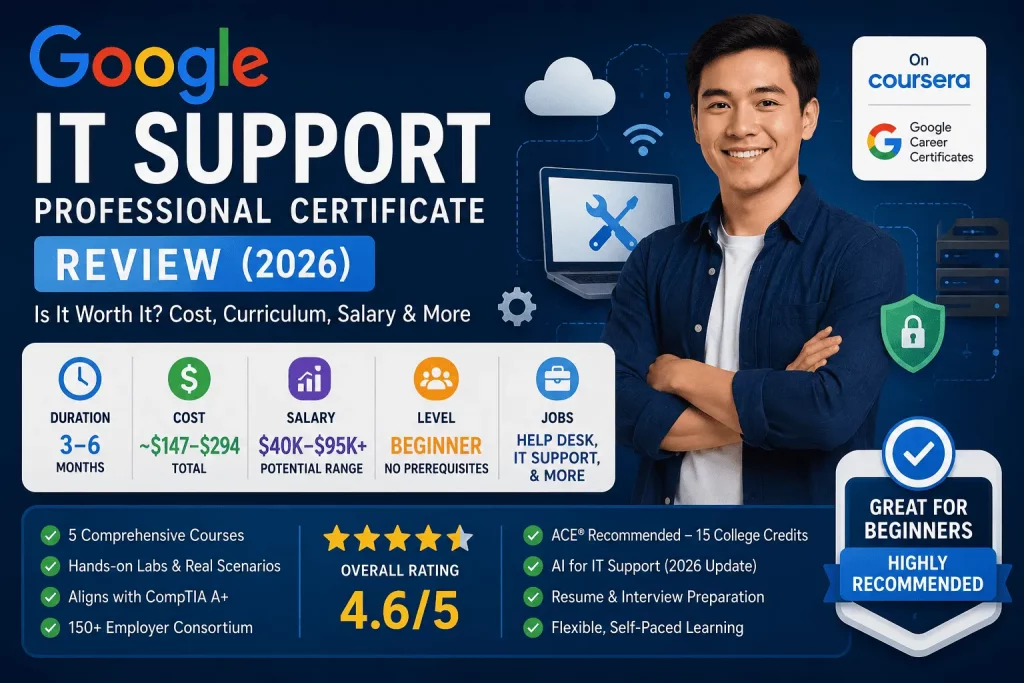
The Google IT Support Professional Certificate is a five-course, beginner-level training program hosted on Coursera that prepares learners with no prior experience for entry-level IT support and help desk roles. It takes roughly 3–6 months at 5–10 hours a week, costs about $147–$294 total on a $49/month Coursera subscription, and has enrolled more than 1.6 million learners worldwide. It also doubles as exam prep for CompTIA A+, one of the most recognized vendor-neutral IT credentials. It’s an excellent starting point for career changers, students, and help desk technicians — but experienced sysadmins, network engineers, and cloud engineers will likely find it too introductory to be worth their time.
Why IT Support Remains One of the Best Entry Points Into Tech
Every industry runs on technology that occasionally breaks, and someone has to fix it. That simple fact is what keeps IT support one of the most dependable on-ramps into a technology career, even as AI reshapes large parts of the software and data job markets. Unlike software engineering or data science, which often expect a portfolio, a degree, or months of independent study before an employer will take a chance on you, IT support has historically been the field where a motivated beginner with the right foundational knowledge can get hired.
That’s exactly the gap Google set out to fill when it built the Google IT Support Professional Certificate. The program doesn’t assume you’ve ever opened a command line, configured a router, or diagnosed a blue screen of death. It starts from zero and walks you through the hardware, networking, operating system, administration, and security fundamentals that show up in nearly every entry-level help desk job posting. In this review, we’ll break down exactly what’s inside the course, who it’s built for, what it costs, what graduates actually earn, and how it stacks up against the other major players in this space — CompTIA A+, IBM’s IT Support certificate, and Microsoft’s IT Support Specialist program — so you can decide with confidence whether it belongs on your 2026 learning plan.
Quick Verdict™
| Category | Rating | Notes |
|---|---|---|
| Beginner-friendliness | ⭐⭐⭐⭐⭐ | No prerequisites; built for complete beginners |
| Curriculum depth | ⭐⭐⭐☆☆ | Broad but intentionally introductory |
| Career support | ⭐⭐⭐⭐☆ | 150+ employer consortium, resume/interview prep |
| Value for cost | ⭐⭐⭐⭐⭐ | ~$150–$300 total vs. $500+ for a proctored exam alone |
| Industry recognition | ⭐⭐⭐⭐☆ | Strong brand recognition; not a substitute for a proctored exam credential |
| Best for | — | Absolute beginners, career changers, students |
| Skip if | — | You already hold 1+ years of hands-on IT experience |
Bottom line: If you are starting from zero and want the lowest-friction path into an entry-level IT support job, this is one of the best-value programs available in 2026.
Course Snapshot™
| Detail | Information |
|---|---|
| Provider | Google, hosted on Coursera |
| Format | Self-paced, online, video + reading + hands-on labs |
| Number of courses | 5 |
| Prerequisites | None |
| Time commitment | 3–6 months at 5–10 hours/week |
| Total cost | ~$147–$294 (Coursera subscription, $49/month) |
| Enrolled learners | 1.6 million+ |
| Employer consortium | 150+ companies (Walmart, Best Buy, Target, Wells Fargo, T-Mobile, Deloitte, Verizon, Google) |
| Exam prep included | Aligns with CompTIA A+ exam objectives |
| College credit | ACE®-recommended, up to 15 credits |
| AI integration | Yes — 2026 curriculum update added AI-for-IT-support lessons |
What Is the Google IT Support Professional Certificate?
The Google IT Support Professional Certificate is a beginner-level training program developed by Google engineers and delivered through Coursera. Launched in 2018 as the flagship entry in Google’s “Career Certificates” portfolio, it has become the largest program of its kind by enrollment, with more than 1.6 million learners to date. It’s important to understand what this certificate is not: it is not a proctored exam like CompTIA A+ or a Google Cloud certification. There’s no test center, no question bank, and no recertification cycle. Instead, it’s a guided curriculum — video lectures, readings, quizzes, and interactive labs — that culminates in a shareable Coursera certificate once you complete all five courses and their graded assessments.
What makes it distinct from a generic online IT course is the backing behind it. Google built the curriculum specifically to mirror the skills that entry-level IT support and help desk jobs actually require, and it organized an employer consortium of more than 150 companies — including Walmart, Best Buy, Target, Wells Fargo, T-Mobile, Deloitte, and Verizon — that have committed to considering certificate graduates for open roles. Graduates can also apply directly to open positions at Google itself. The program is ACE® (American Council on Education) approved, meaning completers can request up to 15 college credits, roughly the equivalent of five bachelor’s-level courses, from participating institutions.
For 2026, Google refreshed the curriculum to fold in AI literacy — specifically, how IT support professionals can use AI tools for tasks like ticket triage, documentation, and first-pass troubleshooting. This matters because AI-driven automation is already changing what “entry-level” help desk work looks like, and a certificate that ignored that shift would be teaching to a job market that no longer exists.
It’s also worth situating this certificate within Google’s broader Career Certificates lineup, since the company now offers similar programs in AI, data analytics, UX design, digital marketing, cybersecurity, project management, and business intelligence. IT Support was the first of these programs and remains the largest by enrollment, which is one reason its brand recognition among hiring managers tends to be a step ahead of newer entries in the same catalog. If you’ve already completed other Google certificates, IT Support slots in as a logical, foundational credential — many learners pair it with the more advanced Google IT Automation with Python certificate once they’ve mastered the basics here.
Who Should Take the Google IT Support Certificate?
Students
If you’re in high school, community college, or a four-year program and want a technology credential you can finish alongside your coursework, this certificate is a low-cost way to build a resume line and a portfolio before you graduate. The ACE credit recommendation is also useful if your school will accept transfer credit.
Career Changers
This is the certificate’s core audience. If you’re moving into tech from retail, hospitality, education, the military, or any non-technical field, the program assumes zero background and builds you up methodically. The employer consortium exists specifically to give career changers a foot in the door that a cold application often can’t.
Help Desk Technicians
Already working an entry-level help desk or service desk job without formal training? The certificate formalizes the tacit knowledge you’ve picked up on the job, fills in gaps (especially around networking and security), and gives you a credential to point to when you apply for a promotion or a role at a larger company.
Government Employees
Many public-sector IT departments and workforce development programs — including community colleges and county job centers — have adopted the Google IT Support certificate as part of federally funded retraining initiatives. If you work in or want to move into a government IT support role, the credential is widely recognized by public-sector hiring managers and often qualifies for workforce grant funding.
Business Owners
If you run a small business and are your own de facto IT department, this certificate teaches you enough networking, hardware, and security fundamentals to troubleshoot your own systems, evaluate IT vendors more intelligently, and know when a problem genuinely requires outside help.
Who Should Skip It?
Experienced System Administrators
If you’re already managing Active Directory environments, patch cycles, or a helpdesk ticketing queue day to day, the content in this certificate will feel remedial. Your time is better spent on something like CompTIA Network+, Security+, or a cloud specialization.
Network Engineers
The networking module here is an overview — subnetting basics, the OSI model, DNS, DHCP — not the depth you’d get from CCNA-level training. Experienced network engineers won’t get meaningful new skills from it.
Cloud Engineers
Cloud computing gets only a brief conceptual treatment in this program. If you’re already working with AWS, Azure, or GCP infrastructure, a Google Cloud, AWS, or Azure certification path will deliver far more relevant and specific value.
Skills You’ll Learn
- Computer Hardware — components, assembly, peripherals, and troubleshooting physical devices
- Networking — IP addressing, subnetting, DNS, DHCP, the OSI model, and network troubleshooting
- Linux — command-line navigation, file permissions, and basic system administration
- Windows — user and system administration in a Windows environment
- System Administration — managing users, hardware, and software across an organization
- Active Directory — directory services, user accounts, and access management
- Security — encryption, risk management, and defending against common threats
- Troubleshooting — structured diagnostic methodology for hardware, software, and network issues
- Customer Support — communication, ticketing workflows, and de-escalation skills for end users
Curriculum Breakdown: Review of Every Course
The program is built as five sequential courses, each roughly 20–30 hours of content, designed to be taken in order.
Course 1 — Technical Support Fundamentals. This introductory course covers computer hardware, software, networking basics, troubleshooting methodology, and customer service, functioning as the foundation for everything that follows. You’ll leave this course understanding what a technical support career actually involves day to day and the basic vocabulary you’ll need for the rest of the program.
Course 2 — The Bits and Bytes of Computer Networking. This course dives into networking protocols, cloud computing fundamentals, and practical troubleshooting for network management, and it’s directly applicable to help desk and network support roles. Expect to learn the OSI model, TCP/IP, subnetting, and how to diagnose common connectivity problems.
Course 3 — Operating Systems and You: Becoming a Power User. This module covers Windows and Linux operating systems, system administration, and hardware configuration, preparing you for the tasks that fill most of a real support technician’s week — installing software, managing users, and configuring devices across both major OS families.
Course 4 — System Administration and IT Infrastructure Services. This course shifts you from managing a single machine to supporting an entire fleet of devices. You’ll cover Active Directory, user and access management, and the infrastructure services (DNS, DHCP, print services) that keep an organization’s IT running.
Course 5 — IT Security: Defense Against the Digital Dark Arts. The capstone security course covers encryption, network security, operating system security, and risk assessment — building the baseline security literacy that every IT support role now requires, given how often frontline support staff are the first line of defense against phishing and social engineering.
Each course ends with graded quizzes and a set of applied labs, and the certificate as a whole closes with a portfolio-style project you can point to in interviews.
Hands-on Labs
Unlike a purely video-based course, Google’s program leans heavily on interactive labs and simulated environments — configuring a virtual network, navigating a Linux terminal, resetting user permissions in a simulated Active Directory environment, and working through mock support tickets. These labs matter more than the video content for job readiness, since IT support interviews frequently include practical, scenario-based questions (“a user says their Wi-Fi keeps dropping — walk me through your troubleshooting steps”).
Tools Covered
| Category | Tools / Technologies |
|---|---|
| Operating Systems | Linux, Windows |
| Directory Services | Active Directory |
| Command Line | Bash, Windows Command Line |
| Support Workflow | Ticketing systems |
| Networking | Networking diagnostic and configuration tools |
Certificate Value
The certificate’s value isn’t in a proctored exam or a vendor badge — it’s in three things working together: brand recognition, an employer pipeline, and exam alignment. The program aligns with the objectives of the CompTIA A+ exam, meaning many graduates go on to sit for that proctored exam with a real head start, effectively stacking a free-standing, widely respected vendor-neutral credential on top of the Google certificate. Combined with the ACE college-credit recommendation and the 150+ employer consortium, the certificate functions less like a single credential and more like a bundle: coursework, a resume-ready credential, potential college credit, and a warmer path into applications at name-brand employers.
Career Opportunities
Graduates typically target entry-level roles including:
- IT Support Specialist — the most common landing role, handling day-to-day hardware, software, and account issues
- Help Desk Technician — first-line phone or ticket-based support for end users
- Desktop Support — in-person or remote support for employee workstations and peripherals
- Technical Support — product- or service-specific support roles, often at software or SaaS companies
- System Support — supporting broader IT infrastructure alongside senior administrators
From any of these roles, the typical next step is a promotion into system administration, network administration, or a specialization such as cybersecurity or cloud support — all fields where additional certifications (Network+, Security+, or a cloud credential) become the next logical investment.
A few of these roles are worth unpacking further, since job titles in this space overlap and vary a lot by company:
- IT Support Specialist roles tend to be the broadest — a mix of hardware, software, and network troubleshooting for a whole organization, often the first title on a graduate’s resume after certification.
- Help Desk Technician roles are more phone- or ticket-queue-focused, with heavier emphasis on the customer-service and communication skills the certificate spends real time developing.
- Desktop Support roles lean more hands-on and hardware-heavy — imaging machines, replacing components, setting up new hires’ workstations.
- Technical Support roles at software or SaaS companies are product-specific, meaning you’ll typically get additional in-house training on the company’s own tools alongside the general skills this certificate provides.
- System Support roles sit closest to system administration, supporting servers and infrastructure alongside more senior staff, and are often the fastest path toward a System Administrator title.
Salary Outlook
Salary data for IT support roles varies noticeably by source and by exactly which job title is being measured, so it’s worth looking at a range rather than a single number.
- Coursera reports a median total salary of $71,000 for IT support specialists in the United States, with entry-level (0–1 year) pay around $62,000 and mid-level (1–3 years) pay around $66,000.
- Glassdoor puts the average IT support specialist salary at roughly $71,346 per year, with typical pay ranging from about $57,000 to $90,000 depending on experience and industry.
- ZipRecruiter’s July 2026 data shows an average of about $69,237 per year, with most salaries falling between roughly $46,500 and $94,000.
- A BLS-sourced estimate puts the median annual salary closer to $61,860, with entry-level pay around $40,980 and senior-level pay around $100,540.
- For a related, more infrastructure-heavy title, BLS reported a median annual wage of $73,340 for computer network support specialists as of May 2024.
Realistic range for 2026: expect roughly $40,000–$50,000 to start in a smaller market or a pure help desk role, climbing toward $65,000–$95,000 with a few years of experience, specialization, or a move to a higher cost-of-living metro. Job growth projections are mixed — some sources point to steady, faster-than-average growth, while others flag that AI-driven ticket automation is beginning to slow demand for the most junior, repetitive support tasks. The practical takeaway is the same either way: the certificate is most valuable as a stepping stone into a first job and a foundation for further specialization, not as a ceiling on your earning potential.
Cost
The Google IT Support Professional Certificate runs on Coursera’s subscription model at roughly $49 per month, and most learners complete it in three to six months, putting total cost somewhere between about $147 and $294 without financial aid. That’s dramatically cheaper than a bootcamp, an associate degree, or even the CompTIA A+ exam voucher pair on its own (more on that comparison below). Faster learners who commit 10+ hours a week can push the total cost toward the lower end of that range; slower, part-time learners will land closer to the top.
| Pace | Estimated duration | Estimated total cost |
|---|---|---|
| Intensive (10+ hrs/week) | ~3 months | ~$147 |
| Moderate (5–7 hrs/week) | ~4–5 months | ~$196–$245 |
| Relaxed (part-time, 3–5 hrs/week) | ~6 months | ~$294 |
Compared to the other options in this review, this is by far the least expensive path to a recognized entry-level IT credential — CompTIA A+ alone runs roughly $530 in exam fees before you’ve spent a dollar on study materials, and a two-year associate degree in IT can run into the thousands even at a community college.
Free Trial
Coursera offers a 7-day free trial on Professional Certificate subscriptions, giving you enough time to preview the first course, get a feel for the video and lab format, and decide whether the pacing and teaching style work for you before committing to a paid month.
Financial Aid
Coursera offers financial aid to learners who can’t afford to pay for a certificate, and if approved, you get full access to course content and can still earn a shareable certificate. A few practical notes if you plan to apply:
- Because a professional certificate is made up of multiple individual courses, you generally need to apply for financial aid separately for each course in the program rather than once for the whole certificate.
- The application asks about your educational background, career goals, and financial circumstances, and most guides recommend responses of at least 150 words per question.
- Review typically takes up to about 16 days, so apply well before you want to start.
- Once approved, you generally have 180 days to complete the course, with extensions available if you’re actively progressing.
For learners in a genuinely tight financial position, stacking financial aid across all five courses can bring the total cost of the certificate to $0.
Time Commitment
Estimates vary slightly by source, but they cluster in a consistent range: roughly five hours a week gets you through the program in about six months, while a more intensive pace of eight to ten hours a week can get you certified in roughly the same six-month window or faster. If you’re studying part-time around a full-time job, plan for closer to six months. If you can dedicate 10+ hours a week — say, over a summer break or a gap between jobs — three months is a realistic target.
Pros
- No prerequisites — genuinely built for absolute beginners
- Low cost relative to bootcamps, degrees, or standalone certification exams
- Employer consortium of 150+ companies committed to considering graduates
- CompTIA A+ alignment gives you a running start at a respected, exam-based credential
- ACE college credit recommendation — up to 15 credits at participating schools
- Hands-on labs, not just video lectures, build practical troubleshooting skill
- Self-paced format fits around a job, school, or family obligations
- Financial aid available, potentially reducing total cost to zero
- 2026 AI curriculum update keeps the content relevant to how support work is actually evolving
Cons
- Not a proctored credential — carries less individual weight with employers than CompTIA A+ or a vendor certification exam
- Breadth over depth — each topic (networking, security, Linux) gets an introduction, not mastery
- Not useful for experienced IT professionals who already have these fundamentals
- Job market headwinds — AI-driven automation is compressing some of the most junior, repetitive support tasks the certificate targets
- Ongoing subscription cost — if you move slowly, the $49/month can add up faster than a one-time exam fee
Comparison: Google IT Support vs. CompTIA A+ vs. IBM IT Support vs. Microsoft IT Support Specialist
| Feature | Google IT Support | CompTIA A+ | IBM IT Support | Microsoft IT Support Specialist |
|---|---|---|---|---|
| Format | Self-paced online course | Proctored exam (2 exams) | Self-paced online course | Self-paced online course |
| Prerequisites | None | None (experience recommended) | None | None |
| Time commitment | 3–6 months | Self-study pace, typically weeks–months | 3–6 months | 4–6 months |
| Cost | ~$147–$294 | ~$530 for both required exams | ~$150–$300 | ~$196–$294 |
| Vendor focus | Vendor-neutral | Vendor-neutral | Vendor-neutral, with cloud (AWS, Azure, GCP, IBM Cloud) exposure | Microsoft ecosystem (Windows, Microsoft 365, Azure) |
| Exam prep included | Aligns with CompTIA A+ objectives | N/A — is the exam | Preps for the CompTIA ITF+/Tech+ exam | Includes a 50% discount voucher for the MS-900 exam |
| Best for | Complete beginners wanting the most recognized brand | Anyone wanting an industry-standard, proctored credential | Beginners who want more cloud exposure alongside support fundamentals | Beginners targeting Microsoft-heavy corporate environments |
How to think about the four options: CompTIA A+ is the only one of these that’s a true, vendor-neutral, proctored certification exam — it’s the credential many employers explicitly list in job postings, but it costs more upfront and requires you to actually pass a timed test. Google, IBM, and Microsoft are all guided coursework programs on Coursera at similar price points, and the real differentiator between them is focus: Google leans on brand recognition and its employer consortium, IBM’s version builds in a stronger foundation in networking, cybersecurity, and cloud computing, and Microsoft’s program emphasizes the Microsoft ecosystem — cloud services and business productivity applications that dominate most corporate IT environments. A common and effective strategy is to complete one of these three as your foundation, then sit the CompTIA A+ exam afterward using the knowledge you’ve already built.
Atlas Decision Matrix™
| If you are… | Best pick |
|---|---|
| A complete beginner who wants the most widely recognized name on your resume | Google IT Support |
| Targeting a job posting that explicitly requires a certification (not a course) | CompTIA A+ |
| Interested in cloud computing alongside support fundamentals | IBM IT Support |
| Applying to companies running primarily on Microsoft 365 / Azure | Microsoft IT Support Specialist |
| On a tight budget and want the lowest total cost | Google IT Support or IBM IT Support (with financial aid) |
| Already working help desk and want to formalize your skills fast | Google IT Support, then CompTIA A+ |
Atlas Career Roadmap™
Beginner
   ↓
Google IT Support Professional Certificate
   ↓
Help Desk Technician
   ↓
Desktop Support
   ↓
System Administrator
   ↓
Cloud Engineer
This roadmap reflects the most common progression reported by graduates: the certificate opens the door to a first help desk or desktop support role, a few years of hands-on experience builds toward a system administrator title, and from there, many professionals specialize further into cloud infrastructure, security, or network engineering — fields where the earlier caution about “who should skip this certificate” starts to apply, because by that point you’ll have outgrown the fundamentals it teaches.
Atlas Learning Path™
The Google IT Support Professional Certificate is an excellent starting point, but it is most valuable when used as the foundation for more advanced certifications and technical specializations.
Google IT Support Professional Certificate
                │
                ▼
           CompTIA A+
                │
                ▼
Google Cybersecurity Professional Certificate
                │
                ▼
  Google IT Automation with Python
                │
                ▼
Cloud Engineer / System Administrator / Security Analyst
Why This Learning Path Works
- Google IT Support Professional Certificate builds core IT knowledge, troubleshooting skills, networking fundamentals, Linux, Windows, and system administration.
- CompTIA A+ validates those skills through an industry-recognized certification exam.
- Google Cybersecurity Professional Certificate expands into security operations, threat detection, Linux, Python, and security monitoring.
- Google IT Automation with Python develops scripting and automation skills that help IT professionals manage systems more efficiently.
- After gaining hands-on experience and additional certifications, learners can pursue careers such as System Administrator, Cloud Engineer, or Cybersecurity Analyst.
Atlas Skill Matrix™
| Skill Area | Depth of Coverage (1–5) |
|---|---|
| Linux | ⭐⭐⭐☆☆ |
| Networking | ⭐⭐⭐⭐☆ |
| Windows | ⭐⭐⭐⭐☆ |
| Hardware | ⭐⭐⭐⭐☆ |
| Security | ⭐⭐⭐☆☆ |
| Customer Support | ⭐⭐⭐⭐⭐ |
Customer support and communication skills get the deepest treatment of any topic in the program — a deliberate choice, since most entry-level IT support rejections come down to soft-skill and communication gaps, not technical knowledge gaps. Security, by contrast, is covered at an awareness level rather than a practitioner level; if security is your long-term goal, plan on a dedicated follow-up certificate like Google Cybersecurity or CompTIA Security+.
Atlas Difficulty Meter™
Not every topic in the Google IT Support Professional Certificate has the same learning curve. The table below provides a general estimate of how challenging each core skill may feel for complete beginners.
| Skill | Difficulty | Notes |
|---|---|---|
| Computer Hardware | ⭐⭐☆☆☆ | Easy to learn through hands-on practice. |
| Windows Administration | ⭐⭐☆☆☆ | Beginner-friendly with guided labs. |
| Networking | ⭐⭐⭐☆☆ | Requires understanding several new concepts. |
| Linux Command Line | ⭐⭐⭐☆☆ | Unfamiliar at first, but manageable with practice. |
| Active Directory | ⭐⭐⭐☆☆ | Best learned through real-world scenarios and labs. |
| IT Security Fundamentals | ⭐⭐☆☆☆ | Focuses on basic security concepts rather than advanced defense techniques. |
Overall Difficulty: ⭐⭐⭐☆☆ (Moderate)
The Google IT Support Professional Certificate is designed for beginners. While networking and Linux may present the biggest learning curve, the program provides enough guided instruction and hands-on labs to help most learners succeed.
Atlas Outcome Score™
| Category | Score |
|---|---|
| Beginner Friendly | ⭐⭐⭐⭐⭐ |
| Career Value | ⭐⭐⭐⭐⭐ |
| Hands-on Learning | ⭐⭐⭐⭐☆ |
| Employer Recognition | ⭐⭐⭐⭐☆ |
| Salary Potential | ⭐⭐⭐⭐☆ |
| Overall Recommendation | ⭐⭐⭐⭐⭐ |
Atlas Outcome Score™: 4.8/5
Recommended for be
Is It Worth It?
For Students
Yes. The low cost, ACE credit recommendation, and zero prerequisites make it one of the more efficient ways to add a real technology credential to a resume before graduation.
For Professionals
Situational. If you’re already in IT, this is a refresher, not a growth path — your time and money are better spent on a specialization. If you’re a professional pivoting in from another field, it’s a strong, low-risk starting point.
For Career Changers
Yes, strongly. This is the audience the program was built for, and the combination of low cost, no prerequisites, and an employer consortium specifically targeting career changers makes it one of the most efficient paths into tech from an unrelated field.
For Business Owners
Yes, conditionally. If your goal is running your own shop’s IT more competently rather than getting hired, the certificate delivers real, applicable skill — just go in knowing you’re not the target audience for the employer consortium.
For Government Employees
Yes. Strong recognition in public-sector hiring, frequent alignment with workforce development funding, and direct applicability to government IT support roles make this a solid investment.
Frequently Asked Questions
Is the Google IT Support Professional Certificate worth it in 2026? For beginners with no IT background, yes — it’s one of the lowest-cost, lowest-barrier ways to build job-ready skills and access an employer network built specifically for entry-level candidates. For experienced IT professionals, it offers little new value.
How long does it take to complete the Google IT Support certificate? Most learners finish in three to six months, studying five to ten hours per week. Full-time, intensive study can compress that timeline further.
How much does the Google IT Support certificate cost? It runs on a $49/month Coursera subscription. At a typical three-to-six-month pace, total cost lands between roughly $147 and $294, before any financial aid.
Does the Google IT Support certificate include a job guarantee? No. It provides access to an employer consortium of 150+ companies committed to considering graduates, plus career support resources, but it does not guarantee employment.
Is the Google IT Support certificate accredited? It’s ACE® (American Council on Education) recommended, which means completers can request college credit — up to 15 credits — at participating institutions, though it’s not a traditional academic accreditation.
Do I need any prior experience to enroll? No. The program has no prerequisites and is explicitly designed for complete beginners.
Does the certificate prepare you for the CompTIA A+ exam? Yes. The curriculum is aligned with CompTIA A+ exam objectives, and many graduates go on to sit for the proctored A+ exam afterward.
Is Google IT Support better than CompTIA A+? They’re not direct substitutes. Google IT Support is a guided coursework program; CompTIA A+ is a proctored, vendor-neutral exam. Many people complete Google’s certificate first, then use it as preparation to sit for the A+ exam.
Is Google IT Support better than IBM’s IT Support certificate? They’re similarly priced and structured. Google has stronger overall brand recognition and a larger employer consortium; IBM’s version includes more direct exposure to cloud platforms and cybersecurity fundamentals.
Is Google IT Support better than Microsoft’s IT Support Specialist certificate? It depends on your target employer. Google’s program is vendor-neutral; Microsoft’s leans heavily into the Microsoft 365 and Azure ecosystem, which is a better fit if you’re targeting corporate environments built on Microsoft tools.
What jobs can you get after completing the Google IT Support certificate? Common entry-level roles include IT support specialist, help desk technician, desktop support technician, technical support representative, and system support roles.
What is the average salary after completing this certificate? Entry-level IT support salaries generally range from about $40,000 to $65,000 depending on location and employer, with median salaries across various sources landing between roughly $62,000 and $71,000.
Can I get the Google IT Support certificate for free? Yes, through Coursera’s financial aid program, applied for separately for each of the five courses in the certificate.
How do I apply for financial aid for this certificate? On each course’s Coursera page, click the financial aid link, complete an application about your background, goals, and financial circumstances (typically requiring 150+ words per response), and wait up to about 16 days for a decision.
Is there a free trial for the Google IT Support certificate? Yes — Coursera offers a 7-day free trial that lets you preview the first course before committing to a paid subscription.
What skills does the Google IT Support certificate teach? Computer hardware, networking, Linux, Windows, system administration, Active Directory, IT security, troubleshooting methodology, and customer support communication.
How many courses are in the Google IT Support Professional Certificate? Five: Technical Support Fundamentals, The Bits and Bytes of Computer Networking, Operating Systems and You, System Administration and IT Infrastructure Services, and IT Security: Defense Against the Digital Dark Arts.
Does the certificate include hands-on labs? Yes. Each course includes interactive labs and simulated environments in addition to video lectures and quizzes.
Who should not take the Google IT Support certificate? Experienced system administrators, network engineers, and cloud engineers will likely find the content too introductory to be worth the time investment.
Does AI affect the value of an IT support career in 2026? Yes, to a degree. AI tools are automating some of the most repetitive first-line support tasks, which is part of why Google added AI-literacy lessons to the 2026 curriculum — the goal is to prepare learners to use AI as a tool rather than compete against it.
Is the Google IT Support certificate self-paced? Yes. There are no live class sessions required; you move through video lectures, readings, and labs on your own schedule within your Coursera subscription period.
Can this certificate lead to college credit? Yes, it’s ACE-recommended for up to 15 college credits at institutions that accept ACE recommendations — check with your specific school, since acceptance varies.
How does the Google IT Support certificate compare to a computer science degree? It’s far cheaper and faster, but narrower in scope. A degree covers broader computer science theory and often unlocks different (and typically higher-paying) roles; this certificate is purpose-built for a fast entry into support-specific roles.
What’s the difference between the Google IT Support certificate and Google IT Automation with Python? IT Support is the foundational, beginner program covering support fundamentals. IT Automation with Python is a follow-on, more advanced certificate that teaches scripting and automation skills for IT professionals who already have foundational knowledge.
Is the Google IT Support certificate still relevant given AI automation trends? Largely yes, especially with the 2026 AI-literacy update, though learners should treat it as a starting point rather than an endpoint — pairing it with a specialization (security, cloud, or networking) will matter more for long-term career resilience.
Conclusion
The Google IT Support Professional Certificate earns its reputation as one of the best entry points into tech because it solves a specific, well-defined problem: getting someone with zero background to job-ready in a matter of months, at a fraction of the cost of a degree or bootcamp, with a real employer network attached to the credential. It’s not a substitute for a proctored certification like CompTIA A+, and it’s not going to teach an experienced sysadmin anything new — but for the audience it was actually built for, students, career changers, and current help desk technicians looking to formalize their skills, it remains one of the highest-value learning investments in tech for 2026.
If you’re still weighing your options, the simplest way to decide is to work backward from the job posting you actually want. If the listing says “certificate or equivalent experience preferred,” Google’s program (potentially paired with CompTIA A+ afterward) covers you well. If the listing explicitly requires “CompTIA A+ certification,” you’ll eventually need the proctored exam regardless of which coursework you use to prepare for it — in which case, doing this certificate first is simply the cheapest, most structured way to get there. And if the roles you’re targeting are Microsoft-shop-specific or cloud-support-specific, it’s worth reading the Microsoft and IBM sections above closely, since the right foundational course really does depend on the specific employers and job titles you have in your sights.
Whichever path you choose, the underlying advice holds across all four programs compared here: treat the certificate as the beginning of a career, not the end of one. Pair it with real practice — a home lab, volunteer IT work for a nonprofit, or a personal project supporting friends and family’s devices — and use the resulting stories in your interviews. That combination of credential plus demonstrable, hands-on experience is consistently what separates certificate holders who land interviews from those who don’t.
Related Guides
- Best Communication Skills Courses Online
- Best Excel Courses Online
- Best Microsoft Word Courses Online
- Best PowerPoint Courses Online
- Best Leadership Courses Online in 2026
- Best Project Management Courses Online in 2026
- Free Online Courses for Skill Upgrade in 2026: The Complete Global Guide
- Google AI Essentials Review (2026): Everything You Need to Know Before You Enroll
- Google AI Professional Certificate: The Complete 2026 Review
- Google Data Analytics Professional Certificate: The Complete Review
- Google Cybersecurity Professional Certificate Review (2026): Is It Worth It?