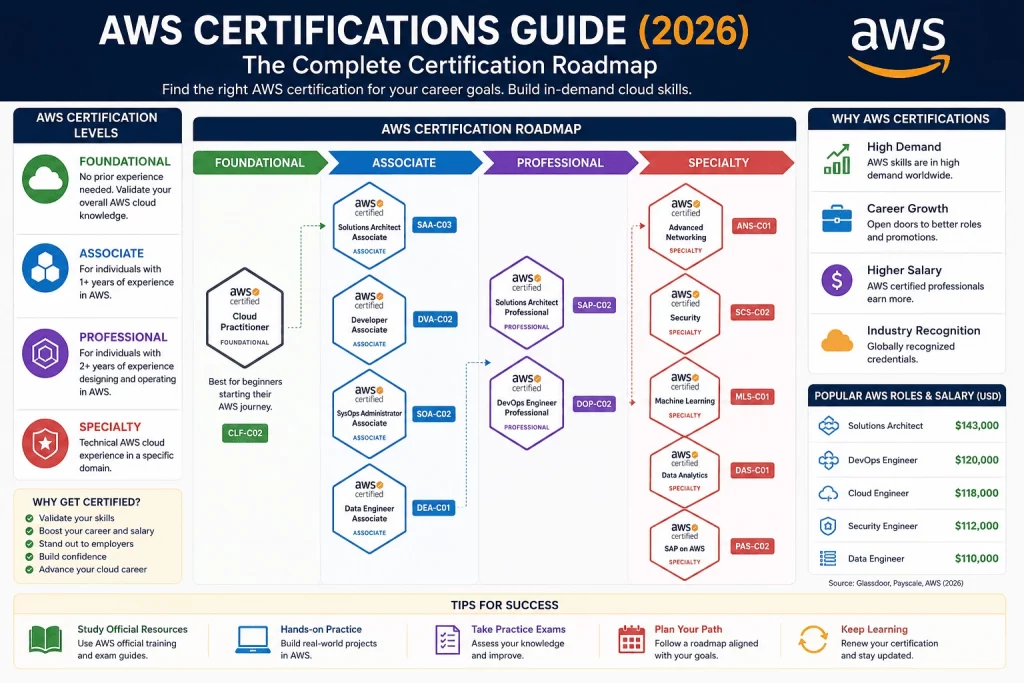
Amazon Web Services has held the largest share of the global cloud infrastructure market for well over a decade, and that lead hasn’t meaningfully closed even as Microsoft Azure and Google Cloud have grown aggressively alongside it. AWS got there first, launched more services faster than anyone else, and built an ecosystem so deep that most large enterprises run at least some critical workload on it — even organizations that are officially “multi-cloud” or primarily standardized on a competitor. That scale is precisely why AWS certifications remain some of the most valuable, most requested credentials in the entire technology industry heading into 2026.
Why AWS Still Dominates the Cloud Market
AWS’s dominance isn’t just about being first. It’s about breadth and depth compounding over time: AWS offers more distinct services than any other provider, spanning compute, storage, databases, networking, machine learning, analytics, and increasingly generative AI — and it keeps shipping new capabilities faster than most organizations can fully adopt the ones they already have. That constant expansion creates a permanent, structural need for professionals who can keep up, which is exactly the gap AWS certifications are designed to close.
There’s also a compounding network effect at play. Because AWS has the largest installed base of enterprise customers, it has the largest ecosystem of third-party tools, integrations, consulting partners, and — critically for this guide — trained professionals. That scale becomes self-reinforcing: organizations choose AWS partly because it’s easier to hire people who already know it, and professionals learn AWS partly because more employers are hiring for it. Breaking that cycle takes a genuinely disruptive shift, and while both Azure and Google Cloud have grown share in specific verticals (Azure in Microsoft-heavy enterprises, Google Cloud in data and AI-native startups), neither has displaced AWS’s overall lead as of 2026.
Why AWS Certifications Remain Valuable in 2026
Three forces make AWS certification especially relevant right now. First, enterprise cloud migration hasn’t slowed — organizations are still moving legacy systems, and every migration project needs administrators, architects, and engineers who can execute it correctly. Second, AWS’s own AI and machine learning stack (Bedrock, SageMaker, and the newer generative AI tooling) has exploded in both scope and hiring demand, prompting AWS to launch entirely new certifications — AI Practitioner and Machine Learning Engineer Associate — to keep pace. Third, employers increasingly use AWS certification as an objective hiring filter in a job market flooded with self-reported “cloud experience” that’s hard to verify any other way. A verified AWS credential cuts through that noise instantly.
There’s a fourth, quieter factor too: AWS actively retires and refreshes its exams to track real platform changes, rather than letting certifications calcify around outdated services. Exam codes like SAA-C03 or DVA-C02 signal a specific, current version — when AWS updates an exam’s content to reflect new services or deprecate old guidance, it ships a new version with a new code, and candidates studying outdated material notice the gap quickly during practice tests. That discipline is part of why employers still trust AWS certification as a signal of current competence, not just competence as of whenever the candidate happened to study.
Who Should Pursue AWS Certifications
AWS certifications aren’t just for engineers writing infrastructure code. The ecosystem now spans roles for cloud support technicians, solutions architects, application developers, DevOps engineers, security specialists, network engineers, data engineers, and machine learning practitioners — plus non-technical roles like sales, procurement, and project management professionals who benefit from the Foundational-level Cloud Practitioner credential to speak intelligently about AWS in cross-functional conversations. If your work touches cloud infrastructure, application delivery, data, or AI in any way, there’s very likely an AWS certification path that fits your specific role.
It’s worth being honest about who gets the least value from AWS certification, too: professionals whose day-to-day work never actually touches AWS, and who are certifying purely for resume padding without a realistic plan to apply the skill. Certification retains its market value specifically because it correlates with real, verifiable competence — candidates who treat it as a checkbox rather than a genuine skill investment tend to struggle in interviews when asked to go beyond exam-level recall, which undermines the very signal the credential is supposed to send.
Career Opportunities in Cloud Computing
Cloud computing remains one of the strongest hiring categories in tech, and AWS-certified professionals sit at the center of it. Typical roles unlocked or strengthened by AWS certification include cloud support engineer, cloud engineer, solutions architect, DevOps engineer, security engineer, network engineer, data engineer, and machine learning engineer — spanning everything from entry-level support positions to senior architectural leadership roles that shape an entire organization’s cloud strategy.
Beyond the obvious technical titles, AWS certification increasingly opens lateral and consulting-adjacent opportunities as well. Certified professionals are frequently pulled into cloud migration projects as contractors or short-term consultants, since organizations undergoing a migration often need burst capacity of verified AWS skill that doesn’t require a permanent headcount commitment. Certification also supports internal mobility — an IT support professional who earns Cloud Practitioner and later Solutions Architect Associate often transitions into a cloud engineering role at the same company, using the certification as concrete evidence of readiness during an internal transfer conversation that would otherwise rely entirely on manager advocacy.
Quick Verdict™
| If you are… | Start here | Why |
|---|---|---|
| New to cloud computing | AWS Certified Cloud Practitioner | No prerequisites, broadest foundation, cheapest entry point |
| Aiming for a cloud engineer or architect role | Solutions Architect Associate | The most requested AWS credential in job postings |
| A hands-on operations professional | CloudOps Engineer Associate (formerly SysOps Administrator) | Validates deployment, management, and operational support skills |
| A software developer | Developer Associate | Validates application development on AWS |
| Interested in AI/ML | AI Practitioner → Machine Learning Engineer Associate | The fastest-growing category in the entire AWS portfolio |
| Focused on cybersecurity | Security – Specialty | The deepest AWS security credential available |
| A data engineer | Data Engineer Associate | Covers data pipelines, storage, and processing on AWS |
| Targeting a senior architecture or DevOps leadership role | Solutions Architect Professional or DevOps Engineer Professional | Expert-level design and operational credentials |
AWS Certification Levels
AWS organizes its entire certification catalog into four tiers, and understanding this structure is the fastest way to avoid picking an exam that’s a poor match for your current experience.
| Level | Who it’s for | Prerequisites | Typical exam fee |
|---|---|---|---|
| Foundational | Beginners, non-technical roles | None | $100 |
| Associate | Hands-on technical professionals, roughly 1+ years of relevant experience | None formally required, though Foundational knowledge is recommended | $150 |
| Professional | Senior technical professionals with multiple years of production AWS experience | None formally required, but content assumes Associate-level knowledge | $300 |
| Specialty | Deep, narrow technical experts in one domain | None formally required, but content assumes real hands-on depth | $300 |
Foundational certifications validate broad cloud literacy without requiring hands-on implementation skill — Cloud Practitioner and AI Practitioner both sit here. Associate certifications test real, hands-on execution in a specific role, whether that’s architecture, development, operations, data, or machine learning. Professional certifications sit at the top of the general track, testing the ability to design and operate complex, multi-service solutions under real-world constraints. Specialty certifications run parallel to the Professional tier but go deep into one narrow technical domain — security, networking, or machine learning — rather than broad architectural synthesis.
Unlike some competing certification systems, AWS does not enforce hard, system-blocked prerequisites for any exam — technically, a total beginner could attempt the Solutions Architect Professional exam directly. In practice, almost nobody does, because the exam content assumes years of hands-on production experience that no amount of last-minute studying can substitute for.
AWS Certification Paths
AWS certifications flow through several distinct career paths, and most professionals only need to go deep in one or two of them.
Cloud
The foundational path that underlies everything else. AWS Certified Cloud Practitioner is the universal starting point — no technical background required, covering core AWS services, billing, security fundamentals, and high-level architectural principles. This path doesn’t climb further on its own; instead, it feeds into every other path below, which is why nearly every AWS roadmap recommends starting here regardless of your ultimate specialization.
Architecture
Anchored by Solutions Architect Associate, widely considered the single most valuable AWS credential for opening doors into cloud engineering and architecture roles, and climbing to Solutions Architect Professional for senior, enterprise-scale design responsibility. This path tests breadth more than any other — candidates are expected to reason across compute, storage, networking, databases, and cost optimization simultaneously, rather than specializing narrowly in one service category.
Development
Centered on Developer Associate, which validates the ability to build and deploy applications using AWS SDKs, deployment tools, and core compute and database services. Unlike the Architecture path, Development stays closer to application code — Lambda functions, API Gateway, DynamoDB integration, and CI/CD pipelines feature far more heavily here than in Solutions Architect content.
SysOps
Built around CloudOps Engineer Associate (the credential formerly known as SysOps Administrator Associate), validating deployment, management, networking, and operational support skills for AWS environments already in production. This path is deliberately operations-first: where Solutions Architect Associate asks “how would you design this,” CloudOps Engineer Associate asks “how would you keep this running, monitored, and troubleshot once it’s already live.”
DevOps
Anchored by DevOps Engineer Professional, one of the hardest certifications in the entire AWS portfolio, validating skill in continuous delivery, automation, monitoring, and incident response at a senior operational level. It sits at the intersection of the Development and SysOps paths, and AWS explicitly recommends either Developer Associate or CloudOps Engineer Associate-level knowledge as informal preparation, even though no hard prerequisite is enforced.
Security
Built around Security – Specialty, a deep, narrow credential covering incident response, logging and monitoring, infrastructure security, identity and access management, and data protection specifically within AWS environments. This path assumes real hands-on security work — it isn’t designed as an entry point the way Cloud Practitioner is, and most successful candidates already hold a security-adjacent job title before attempting it.
Networking
Anchored by Advanced Networking – Specialty, validating the ability to design and implement complex networking architectures, including hybrid connectivity between AWS and on-premises environments. This is one of the more niche paths in the portfolio, attracting a smaller but highly specialized candidate pool — typically network engineers extending existing on-premises networking expertise into AWS rather than cloud generalists.
Machine Learning
Includes both Machine Learning – Specialty, AWS’s original deep ML credential, and the newer Machine Learning Engineer – Associate, which has quickly become the more commonly recommended entry point for hands-on ML practitioners given its more accessible Associate-level positioning. The two aren’t strictly redundant: Machine Learning Specialty still carries slightly broader, deeper coverage and remains valuable for candidates who already hold it, while new candidates are increasingly directed toward the Associate-level exam first.
AI
The newest path in the AWS portfolio, anchored by AI Practitioner, a Foundational-level credential covering generative AI, machine learning concepts, and responsible AI — introduced in late 2024 and now one of the fastest-growing AWS exams by volume. This path exists specifically to serve the wave of professionals whose jobs now touch AI tooling (through Bedrock, SageMaker, or generative AI application development) without requiring the deep, hands-on technical background that Machine Learning Engineer Associate assumes.
Data Analytics
Anchored by Data Engineer Associate, covering data ingestion, transformation, storage, and pipeline orchestration across AWS’s data services, from S3 and Glue through Redshift and Kinesis. This path absorbed much of what used to be tested under AWS’s now-retired Data Analytics Specialty credential, consolidating data engineering validation into a single, more accessible Associate-level exam rather than a narrower Specialty-tier one.
AWS Certification Roadmap
The typical, Microsoft-style progression through AWS’s ecosystem looks like this for most technical career paths:
- Cloud Practitioner — build foundational AWS literacy, regardless of your eventual specialization.
- An Associate-level certification matching your role — Solutions Architect, Developer, CloudOps Engineer, Data Engineer, or Machine Learning Engineer Associate.
- A Professional or Specialty certification — Solutions Architect Professional, DevOps Engineer Professional, Security Specialty, Advanced Networking Specialty, or Machine Learning Specialty, depending on your senior specialization.
Because AWS’s automatic renewal cascade means passing a higher-level exam in the same domain also renews the certifications beneath it, this roadmap isn’t just a learning progression — it’s also the most cost-efficient way to manage renewal across multiple credentials over your career.
Best AWS Certifications for Beginners
AWS Certified Cloud Practitioner (CLF-C02) is, without much competition, the ideal first AWS certification. It requires no technical background, costs the lowest exam fee in the entire portfolio, and covers exactly the vocabulary and conceptual grounding that makes every subsequent Associate-level exam significantly easier to approach. Microsoft, Google, and AWS all converge on the same design philosophy here: a broad, low-stakes Foundational credential exists specifically to de-risk the much harder technical exams that follow it. Skipping Cloud Practitioner to jump straight into Solutions Architect Associate is technically possible, but it consistently costs candidates more total study time than simply taking the cheaper, faster Foundational exam first.
Best AWS Certifications for Cloud Engineers
- Solutions Architect Associate — the flagship credential for cloud engineering and architecture roles, and the most requested AWS certification across job postings by a wide margin. It’s the closest thing AWS has to a universal “you’re a real cloud professional” signal, which is exactly why it draws the largest candidate pool of any Associate-level exam.
- CloudOps Engineer Associate (SysOps) — the right choice for professionals focused on day-to-day operational management, monitoring, and troubleshooting of existing AWS environments rather than greenfield design. If your job title leans more toward “keeping things running” than “deciding how things should be built,” this credential maps more directly to your daily work than Solutions Architect Associate does.
- DevOps Engineer Professional — the natural senior-level target for cloud engineers moving into automation, continuous delivery, and large-scale operational ownership. Most candidates approach it only after several years of combined architecture and operations experience, since it assumes fluency across both domains simultaneously.
A useful pattern for cloud engineers specifically: Solutions Architect Associate and CloudOps Engineer Associate aren’t mutually exclusive choices — many working cloud engineers hold both, since the design mindset from Solutions Architect Associate and the operational mindset from CloudOps Engineer Associate genuinely complement each other in a real production environment.
Best AWS Certifications for Developers
Developer Associate (DVA-C02) is the clear choice for software engineers building and deploying applications on AWS. It validates hands-on skill with AWS SDKs, serverless development using Lambda, application deployment pipelines, and core database and messaging services — the day-to-day toolkit of an AWS-focused application developer, distinct from the infrastructure-heavy focus of Solutions Architect or CloudOps Engineer. Developers who eventually take on more infrastructure ownership often follow Developer Associate with either Solutions Architect Associate (for design responsibility) or DevOps Engineer Professional (for release and automation ownership), depending on which direction their role evolves.
Best AWS Certifications for AI Engineers
- AI Practitioner (AIF-C01) — a Foundational-level credential covering generative AI concepts, machine learning fundamentals, and responsible AI practices, ideal for both technical and business-facing professionals working with AWS’s AI tooling. It’s deliberately accessible: no coding or deep ML background required, making it a genuinely useful entry point for professionals who are AI-adjacent rather than AI-specialized.
- Machine Learning Engineer Associate (MLA-C01) — the newer, more accessible technical ML credential, validating hands-on skill building, training, and deploying machine learning models using AWS services like SageMaker. This is where the real hands-on validation happens; expect the exam to test actual model development workflow, not just conceptual recognition of ML terminology.
Together, these two certifications represent the fastest-growing corner of the entire AWS certification catalog, reflecting the same generative AI hiring surge reshaping every major cloud provider’s certification roadmap. Candidates who complete both, in that order, build a credible AI career narrative that spans from foundational literacy through genuine hands-on technical capability — a sequencing pattern AWS itself explicitly encourages in its own published learning plans.
Best AWS Certifications for Security Professionals
AWS Certified Security – Specialty (SCS-C02) is the deepest, most respected AWS security credential, covering incident response, logging and monitoring, infrastructure security, identity and access management, and data protection specifically within AWS environments. It’s a Specialty-tier exam, meaning AWS expects genuine, hands-on security experience — this isn’t a credential most candidates approach without real production exposure first. Many candidates pair it with Solutions Architect Associate as a foundation, since a solid architectural understanding of how AWS services connect makes the security-specific scenarios on this exam far easier to reason through than approaching security concepts in isolation.
Best AWS Certifications for Data Engineers
AWS Certified Data Engineer – Associate (DEA-C01) validates the ability to design, build, and maintain data pipelines using AWS’s data services — including ingestion, transformation, storage optimization, and orchestration across tools like Glue, Kinesis, Redshift, and S3. It replaced much of the ground previously covered by the retired Data Analytics Specialty credential, consolidating data engineering skill validation into a more accessible Associate-level exam. For professionals moving from traditional database administration into cloud-native data engineering, this certification serves as a structured, exam-verified bridge between the two skill sets, and it pairs naturally with Machine Learning Engineer Associate for professionals whose data pipelines ultimately feed ML training workflows.
AWS Certification Costs
| Certification | Exam Fee | Level |
|---|---|---|
| Cloud Practitioner (CLF-C02) | $100 | Foundational |
| AI Practitioner (AIF-C01) | $100 | Foundational |
| Solutions Architect Associate (SAA-C03) | $150 | Associate |
| Developer Associate (DVA-C02) | $150 | Associate |
| CloudOps Engineer Associate (SOA-C03) | $150 | Associate |
| Data Engineer Associate (DEA-C01) | $150 | Associate |
| Machine Learning Engineer Associate (MLA-C01) | $150 | Associate |
| Solutions Architect Professional (SAP-C02) | $300 | Professional |
| DevOps Engineer Professional (DOP-C02) | $300 | Professional |
| Security – Specialty (SCS-C02) | $300 | Specialty |
| Advanced Networking – Specialty (ANS-C01) | $300 | Specialty |
| Machine Learning – Specialty (MLS-C01) | $300 | Specialty |
AWS’s pricing follows a clean, predictable structure: Foundational exams cost $100, Associate exams cost $150, and both Professional and Specialty exams cost $300. A common three-certification path — Cloud Practitioner, Solutions Architect Associate, Solutions Architect Professional — totals $550 at full price. Passing any AWS certification earns a 50% discount voucher toward your next exam, which can meaningfully reduce the total cost of a multi-certification path if you plan your sequence deliberately.
AWS Certification Renewal
- Validity period: every AWS certification is valid for three years from the date you pass the exam.
- Renewal: AWS does not accept continuing education credits — recertification requires passing an exam, either the current version of the same exam or a higher-level exam in the same domain.
- Recertification cascade: passing a higher-level certification automatically renews lower-level certifications in the same domain — passing Solutions Architect Professional, for example, renews both Solutions Architect Associate and Cloud Practitioner if you hold them.
- Reminders: AWS sends renewal reminder emails in the months leading up to expiration, but there is no grace period — once a certification lapses, it must be earned again from scratch at full exam price.
Because AWS enforces recertification strictly by exam rather than by credit logging, the most efficient long-term strategy is to time your career progression so that earning a higher-level credential naturally renews everything beneath it, rather than treating each certification’s expiration as a separate, isolated event to manage.
There’s a genuine strategic difference between AWS’s approach here and competing certification ecosystems that accept continuing-education credits for renewal. AWS’s exam-only model is more demanding, but it also means an active AWS certification is a stronger, more current signal than a credential maintained purely through logging conference attendance or webinar hours. The tradeoff is real, though: professionals managing several AWS certifications simultaneously need a deliberate renewal calendar, since AWS’s reminder emails are easy to lose in a busy inbox, and there’s no grace period once a three-year window closes — a lapsed certification must be earned again from scratch, at full exam price, with no partial credit for having held it previously.
AWS Free Learning Resources
- AWS Skill Builder — AWS’s own free digital training platform, offering self-paced courses aligned to every certification, including the well-regarded Cloud Practitioner Essentials course.
- AWS Documentation — comprehensive, official, and free, covering every service in depth; less structured than a guided course but authoritative for verifying specific technical details.
- AWS Workshops — hands-on, scenario-based labs (workshops.aws) that let you build real AWS architectures step by step, free of charge.
- AWS Free Tier — 12 months of free access to core services (including a meaningful allotment of EC2 compute hours and S3 storage), letting you practice in a real AWS account without significant cost.
AWS Certification Study Plans
Study plan length should scale with certification level, not just personal preference — Foundational and Associate exams can realistically be compressed into shorter windows, while Professional and Specialty exams genuinely benefit from the longer runway.
14-Day Plan (for experienced IT professionals targeting an Associate-level exam)
Days 1–3: Core service review and AWS Skill Builder foundational modules. Days 4–8: Domain-by-domain deep dive using official exam guide objectives, with daily hands-on labs. Days 9–12: Practice exams, reviewing every missed question against documentation. Days 13–14: Final review of weak domains and a last full practice exam before booking. This compressed timeline works best for candidates who already have real, recent AWS hands-on experience and simply need to fill specific knowledge gaps rather than build foundational understanding from scratch.
30-Day Plan (for most Associate-level candidates)
Week 1: Foundational review and AWS Skill Builder courses. Week 2: Hands-on labs covering the exam’s core services, building real resources in a free-tier account. Week 3: Deep dive into weaker domains, with a first full practice exam at the end of the week. Week 4: Second and third practice exams spaced a few days apart, targeted review of any domain scoring below 75%, and a final walkthrough of AWS Workshops relevant to the exam. This is the default recommended pace for most working professionals studying part-time alongside a full-time job.
60-Day Plan (for beginners or candidates targeting Professional/Specialty-level exams)
Weeks 1–2: Foundational AWS literacy if starting from scratch, or a refresher if it’s been a while since your last certification. Weeks 3–5: Domain-by-domain study with heavy hands-on lab repetition — Professional and Specialty exams reward real production-style experience far more than reading alone. Weeks 6–7: Multiple full-length practice exams, with dedicated review sessions for missed questions. Week 8: Final review, a last practice exam scoring consistently above 80%, and exam booking. Candidates targeting Professional or Specialty exams without several years of hands-on AWS experience already under their belt should treat 60 days as a floor, not a ceiling — genuine production judgment on these exams is difficult to compress into any fixed timeline.
AWS Learning Resources
- Books — long-standing study guides remain popular for Associate and Professional-level exams, particularly for candidates who prefer structured reading alongside hands-on labs; look for titles updated for the current exam code (SAA-C03, DVA-C02, and so on), since older editions covering retired exam versions can teach outdated service behavior.
- Labs — AWS Skill Builder’s guided labs and AWS Workshops both provide free, hands-on practice building real AWS resources, and are generally sufficient on their own for Foundational and most Associate-level exams without needing a paid lab subscription.
- Practice Exams — third-party practice exam providers offer large question banks with detailed explanations; treat them as supplementary repetition rather than a primary source, and prioritize any official AWS practice question sets where available, since third-party questions occasionally drift from the actual exam’s style and difficulty calibration.
- Courses — paid video course platforms offer structured, exam-aligned content ranging from budget-friendly to premium live-instructor options; these are optional, not required, given how comprehensive AWS’s own free resources are, though some candidates find the fixed pacing and instructor narration genuinely helpful for staying accountable through a longer study plan, particularly for Professional and Specialty-level exams where self-discipline over 8+ weeks can be harder to sustain alone.
⭐ Atlas AWS Certification Matrix™
| Certification | Beginner | Intermediate | Advanced |
|---|---|---|---|
| Cloud Practitioner | ✅ | ||
| AI Practitioner | ✅ | ||
| Solutions Architect Associate | ✅ | ||
| Developer Associate | ✅ | ||
| CloudOps Engineer Associate | ✅ | ||
| Data Engineer Associate | ✅ | ||
| Machine Learning Engineer Associate | ✅ | ||
| Solutions Architect Professional | ✅ | ||
| DevOps Engineer Professional | ✅ | ||
| Security – Specialty | ✅ | ||
| Advanced Networking – Specialty | ✅ | ||
| Machine Learning – Specialty | ✅ |
This matrix mirrors AWS’s own four-tier system almost exactly, with one useful nuance: every Associate-level exam sits at genuinely “Intermediate” difficulty, not “Beginner-plus” — even candidates with some cloud background should expect real study time, not a quick review session, before attempting any of the five Associate credentials listed here.
⭐ Atlas AWS Career Map™
| Career Goal | Recommended Certification |
|---|---|
| Cloud Engineer | Solutions Architect Associate |
| Cloud Administrator | CloudOps Engineer Associate |
| Solutions Architect | Solutions Architect Professional |
| Application Developer | Developer Associate |
| DevOps Engineer | DevOps Engineer Professional |
| AI Engineer | AI Practitioner → Machine Learning Engineer Associate |
| Security Engineer | Security – Specialty |
| Network Engineer | Advanced Networking – Specialty |
| Data Engineer | Data Engineer Associate |
| Machine Learning Engineer | Machine Learning Engineer Associate or Machine Learning – Specialty |
Treat this map as your primary certification target for a given role, not necessarily the only credential worth holding — most senior professionals in this ecosystem hold two or more certifications earned progressively over several years, often anchored by one Associate-level credential plus a Professional or Specialty exam matching their eventual specialization.
A few of these career-to-certification pairings deserve a second look before you commit. “Cloud Administrator” mapping to CloudOps Engineer Associate assumes a hands-on operational role; if your administrator title actually leans toward architecture decisions rather than day-to-day monitoring, Solutions Architect Associate may be the better match despite the title similarity. Similarly, “Network Engineer” mapping to Advanced Networking Specialty assumes deep, dedicated networking responsibility — a generalist cloud engineer who occasionally touches networking configuration is usually better served by the networking domain coverage already built into Solutions Architect Associate, rather than jumping straight to a narrow Specialty-tier exam.
⭐ Atlas AWS Learning Path™
Cloud Fundamentals → Cloud Practitioner → Associate → Professional → Specialty
This condensed path reflects how most working AWS professionals actually progress through the ecosystem: general cloud literacy first, then a low-cost Foundational credential to validate it, then a role-specific Associate certification tied to real hands-on execution, and finally a Professional or Specialty credential once genuine production experience has accumulated. Specialty certifications don’t sit strictly “above” Professional ones in a hierarchy — they run parallel, representing depth in one narrow domain rather than broad architectural seniority — which is why many professionals hold a Professional certification and a Specialty certification side by side rather than treating one as a strict prerequisite for the other.
⭐ Atlas AWS Certification Decision Tree™
New to Cloud? → YES → Start with Cloud Practitioner → NO, I have hands-on cloud experience → Skip to the relevant Associate-level exam for your role
From Cloud Practitioner — Want Architecture? → Solutions Architect Associate
From Solutions Architect Associate — Want Enterprise-Scale Design? → Solutions Architect Professional
From Cloud Practitioner — Want Application Development? → Developer Associate
From Cloud Practitioner — Want Operations/Support? → CloudOps Engineer Associate
From Any Associate Certification — Want DevOps Leadership? → DevOps Engineer Professional
From Cloud Practitioner — Want AI/ML? → AI Practitioner → Machine Learning Engineer Associate
From Any Associate Certification — Want Deep Security Expertise? → Security – Specialty
Use this decision tree as a fast, repeatable way to reorient yourself any time you’re unsure what to study next — most indecision in AWS certification planning comes from treating the entire 12-exam catalog as one big undifferentiated list instead of a branching tree with a small number of relevant paths for any given goal.
⭐ Atlas Difficulty Meter™
| Certification | Difficulty |
|---|---|
| Cloud Practitioner | ⭐⭐ |
| AI Practitioner | ⭐⭐ |
| Solutions Architect Associate | ⭐⭐⭐⭐ |
| Developer Associate | ⭐⭐⭐ |
| CloudOps Engineer Associate | ⭐⭐⭐⭐ |
| Data Engineer Associate | ⭐⭐⭐⭐ |
| Machine Learning Engineer Associate | ⭐⭐⭐⭐ |
| Solutions Architect Professional | ⭐⭐⭐⭐⭐ |
| DevOps Engineer Professional | ⭐⭐⭐⭐⭐ |
| Security – Specialty | ⭐⭐⭐⭐⭐ |
| Advanced Networking – Specialty | ⭐⭐⭐⭐⭐ |
| Machine Learning – Specialty | ⭐⭐⭐⭐⭐ |
Solutions Architect Associate consistently rates harder than the other Associate-level exams, largely because of its sheer breadth — it touches nearly every core AWS service rather than focusing on one functional area the way Developer Associate or Data Engineer Associate do. At the top of the scale, Professional and Specialty exams cluster together at 5 stars, reflecting AWS’s explicit expectation of multiple years of real, hands-on production experience rather than study time alone.
⭐ Atlas Certification Timeline™
| Stage | Time |
|---|---|
| Cloud Practitioner | 2 weeks |
| Associate | 2–3 months |
| Professional | 4–6 months |
| Specialty | Depends heavily on prior domain experience |
These timelines assume consistent, part-time study alongside a full-time job — a few hours on weeknights plus a longer session on weekends — not full-time, immersive study. Cloud Practitioner’s two-week window is realistic precisely because it’s conceptual rather than hands-on; Associate and Professional timelines stretch out mainly to make room for real lab repetition, not just additional reading. Specialty certifications resist a fixed timeline more than any other tier: a Security Specialty candidate who already works a security-adjacent job day to day might genuinely be ready in six to eight weeks of focused review, while a candidate approaching it purely from self-study with no security job experience should expect several months, if not longer, to build the underlying judgment the exam assumes. Treat the Specialty row as a prompt to assess your own starting point honestly, not a gap in the data.
⭐ Atlas ROI Meter™
| Certification | ROI |
|---|---|
| Cloud Practitioner | ⭐⭐⭐ |
| Solutions Architect Associate | ⭐⭐⭐⭐⭐ |
| Developer Associate | ⭐⭐⭐⭐ |
| CloudOps Engineer Associate | ⭐⭐⭐⭐ |
| Data Engineer Associate | ⭐⭐⭐⭐ |
| Machine Learning Engineer Associate | ⭐⭐⭐⭐⭐ |
| Solutions Architect Professional | ⭐⭐⭐⭐ |
| DevOps Engineer Professional | ⭐⭐⭐⭐⭐ |
| Security – Specialty | ⭐⭐⭐⭐ |
ROI here weighs exam cost and study time against salary impact and hiring demand together, not any single factor alone — which is exactly why Cloud Practitioner, despite being the cheapest and fastest certification to earn, doesn’t top the list. Its direct salary impact is modest, so its ROI reflects that honestly, even though it remains the smartest first certification for almost everyone. Solutions Architect Associate, Machine Learning Engineer Associate, and DevOps Engineer Professional top the meter because they combine strong salary association with genuinely high hiring demand relative to their study time cost — Machine Learning Engineer Associate in particular is a standout because it captures rising AI-driven demand at only Associate-level difficulty and cost, a combination that’s becoming rarer as AI-adjacent roles increasingly expect Professional-level depth. Solutions Architect Professional rates a notch below its Associate counterpart on this specific meter not because it pays less — it doesn’t — but because its much larger time investment pulls the ratio down slightly relative to certifications that deliver comparable career impact faster.
⭐ Atlas Hiring Demand™
| Certification | Hiring Demand |
|---|---|
| Cloud Practitioner | ⭐⭐⭐ |
| Solutions Architect Associate | ⭐⭐⭐⭐⭐ |
| Developer Associate | ⭐⭐⭐⭐ |
| CloudOps Engineer Associate | ⭐⭐⭐⭐ |
| Data Engineer Associate | ⭐⭐⭐⭐ |
| Machine Learning Engineer Associate | ⭐⭐⭐⭐⭐ |
| AI Practitioner | ⭐⭐⭐⭐⭐ |
| Solutions Architect Professional | ⭐⭐⭐⭐ |
| DevOps Engineer Professional | ⭐⭐⭐⭐ |
| Security – Specialty | ⭐⭐⭐⭐⭐ |
This is the one table most other AWS certification guides skip entirely, because it requires tracking live job posting volume rather than just repeating AWS’s own marketing language about each exam. Three certifications currently sit at the top of the demand curve for genuinely different reasons: Solutions Architect Associate because it’s the default requirement listed across the largest overall volume of cloud job postings; Security Specialty because the global cybersecurity talent shortage keeps demand structurally high even as overall tech hiring fluctuates; and AI Practitioner because it’s riding the sharpest, fastest-moving hiring curve in the entire portfolio, with job postings mentioning AWS AI/ML skills climbing far faster than the broader cloud job market. Cloud Practitioner’s comparatively modest ⭐⭐⭐ rating isn’t a knock against it — very few job postings list a Foundational-level certification as a requirement on its own, since it’s designed as a stepping stone rather than a hiring qualification in itself. Read this table alongside the ROI Meter above: a certification can carry very high hiring demand and still show a slightly lower ROI rating if its study time or exam cost is disproportionately large relative to that demand, which is exactly the nuance a single “demand” or “salary” number alone would miss.
⭐ Atlas Career Readiness™
| Career | Ready? |
|---|---|
| Cloud Support | ⭐⭐⭐⭐⭐ |
| Cloud Engineer | ⭐⭐⭐⭐ |
| Solutions Architect | ⭐⭐⭐ |
| DevOps Engineer | ⭐⭐⭐ |
| Security Engineer | ⭐⭐ |
| Machine Learning Engineer | ⭐⭐ |
This table reflects how quickly a motivated candidate with a relevant certification, but limited real-world experience, is likely to feel genuinely production-ready in each role — not how hard the exam itself is. Cloud support and cloud engineering roles have relatively short ramp-up periods after certification because the day-to-day work maps closely to exam content. Security and machine learning engineering roles rate lower here specifically because production readiness in those domains depends heavily on judgment built through real incidents and real model failures — judgment that no certification, however well-designed, can fully substitute for on day one.
This is a useful reframe for anyone tempted to treat certification as a finish line rather than a starting point. A newly certified Security Specialty holder walking into their first cloud security role should expect a genuine on-the-job learning curve, not instant senior-level fluency — and that’s a normal, expected part of the transition, not a sign the certification failed to do its job. The certification proves you have the conceptual and technical foundation to learn quickly in that role; it doesn’t claim to replace the judgment that only comes from handling real incidents over time.
⭐ Atlas Salary Outlook™
| Certification | Typical Role | Salary Potential |
|---|---|---|
| Cloud Practitioner | Cloud Support Associate | Entry-level; strongest as a resume differentiator rather than a standalone salary driver |
| Solutions Architect Associate | Cloud Engineer / Junior Architect | Consistently associated with six-figure average salaries in the U.S. market |
| Developer Associate | AWS Application Developer | Comparable to general software developer salary bands, with an AWS-specific premium |
| CloudOps Engineer Associate | Cloud Operations Engineer | Strong mid-level salary association, often comparable to Solutions Architect Associate |
| Solutions Architect Professional | Senior Solutions Architect | Among the highest-paying certifications in the entire AWS portfolio |
| DevOps Engineer Professional | Senior DevOps Engineer | Comparable to or exceeding Solutions Architect Professional in several market surveys |
| Security – Specialty | Cloud Security Engineer | Strong premium, reflecting persistent global security talent shortages |
| Machine Learning Engineer Associate | ML Engineer / AI Engineer | Fast-rising salary association, tracking the broader AI hiring surge |
Salary figures for cloud certifications are widely reported through annual industry salary surveys (including Skillsoft’s Global Knowledge IT Skills and Salary Report and similar independent studies), which have consistently ranked AWS Solutions Architect Professional and DevOps Engineer Professional among the highest-paying IT certifications globally in recent years. Treat the ranges above as directional rather than fixed, since actual compensation varies substantially by region, employer, and years of hands-on experience — a certification signals capability, but real-world experience is what ultimately negotiates the number on an offer letter.
One pattern worth internalizing from these surveys: the salary gap between Associate and Professional-level AWS certifications tends to be larger than the equivalent gap in many other certification ecosystems, likely reflecting just how demanding AWS’s Professional-tier exams genuinely are. A candidate who holds only a Foundational certification shouldn’t expect it to move compensation much on its own — its value is almost entirely as a stepping stone and resume signal rather than a direct salary lever. The real financial inflection points in the AWS ecosystem sit at Associate (a meaningful, well-documented jump) and again at Professional or Specialty (a further, often larger jump for candidates who back the credential with genuine senior-level experience).
AWS Certification Comparison
Cloud Practitioner vs. Solutions Architect Associate
Cloud Practitioner tests conceptual, high-level AWS knowledge with no hands-on requirement; Solutions Architect Associate tests real architectural design skill across nearly every core AWS service. The gap between them is substantial — most candidates report needing 60–90 hours to prepare for Solutions Architect Associate versus 15–30 hours for Cloud Practitioner — which is exactly why taking Cloud Practitioner first, even though it isn’t required, consistently shortens total study time across both exams combined. Candidates who skip straight to Solutions Architect Associate frequently report spending their first several study sessions simply building vocabulary that Cloud Practitioner would have covered for a fraction of the cost and time.
Solutions Architect Associate vs. Developer Associate
Solutions Architect Associate focuses on designing complete, resilient AWS infrastructure; Developer Associate focuses on building and deploying applications within that infrastructure, with deeper coverage of SDKs, serverless development, and CI/CD tooling. Professionals who both design and build systems often hold both certifications, since they cover genuinely complementary — rather than overlapping — skill sets. If you had to choose only one, the deciding question is simple: does your job title include “architect” or “engineer” more in the infrastructure sense (choose Solutions Architect Associate), or does it involve writing and shipping application code day to day (choose Developer Associate)?
Developer Associate vs. CloudOps Engineer Associate (SysOps)
Developer Associate is application-centric, testing how code is built and deployed on AWS; CloudOps Engineer Associate is operations-centric, testing how existing AWS environments are monitored, maintained, and troubleshot in production. A useful heuristic: if your daily work is writing and shipping code, Developer Associate fits better; if it’s keeping already-deployed systems healthy and responsive, CloudOps Engineer Associate fits better. Some organizations blend these two functions into a single “platform engineer” role, in which case holding both certifications — rather than picking one — often maps most accurately to the actual scope of the job.
Professional vs. Specialty
Professional certifications (Solutions Architect Professional, DevOps Engineer Professional) test broad, senior-level synthesis across many AWS services simultaneously. Specialty certifications (Security, Advanced Networking, Machine Learning) test deep, narrow expertise in one domain instead. They aren’t ranked against each other in a strict hierarchy — a Security Specialty holder isn’t “behind” a Solutions Architect Professional holder, they’ve simply specialized in a different direction. Many senior AWS professionals eventually hold one Professional certification plus one Specialty certification that matches their team’s specific focus, and there’s no requirement to earn them in any particular order relative to each other, unlike the strict Foundational-to-Associate-to-Professional progression within a single path.
Is AWS Certification Worth It?
ROI: for most technical roles, yes, decisively. The combination of exam cost ($100–$300), moderate study time, and consistently strong hiring and salary association makes AWS certification one of the highest-ROI professional development investments available in tech today, particularly at the Associate level.
Hiring demand: AWS certifications appear explicitly as “preferred” or “required” qualifications across a large share of cloud infrastructure, DevOps, and cloud security job postings, and recruiters frequently use certification status as a first-pass filter in applicant tracking systems.
Career growth: certification alone rarely creates instant promotions, but it consistently opens doors to interviews and internal role changes that weren’t previously accessible, particularly for professionals trying to formalize skills they’ve already been using informally on the job.
Salary impact: Associate-level certifications show strong, consistent salary association; Professional and Specialty certifications show an even larger step-up, reflecting the senior, harder-to-replace expertise they validate.
Time investment: ranges from as little as 15–30 hours for Cloud Practitioner up to 100–150+ hours for Professional and Specialty exams — a real but proportionate investment relative to the career impact most candidates report.
It’s worth framing “worth it” the same way as any other professional development decision: as opportunity cost, not just dollar cost. A candidate spending 60–90 hours on Solutions Architect Associate over two to three months is trading roughly the equivalent of one part-time semester course for a globally recognized, verifiable credential that opens doors to some of the highest-demand roles in tech. Very few alternative uses of that time — an unstructured side project, a generic online course with no verification, casual reading — offer a comparable, externally legible signal of capability. The clearest way certification underperforms its potential is when candidates earn it and then do nothing further with it — no updated resume, no LinkedIn announcement, no active job search or internal promotion conversation within the following few months. Certification opens a window; it doesn’t walk through it for you.
Pros
- Globally recognized, vendor-verified proof of AWS skill
- Clear, structured tiering that matches study effort to actual career stage
- Strong, well-documented salary association at every level above Foundational
- Extensive free official training removes cost as a real barrier to entry
- Certification cascade makes maintaining multiple credentials over time efficient
Cons
- No hard prerequisites means it’s easy to attempt an exam you’re genuinely not ready for
- Professional and Specialty exams demand real production experience that can’t be substituted with study time alone
- Three-year expiration with no continuing-education option requires ongoing exam-based renewal
- Twelve active certifications can feel overwhelming to navigate without a clear roadmap
Atlas Decision Matrix™
A side-by-side rating of AWS’s most commonly pursued certifications across the five factors that matter most when choosing where to start.
| Certification | Difficulty | Job Opportunities | Salary Potential | Learning Curve | Beginner Friendliness |
|---|---|---|---|---|---|
| Cloud Practitioner | Low | Moderate | Low (direct) | Gentle | Very High |
| AI Practitioner | Low | High (rising fast) | Moderate | Gentle | Very High |
| Solutions Architect Associate | High | Very High | High | Steep | Low |
| Developer Associate | Moderate–High | High | High | Moderate | Low–Moderate |
| CloudOps Engineer Associate | High | High | High | Steep | Low |
| Data Engineer Associate | High | High (rising) | High | Steep | Low |
| Machine Learning Engineer Associate | High | Very High (rising fast) | Very High | Steep | Low |
| Solutions Architect Professional | Very High | High | Very High | Very Steep | Very Low |
| DevOps Engineer Professional | Very High | Moderate–High | Very High | Very Steep | Very Low |
| Security – Specialty | Very High | High | High | Very Steep | Very Low |
Read this matrix as a tool for matching effort to payoff, not just picking whatever scores highest on salary. A candidate early in their career gets more real value from Cloud Practitioner’s “Very High” beginner friendliness than from chasing Solutions Architect Professional’s higher salary ceiling before they have the production experience to actually pass it — the matrix is designed to be read alongside your current experience level, not in isolation.
Notice, too, that “Beginner Friendliness” and “Salary Potential” move in almost opposite directions across this table — that’s not a flaw in the matrix, it’s the actual structure of the AWS certification ecosystem. Exams accessible enough for true beginners are, by design, tested at a level that doesn’t yet command a large salary premium on its own; exams that command the largest premiums are, by design, gated behind real experience that takes years to build regardless of how quickly someone studies. Trying to shortcut that relationship — chasing a high-salary-potential certification before the underlying experience exists — is the single most common planning mistake this matrix is built to prevent.
Frequently Asked Questions
1. Which AWS certification should I get first? AWS Certified Cloud Practitioner, for nearly everyone — it requires no technical background and builds the foundational vocabulary that makes every subsequent exam easier.
2. Is AWS Cloud Practitioner worth it? Yes, particularly as a first certification — it’s inexpensive, broadly recognized, and significantly reduces the study time needed for harder Associate-level exams that follow it.
3. How long does it take to prepare for an AWS certification? Anywhere from 15–30 hours for Cloud Practitioner up to 100–150+ hours for Professional and Specialty-level exams, depending on your prior experience.
4. Which AWS certification pays the most? Solutions Architect Professional and DevOps Engineer Professional are consistently ranked among the highest-paying IT certifications globally in independent salary surveys.
5. Are AWS certifications difficult? Difficulty scales sharply with level — Foundational exams are approachable for beginners, while Professional and Specialty exams assume multiple years of real, hands-on production experience.
6. Do AWS certifications expire? Yes — every AWS certification is valid for three years and must be renewed by passing a current or higher-level exam; there is no continuing-education renewal option.
7. Is AWS better than Azure? Neither is universally “better” — AWS holds the largest overall market share and broadest service catalog, while Azure has particular strength in enterprises already invested in the Microsoft ecosystem; the right choice depends on your target employer or industry.
8. Which AWS certification is best for beginners? Cloud Practitioner, without much competition — it’s specifically designed to be accessible with no prior technical background.
9. What is the cheapest AWS certification? Cloud Practitioner and AI Practitioner are tied as the cheapest, both priced at $100.
10. What is the most expensive AWS certification? Professional and Specialty-level exams are all priced at $300, the highest tier in AWS’s fee structure.
11. Can I skip Cloud Practitioner and go straight to Solutions Architect Associate? Yes, technically — there’s no enforced prerequisite — but most candidates find that skipping it increases total study time rather than saving it.
12. What’s the difference between AWS Associate and Professional certifications? Associate certifications test hands-on execution within a specific role; Professional certifications test broader, senior-level synthesis across many services and real-world architectural tradeoffs.
13. How many AWS certifications are there in 2026? Twelve active certifications, spanning Foundational, Associate, Professional, and Specialty tiers.
14. What replaced AWS Certified SysOps Administrator? It has been rebranded as AWS Certified CloudOps Engineer – Associate, reflecting an updated scope and naming convention.
15. Is the AWS Certified AI Practitioner exam new? Yes — it launched in late 2024 and has quickly become one of the fastest-growing AWS exams by candidate volume.
16. What’s the difference between AI Practitioner and Machine Learning Engineer Associate? AI Practitioner is a Foundational-level, largely conceptual credential; Machine Learning Engineer Associate is a hands-on, technical Associate-level credential requiring real ML model-building skill.
17. Do I need coding experience for AWS certifications? Only for certain paths — Developer Associate, Machine Learning Engineer Associate, and most Professional/Specialty exams expect coding familiarity; Cloud Practitioner, AI Practitioner, and Solutions Architect Associate do not require writing code.
18. What is the passing score for AWS exams? AWS uses a scaled scoring system from 100–1000, with a passing score typically around 700, though the exact threshold can vary slightly by exam.
19. How much does it cost to get AWS certified? Exam fees range from $100 for Foundational exams to $300 for Professional and Specialty exams; total cost can be much lower using AWS’s extensive free training resources.
20. Is there a discount for retaking a failed AWS exam? No standard discount for retakes specifically, but passing any AWS certification earns a 50% discount voucher toward your next exam attempt.
21. What happens if my AWS certification expires? It becomes inactive, your digital badge is no longer valid, and you must pass the current exam again at full price to reinstate it — there is no grace period or partial credit.
22. Does passing a higher-level AWS exam renew lower-level certifications? Yes — AWS’s recertification cascade means passing a higher-level exam in the same domain automatically renews the certifications beneath it.
23. What’s the best AWS certification for a career changer with no IT background? Cloud Practitioner, followed by a role-specific Associate certification once you’ve identified which functional path — architecture, development, operations, data, or AI — matches your target role.
24. Is AWS Solutions Architect Associate hard? Yes, relative to other Associate-level exams — it’s widely considered the hardest Associate certification due to its broad coverage across nearly every core AWS service.
25. What is the hardest AWS certification overall? DevOps Engineer Professional and Solutions Architect Professional are commonly cited as the hardest, alongside the Specialty-tier exams, all requiring genuine multi-year production experience.
26. Can I take AWS certification exams online? Yes — AWS exams can be taken via online proctoring from home or in person at a Pearson VUE testing center, depending on candidate preference and availability.
27. What free resources does AWS offer for exam prep? AWS Skill Builder, official AWS Documentation, AWS Workshops, and the AWS Free Tier all provide free, official preparation resources covering every certification.
28. Is AWS Developer Associate good for a non-developer? Not ideal — it specifically tests application development and coding skill; professionals without a development background typically get more value from Solutions Architect Associate or CloudOps Engineer Associate instead.
29. What’s the best AWS path for someone interested in data engineering? Cloud Practitioner, followed by Data Engineer Associate, which covers data pipelines, ingestion, transformation, and storage across AWS’s data services.
30. Should I get AWS Security Specialty without prior security experience? It’s not recommended — Specialty-tier exams assume genuine hands-on depth, and most successful Security Specialty candidates already work in a security-adjacent role before attempting it.
31. What’s the best AWS certification for machine learning careers? Start with AI Practitioner for foundational AI/ML literacy, then move to Machine Learning Engineer Associate for hands-on technical validation.
32. How does the AWS certification exam format work? Most exams combine multiple-choice and multiple-response questions, with Professional and Specialty exams also including more complex, scenario-based case questions.
33. Is AWS certification recognized internationally? Yes — AWS certifications are globally recognized and respected across regions and industries, given AWS’s dominant global cloud market position.
34. What’s the difference between AWS Certified Solutions Architect and AWS Certified DevOps Engineer? Solutions Architect focuses on designing infrastructure and systems; DevOps Engineer focuses on the automation, continuous delivery, and operational processes that keep those systems running reliably.
35. Can business professionals benefit from AWS certifications? Yes — Cloud Practitioner and AI Practitioner in particular are specifically designed to be accessible and valuable for non-technical roles like sales, product, and project management professionals working alongside technical AWS teams.
36. How often does AWS update its certification exams? Regularly — AWS periodically refreshes exam versions (reflected in changing exam codes like SAA-C03 or DVA-C02) to keep pace with new services and retire outdated content.
37. What’s the best way to study for an AWS Professional-level exam? A combination of real, multi-month hands-on production experience, AWS Skill Builder’s advanced content, and multiple full-length practice exams — reading alone is rarely sufficient at this level.
38. Is it worth getting multiple AWS certifications? Yes, if they align with a coherent career path — most senior AWS professionals hold two or more certifications, typically one Associate-level credential plus a Professional or Specialty exam matching their specialization.
39. What should I do after finishing this guide? Identify your target career path using the Atlas AWS Career Map™, start with Cloud Practitioner if you’re new to AWS, and follow the Atlas AWS Certification Decision Tree™ toward the Associate and Professional or Specialty-level credential that matches your goal.
40. Is AWS certification still worth it given how fast AI is changing cloud roles? Yes — if anything, AWS has responded to that shift directly by launching AI Practitioner and Machine Learning Engineer Associate, making its certification ecosystem one of the most current and responsive to AI-driven hiring demand of any major cloud provider.
Conclusion
AWS’s certification ecosystem can look intimidating from the outside — twelve active exams, four tiers, and nine distinct career paths is a lot to take in at once. But the system isn’t actually as complicated as it first appears once you stop treating it as one long list and start treating it as a map. Nearly everyone starts in the same place, at Cloud Practitioner. From there, the path splits based on what you actually do, or want to do, day to day — architecture, development, operations, security, networking, data, or AI — and each path climbs through the same predictable Associate-to-Professional-or-Specialty structure.
The biggest mistake this guide is designed to prevent isn’t choosing a “bad” certification — nearly every credential in AWS’s catalog has real value for someone. It’s choosing a certification that doesn’t match your actual role or realistic next step, whether that means skipping Cloud Practitioner and struggling unnecessarily with Solutions Architect Associate’s vocabulary, or attempting a Professional-level exam before the hands-on experience it assumes has had time to develop. Use the Atlas frameworks throughout this guide — the Certification Matrix, Career Map, Decision Tree, Difficulty Meter, Timeline, ROI Meter, and Hiring Demand tables — together, not in isolation, to find the certification that actually matches where you are right now and where you’re trying to go next.
Start with Cloud Practitioner if you’re new to AWS. Pick one Associate-level path that matches your real job function. Give Professional and Specialty exams the time and production experience they genuinely require. And treat certification as the beginning of a career conversation, not the end of one — the professionals who see the strongest return are the ones who put a freshly earned credential to work immediately, not the ones who let it sit quietly on a resume.
This guide reflects AWS’s certification ecosystem as of mid-2026, including current exam pricing, the SysOps-to-CloudOps Engineer rebrand, and the newer AI Practitioner and Machine Learning Engineer Associate credentials. Exam names, prices, and prerequisites can change — always confirm current details on AWS’s official Certification and Training pages before scheduling an exam.
Related Guides
- Microsoft Certifications Guide (2026): The Complete Certification Roadmap
- AI-900 Review (2026): Is Azure AI Fundamentals Worth It?
- AZ-104 Microsoft Azure Administrator Review (2026): Is It Worth It?
- Azure Certifications Guide (2026): The Complete Azure Certification Roadmap
- Free Online Courses for Skill Upgrade in 2026: The Complete Global Guide
- Best Time Management Courses in 2026 (For Government Employees & Professionals)
- Google AI Essentials Review (2026): Everything You Need to Know Before You Enroll
- Google AI Professional Certificate: The Complete 2026 Review
- Google Data Analytics Professional Certificate: The Complete Review
- Google Cybersecurity Professional Certificate Review (2026): Is It Worth It?
- Google IT Support Professional Certificate Review (2026): Is It Worth It?
- Google UX Design Professional Certificate Review (2026): Is It Worth It?
- Google Digital Marketing & E-commerce Professional Certificate Review: Is It Worth It